[

Agent Kit

]

A design system your agent obeys.

Add new pages that match your Framer template design.

Add new pages that match your Framer template design.

Agent Kit video poster: One Framer template. As many pages as you need. Over a blurred Framer editor, with an AGENT KIT.zip tag

[

The short version

]

Your AI agent builds new pages to match the ones you already have.

Your AI agent builds new pages to match the ones you already have.

Diagram: an agent-kit folder of rules sitting beside an Omakase template

Context for your agent

A set of files that live with your Omakase template and tell an AI agent how that template is built — what the rules are, which pages to copy from, and where the traps are. It’s an add-on to a template, not a tool you sign up for.

Mockup: Claude Code reading the Agent Kit files before building a pricing page

The agent reads it first

You hand the Kit to Claude Code or Cursor along with your template, then ask for the page you want. Instead of inventing a layout, the agent works from the pages you already have.

Mockup: a new pricing page matching the existing home page, ready to review and publish

Pages that still match

A new pricing page, case study or landing page that reads as part of the same site — same type, same spacing, same components. You review it and publish.

[

See how it works

]

Watch it build a page.

Watch it build a page.

[

Why this is needed

]

Agents have skill. They don’t have memory of your taste.

Agents have skill. They don’t have memory of your taste.

Every session starts fresh. You explain your spacing rules, your type scale, the fact that you never use drop shadows and always use sentence case. The agent complies, beautifully, for that page.

Then next week you open a new session and explain it all again — slightly differently, because you’re human. Three months later you have twelve pages that were each individually good and collectively look like four different companies.
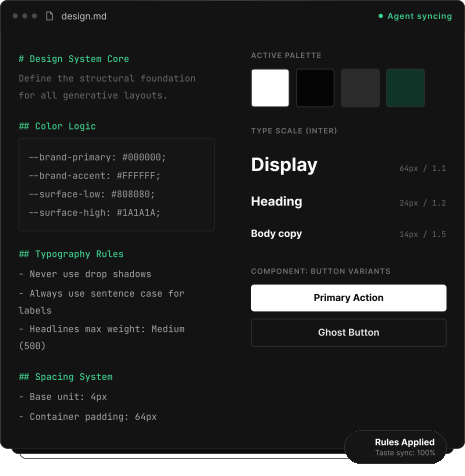
Preview of a design.md file, the brand rules your agent reads each session

The fix isn’t better prompting. It’s giving the agent a file it reads every time.

Type scale, weights and the rules for using them

Spacing system and the grid it sits on

Colour logic — not just values, but when each one is allowed

Component patterns and their variants

Voice and copy conventions

The negative rules — everything your brand never does

[

Who it's for

]

Anyone generating more than one page.

[

Who it's for

]

Anyone generating more than one page.

Founders shipping weekly

New landing page per campaign, per feature, per experiment. Consistency dies around page four.

Founders shipping weekly

New landing page per campaign, per feature, per experiment. Consistency dies around page four.

Founders shipping weekly

New landing page per campaign, per feature, per experiment. Consistency dies around page four.

Agencies running AI agents

Multiple clients, multiple brands, multiple people prompting. Every one drifts in a different direction.

Agencies running AI agents

Multiple clients, multiple brands, multiple people prompting. Every one drifts in a different direction.

Agencies running AI agents

Multiple clients, multiple brands, multiple people prompting. Every one drifts in a different direction.

Teams with a brand to protect

You have guidelines. They’re a PDF nobody opens and no agent can read.

Teams with a brand to protect

You have guidelines. They’re a PDF nobody opens and no agent can read.

Teams with a brand to protect

You have guidelines. They’re a PDF nobody opens and no agent can read.

[

How you use it

]

Four steps, then you’re done.

[

How you use it

]

Four steps, then you’re done.

Illustration for step 04

Pick the package with the Kit

Choose the tier that includes Agent Kit, or add it to a template you already own. Your remix link is instant.

Illustration for step 2: get the read, a written audit within 48 hours

Give it to Claude Code or Cursor

Hand the agent the Kit along with the template it’s working on. The guidebook shows you exactly how.

Illustration for step 3: we build on a live branch at a fixed price

Ask for the page

Describe what you need. The agent works from your existing pages instead of inventing new ones.

Illustration for step 4: the published site handed over with its design system

Check and publish

Review the new page or pages on your Framer template, refine anything that’s off, publish it.

[

Pricing

]

How the pricing works.

Agent Kit is an add-on. You pay it on top of whatever the template costs.

Framer Agent Kit

+$20

ON ANY TEMPLATE PRICE

Build new pages in your Framer project

Buy it with a template, or on its own if you already own one

Guide and walkthrough video included

Framer + Figma Agent Kits

+$40

ON ANY TEMPLATE PRICE

Everything in the Framer Agent Kit

Plus a second Kit for the Figma file, so your design file and your Framer template stay consistent

For packages that include the Figma file

Already own Mindly, Solwell or Ampcore? If you bought a Standard or Extended package, both Kits are already in your Polar account. Nothing to pay. If you bought the template on its own, email tech@oma-kase.com and we’ll send you a link.

Already own Mindly, Solwell or Ampcore? If you bought a Standard or Extended package, both Kits are already in your Polar account. Nothing to pay. If you bought the template on its own, email tech@oma-kase.com and we’ll send you a link.

[

AI tools

]

Tested where it counts.

Tested where it counts.

  • Claude logo
  • OpenAI logo
  • Figma logo
  • Framer logo

[

FAQ

]

Straight answers

Portrait of an Omakase team member

Still have questions?

Reach out to us and we’ll get back to you within 24 hours.

What is Agent Kit?
An add-on to an Omakase Framer template. It gives your AI agent the context to build new pages that match the template.
Isn't this just a DESIGN.md file?
No. A design file is one of nine. The Kit also covers components, page patterns, guardrails, brand voice, workflow, an audit and a readme, plus a user guide with a walkthrough video. The design file tells the agent how things look. The rest tells it what to reuse, what to avoid and how to check its work.
Which templates have one?
Mindly, Solwell and Ampcore today. More are on the way as we build them.
I already bought the template. Can I add it?
Yes. If you bought a Standard or Extended package, both Kits are already in your Polar account, so there's nothing to pay. If you bought the template on its own, email tech@oma-kase.com and we'll send you a link.
Do I need to know how to code?
No. You hand the Kit to Claude Code or Cursor along with your template, describe the page you want, then review and publish it in Framer. The user guide walks you through the setup.
What's the difference between the Framer Kit and the Figma Kit?
The Framer Agent Kit (+$20) builds new pages in your Framer project. The Framer + Figma Agent Kits (+$40) add a second Kit for the Figma file, so your design file and Framer template stay consistent. It's for packages that include the Figma file.
Will the AI still get things wrong?
Sometimes. The Kit cuts down the drift, and the Audit file checks the finished page for design drift, component misuse and responsiveness issues before you publish. You still review the page and refine anything that's off.
Which AI tools does it work with?
It's built for Claude Code and Cursor, and tested with the tools in the AI tools section above.

[

FAQ

]

Straight answers

What is Agent Kit?
An add-on to an Omakase Framer template. It gives your AI agent the context to build new pages that match the template.
Isn't this just a DESIGN.md file?
No. A design file is one of nine. The Kit also covers components, page patterns, guardrails, brand voice, workflow, an audit and a readme, plus a user guide with a walkthrough video. The design file tells the agent how things look. The rest tells it what to reuse, what to avoid and how to check its work.
Which templates have one?
Mindly, Solwell and Ampcore today. More are on the way as we build them.
I already bought the template. Can I add it?
Yes. If you bought a Standard or Extended package, both Kits are already in your Polar account, so there's nothing to pay. If you bought the template on its own, email tech@oma-kase.com and we'll send you a link.
Do I need to know how to code?
No. You hand the Kit to Claude Code or Cursor along with your template, describe the page you want, then review and publish it in Framer. The user guide walks you through the setup.
What's the difference between the Framer Kit and the Figma Kit?
The Framer Agent Kit (+$20) builds new pages in your Framer project. The Framer + Figma Agent Kits (+$40) add a second Kit for the Figma file, so your design file and Framer template stay consistent. It's for packages that include the Figma file.
Will the AI still get things wrong?
Sometimes. The Kit cuts down the drift, and the Audit file checks the finished page for design drift, component misuse and responsiveness issues before you publish. You still review the page and refine anything that's off.
Which AI tools does it work with?
It's built for Claude Code and Cursor, and tested with the tools in the AI tools section above.
Portrait of an Omakase team member

Still have questions?

Reach out to us and we’ll get back to you within 24 hours.

[

FAQ

]

Straight answers

What is Agent Kit?
An add-on to an Omakase Framer template. It gives your AI agent the context to build new pages that match the template.
Isn't this just a DESIGN.md file?
No. A design file is one of nine. The Kit also covers components, page patterns, guardrails, brand voice, workflow, an audit and a readme, plus a user guide with a walkthrough video. The design file tells the agent how things look. The rest tells it what to reuse, what to avoid and how to check its work.
Which templates have one?
Mindly, Solwell and Ampcore today. More are on the way as we build them.
I already bought the template. Can I add it?
Yes. If you bought a Standard or Extended package, both Kits are already in your Polar account, so there's nothing to pay. If you bought the template on its own, email tech@oma-kase.com and we'll send you a link.
Do I need to know how to code?
No. You hand the Kit to Claude Code or Cursor along with your template, describe the page you want, then review and publish it in Framer. The user guide walks you through the setup.
What's the difference between the Framer Kit and the Figma Kit?
The Framer Agent Kit (+$20) builds new pages in your Framer project. The Framer + Figma Agent Kits (+$40) add a second Kit for the Figma file, so your design file and Framer template stay consistent. It's for packages that include the Figma file.
Will the AI still get things wrong?
Sometimes. The Kit cuts down the drift, and the Audit file checks the finished page for design drift, component misuse and responsiveness issues before you publish. You still review the page and refine anything that's off.
Which AI tools does it work with?
It's built for Claude Code and Cursor, and tested with the tools in the AI tools section above.
Portrait of an Omakase team member

Still have questions?

Reach out to us and we’ll get back to you within 24 hours.

[

Try it for free

]

One Framer template. As many pages as you need.

Let us decide the hard parts.

Agent Kit gives your AI the context to keep building without losing the design. Try it for free with Ampcore Template