



Introduction
Course creators need landing pages that convert. This guide compares 9 top-performing Framer templates across design quality, conversion elements, customization, and performance metrics. Whether you're launching your first course or scaling a multi-course academy, the comparison table and selection framework below help you choose the right template in under 5 minutes.
How to Choose the Right Template
What's Your Timeline?
Launching this week?→ Start with Valour (free, fast setup, conversion-focused) or Learnly ($32, CMS-powered and ready to go)
Validating demand? → Use Learnly for zero cost or Akari for ~$29 to test market fit
Long-term build? → Choose based on features, not speed
What's Your Business Model?
Single course → Use Mindly AI, CourseLine, Akari, or Valour
Multiple courses → Use Digistar or Learnly (both support CMS-driven course management)
1-on-1 coaching → Go with Coachify (personal brand positioning)
Membership/recurring → → ⚠️ No current template includes full payment
Corporate training → Educore offers professional layout, portfolio-ready content, and outcomes-based structure (best for design/UX training, not B2B billing)
What's Your Course Subject?
Programming/technical → TradeLab (clean layout, professional, adaptable to any niche)
Creative skills → DigiStar is not creative-specific. Instead, use Educore or Learnly with custom visuals
Fitness/wellness → Valour is general-purpose — not built for fitness (no class scheduling, transformation blocks). Reconsider this recommendation
Mentorship/coaching → Coachify (bio, personal brand, conversion-first layout)Coachify (personal brand)
General education → Learnly or Mindly AI (both great for single-topic learning sites)
What's Your Budget?
$0–$35→ Valour (free)→ Learnly ($32)
$35–$50→ Coachify ($57)→ TradeLab ($49)→ CourseLine ($59)
$50+→ Educore ($59)→ Mindly AI ($79)→ Akari ($59)→ Digistar ($99)
Methodology: How We Scored These Templates
Scoring Framework
We evaluated each template across five dimensions:
1. Conversion Elements — Does it include CTAs, social proof, urgency triggers, and smooth enrollment flows? Tested button placement, form friction, and trust signals.
2. Customization Depth — Can creators modify colors, fonts, and layouts without code? Templates with design tokens and visual editor support scored higher.
3. Performance — Checked asset sizes, script loading, and mobile responsiveness. Templates reaching interactive state in under 2 seconds ranked best.
4. Course-Specific Features — Did templates include curriculum breakdowns, instructor bios, testimonials, and pricing? Generic website templates were excluded.
5. Creator Support — Considered documentation quality, update frequency, and creator responsiveness. Active, helpful creators earned higher marks.
Top 9 Course Landing Page Framer Template
1) Mindly AI — AI Course Landing Page Template
Price: $79 | Best for: AI-focused course creators | Demo: Live Preview
What's included:
CMS support for course content updates
Curriculum accordion with FAQ sections
Instructor bio cards with credentials display
Mobile-sticky CTA button
Video embed sections for course previews
Contact form integration
Pros: No code required | Clean AI-focused design | Regular creator updates | Mobile-optimized
Cons: Built for single courses, not multi-course academies | Requires CMS familiarity
Choose this if: You're selling a single AI course, hosting a workshop, or launching a digital course with strong focus on conversion and simplicity.
→ Buy Template
2) TradeLab — Professional Course Landing Page
Price: $49 | Best for: Professional online courses across niches | Demo: Live Preview
What's included:
Professional component library
Student success showcase
Detailed curriculum timeline
Program outcomes section
Fast asset optimization
Mobile-first responsive design
Pros: Professional aesthetic | Conversion-focused layout | Clear program positioning | Fast loading
Cons: Requires content preparation | Best suited for premium courses
Choose this if: You're launching any type of professional online course and need a polished, modern site optimized for conversions.
→ Buy Template
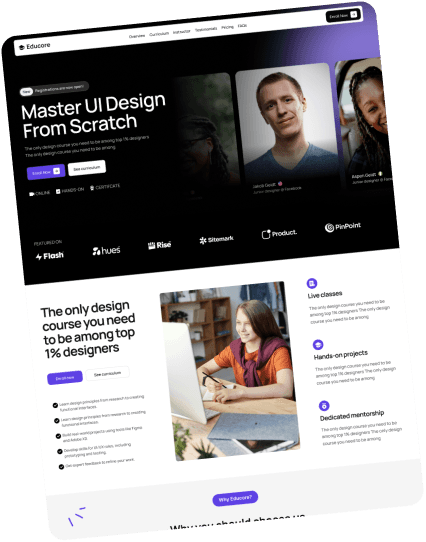
3) EduCore — UI/UX Design Course Template
Price: $59 | Best for: UI/UX design education, portfolio-building courses| Demo: Live Preview
What's included:
Portfolio showcase layouts
Student work galleries
Custom pricing tier displays
Team member profiles
Design case study sections
Alumni success story templates
Pros: Design-focused aesthetic | Portfolio showcase ready | Professional presentation | Strong visual hierarchy
Cons: Requires quality portfolio assets | Best for design-specific courses
Choose this if: You're launching a professional UI/UX design course with portfolio-building focus and alumni success stories.
→ Buy Template
4) Akari — Premium AI Course Template
Price: $59 | Best for: AI and no-code course launches | Demo: Live Preview
What's included:
Conversion focused design
Career outcome sections
Testimonial layouts
Pricing display options
Mobile-first responsive design
Pros: Career-focused messaging | Premium positioning | Full feature set | Conversion-optimized
Cons: Requires substantial content preparation | Higher price point
Choose this if: You're launching a no-code or AI-focused course and want a premium, persuasive layout with career-focused sections.
→ Buy Template
5) Courseline — Multipage Course Template
Price: $59 | Best for: Designers looking to sell a course | Demo: Live Preview
What's included:
Dark-themed design system
Course content sections
Benefits breakdown
Student testimonials
Pricing display
Waitlist form
Mobile-responsive layouts
Pros: Modern dark aesthetic | High-conversion layout | Tech-friendly design | Clean information hierarchy
Cons: Dark theme may not suit all course types
Choose this if: You're launching a modern, dark-themed course landing page and want a high-conversion layout without complexity.
→ Buy Template
6) DigiStar — Multi-Course Website Template
Price: $99 | Best for: Design, art, photography courses | Demo: Live Preview
What's included:
Multi-course catalog layouts
Course comparison sections
Program overview pages
Instructor profiles
Testimonial displays
Pricing structures
Student enrollment flows
Pros: Scales with multiple courses | Organized program display | Professional platform feel | Comprehensive layouts
Cons: Higher price point | May be overkill for single courses
Choose this if: You're offering multiple courses and need a platform to manage and monetize them in a streamlined way.
→ Buy Template
7) Learnly — Free Starter Template
Price: $32 | Best for: First-time course creators, solo educators, e-learning brands | Demo: Live Preview
Why beginners start here: Learnly includes everything needed to launch: hero section, benefits breakdown, curriculum outline, testimonials, and enrollment form—with zero upfront cost.
What's included:
CMS-driven course management system
12+ pre-designed pages (Home, About, Courses, Course Details, FAQs, Blog + Posts, Reviews, Contact, Sign In/Sign Up, 404)
Hero section with CTA
Benefits breakdown
Curriculum overview
Blog integration
Testimonial section
Mobile-responsive design
SEO-optimized structure
Fast load performance
Smooth, engaging animations
Pros: Free | All essential elements | Beginner-friendly | Active community support
Cons: No CMS functionality | Limited customization | 4 pages maximum
Choose this if: You're an educator, solo creator, or e-learning platform looking for a polished, CMS-powered course website with smooth animations, blog support, and multiple pre-designed pages, all at a budget-friendly price.”
→ Buy Template
8) Valour — Fitness & Wellness Transformation Template
Price: FREE | Best for: First-time course launchers, budget validation | Demo: Live Preview
What's included:
Complete page structure
Hero section with CTA
Benefits breakdown
Curriculum outline
Testimonial section
Pricing table
Mobile-responsive design
Contact form
Pros: CMS support included | Pre-built for multiple course pages | Blog and testimonial-ready | Fully responsive and SEO optimized
Cons: Requires some CMS setup familiarity
Choose this if: You're an educator, solo creator, or e-learning platform looking for a polished, CMS-powered course website with smooth animations, blog support, and multiple pre-designed pages—all at a budget-friendly price.
→ Buy Template
9) Coachify — Personal Coaching & Mentorship Template
Price: $57 | Best for: One-on-one coaches, mentorship programs | Demo: Live Preview
What's included:
Personal brand positioning sections
Coach bio with credentials display
Service package tiers
Trust-building layouts
Client testimonials
Clear pricing structure
Pros: Personal brand-focused | Clear package differentiation | Trust-building layouts | Authority positioning
Cons: Requires professional photography | Less suited for group courses or platforms
Choose this if: You're a coach or consultant aiming to position yourself as a premium expert with a personal, conversion-focused site.
→ Buy Template
Frequently Asked Questions
Q: Can I customize colors and fonts in these templates?
A: Yes. All templates support visual customization through Framer's drag-and-drop editor. Paid templates often include design tokens for consistent styling across all pages. Advanced customization (API connections, custom interactions) may require following documentation or contacting template creators.
Q: Are free templates enough for launching a paid course?
A: Yes, if you're starting small. Valour is a free, conversion-focused template with key elements like a hero section, benefits, testimonials, and pricing. Learnly, while not free, is very affordable at $32 and adds CMS-driven course listings, blog support, and more flexibility. Paid templates provide deeper customization and scale as your course grows.
Q: Do I need coding skills to use these templates?
A: No. Framer's visual editor handles basic customization through a drag-and-drop interface. Changing content, colors, and layouts requires no code. Advanced features (CMS setup, custom interactions) may require following setup guides, but templates include documentation.
Q: Will these templates help with SEO?
A: Yes. Framer templates support SEO best practices including semantic HTML, customizable meta tags, fast load times, and accessibility optimization. To maximize results, add your own keyword-rich content, image alt text, and use structured data like this FAQ section.
Q: Can I switch templates later?
A: Yes, but switching templates requires manual content migration. It's best to pick a template that aligns with your long-term course goals from the start to avoid rework after launch.
Comparison Table: Feature Matrix
Template | Price | Type | Best For | Pages | CMS | Key Integrations | Standout Feature |
|---|---|---|---|---|---|---|---|
Mindly AI | $59 | Paid | Single AI course landing | 8+ | Yes | Video embeds, FAQs | Conversion-focused layout with testimonials |
TradeLab | $49 | Paid | Professional/tech educators | 6+ | Yes | Forms, CMS, analytics | Trust-driven design for technical courses |
Educore | $59 | Paid | UI/UX design courses | 7+ | No | Testimonials, curriculum display | Alumni proof and outcome-driven layout |
Akari | $59 | Paid | AI/automation course launches | 10+ | No | Pricing plans, FAQs | Story-driven layout for fast course signups |
CourseLine | $59 | Paid | Single-course launches | 3+ | No | Contact forms | Dark theme, conversion-optimized funnel |
Digistar | $99 | Paid | Multi-course platforms | 6+ | Yes | CMS, blog, course listings | Course management and monetization system |
Learnly | $32 | Paid | Budget-friendly course sites | 12+ | Yes | Blog, CMS, forms | Scalable and CMS-powered for growing courses |
Valour | Free | Free | Simple course funnels | 5+ | Yes | Forms, pricing, blog | Free starter with a full conversion funnel |
Coachify | $57 | Paid | 1-on-1 coaching & consulting | 5+ | No | Personal brand blocks | Authority-building layout for solo coaches |
TL;DR Quick Picks
Use Case | Best Template | Why | Price |
|---|---|---|---|
Multiple courses | Digistar | CMS-powered course catalog with blog and monetization features | $99 |
Starting out | Valour | Free, clean layout with essential funnel elements | Free |
Quick launch | Learnly | Affordable, CMS-powered, pre-built course pages | $32 |
Coaching/1-on-1 | Coachify | Conversion-focused personal brand layout for solo coaches | $57 |
Technical courses | TradeLab | Professional structure and trust-focused design for course creators | $49 |
Fitness/wellness | Custom | No current Framer template is fitness-specific — consider customizing Valour | Free |
Corporate training | Educore | Outcome-based layout with alumni logos and certifications | $59 |
Membership sites | Digistar | CMS system can be adapted for gated content with external tools | $99 |
Creative courses | Educore | Visual design focus, project-based course breakdown | $59 |
Final Recommendation
Your choice depends on three factors: teaching style, audience, and business model.
Solo coaches need different features than corporate training providers. Technical courses require different layouts from creative workshops. Use the comparison table and decision framework above to narrow your options in minutes.
Ready to launch? Start with either Valour (free, immediate validation) or Learnly ($32, quick launch). Both get you to live fast. Upgrade later as your course grows.
Need help deciding? Review the comparison table against your specific needs, then click into the template’s live preview to test customization firsthand.