

I use a dictation app every day, not for meetings, not for transcription. For prompting AI. I talk faster than I type, and when you're feeding detailed context into Claude or ChatGPT, speed is everything. That single use case has turned voice-to-text from a niche accessibility tool into a core productivity layer for millions of people.
Founders know it. Wispr just raised $81M to build what they call a "Voice OS." Superwhisper has Andrej Karpathy and Pieter Levels publicly endorsing it. Aqua Voice came out of Y Combinator. Willow followed right behind in YC X25. Every month, a new speech-to-text startup launches, and every one of them needs a website that makes an invisible product feel real.
Here's the problem. If you're building a voice product and need website inspiration, you're stuck. Generic SaaS galleries bury STT products under hundreds of unrelated entries. API comparison articles talk about word error rates and latency, not design. Nobody has curated what the best voice-to-text websites actually look like, and why they work.
So I did it.
I reviewed the websites of the biggest voice dictation apps, broke down what makes each one effective, and pulled the specific design patterns you can steal. I also built a Framer template specifically for this niche, because after looking at dozens of these sites, the playbook is clear. Most founders shouldn't have to figure it out from scratch.
Key Takeaways
9 voice-to-text SaaS websites analyzed, each with specific design moves identified and explained
A 5-criteria evaluation framework (hero clarity, product demonstration, trust signals, audience positioning, conversion path) you can use to audit any voice AI landing page
The 4 design patterns that repeat across every top site: before/after text heroes, WPM speed comparisons, tone adaptation demos, and named social proof with photographs
Site-by-site verdicts on who each approach works for, consumer apps, developer tools, open-source projects, and founder-backed teams
A production-ready Framer template (Whisper) built from these exact patterns, with all five essential pages included
What Makes a Great Voice-to-Text SaaS Website
Before the list, here's how I evaluated each site.
Voice-to-text products share a design problem that almost no other category has: your product is invisible. Sound doesn't screenshot. You can't show a "before and after" the way a photo editor can. The best voice SaaS sites solve this five ways.
Hero clarity. Can a visitor understand what the product does in five seconds? Voice AI companies love jargon, "enterprise-grade speech intelligence platform" tells nobody anything. The best sites say it plain.
Product demonstration. Does the site show the voice-to-text experience in action? Before/after text comparisons, animated waveforms, live demos, these turn an invisible product into something a visitor can feel.
Trust signals. Named endorsers, accuracy stats, compliance badges (SOC 2, HIPAA), WPM benchmarks. Voice-to-text buyers care about precision and speed. Lead with proof.
Audience positioning. Developer prompting AI agents, professional blasting through emails, or writer capturing ideas? Pick a lane and commit. The sites that try to speak to everyone confuse everyone.
Conversion path. Free trial, app download, or install command, voice-to-text has multiple valid CTAs. Make the next step obvious. Small details matter here too, a polished loading experience (like a custom preloader) sets the tone before the visitor even hits your hero.
With that, here's who's doing it right.
Quick Comparison
Website | Type | Best Design Move | Who It's For | Notable |
|---|---|---|---|---|
Wispr Flow | Consumer App | Before/after text cleanup hero | Professionals & creators | $81M raised, featured on SaaS Landing Page |
Superwhisper | Consumer App | Keyboard-as-app-grid visualization | Developers & power users | Endorsed by Karpathy, Pieter Levels |
Aqua Voice | Consumer App | Developer-specific demo sections | Developers & coders | YC W24, own Avalon AI model |
Willow Voice | Consumer App | Founder social proof wall | Professionals & teams | YC X25, 50K+ users, Framer-built |
Monologue | Consumer App | Every-subscription integration | Writers & professionals | Hugging Face CTO endorsement, Framer-built |
TurboWhisper | Consumer App | Privacy-first minimal design | Privacy-conscious users | Lifetime license, 100% local |
Whisper by Omakase | Framer Template | Dark UI + speed comparison | Founders building voice SaaS | Niche-specific Framer template |
FluidVoice | Free / Open Source | Performance benchmarks hero | Developers & open-source fans | Free forever, Apache 2.0 |
open-wispr | Free / Open Source | Competitor comparison table | CLI-native developers | MIT license, Homebrew install |
Now let's break each one down.
1. Wispr Flow: Best Overall Voice-to-Text Website Design
URL: wisprflow.ai
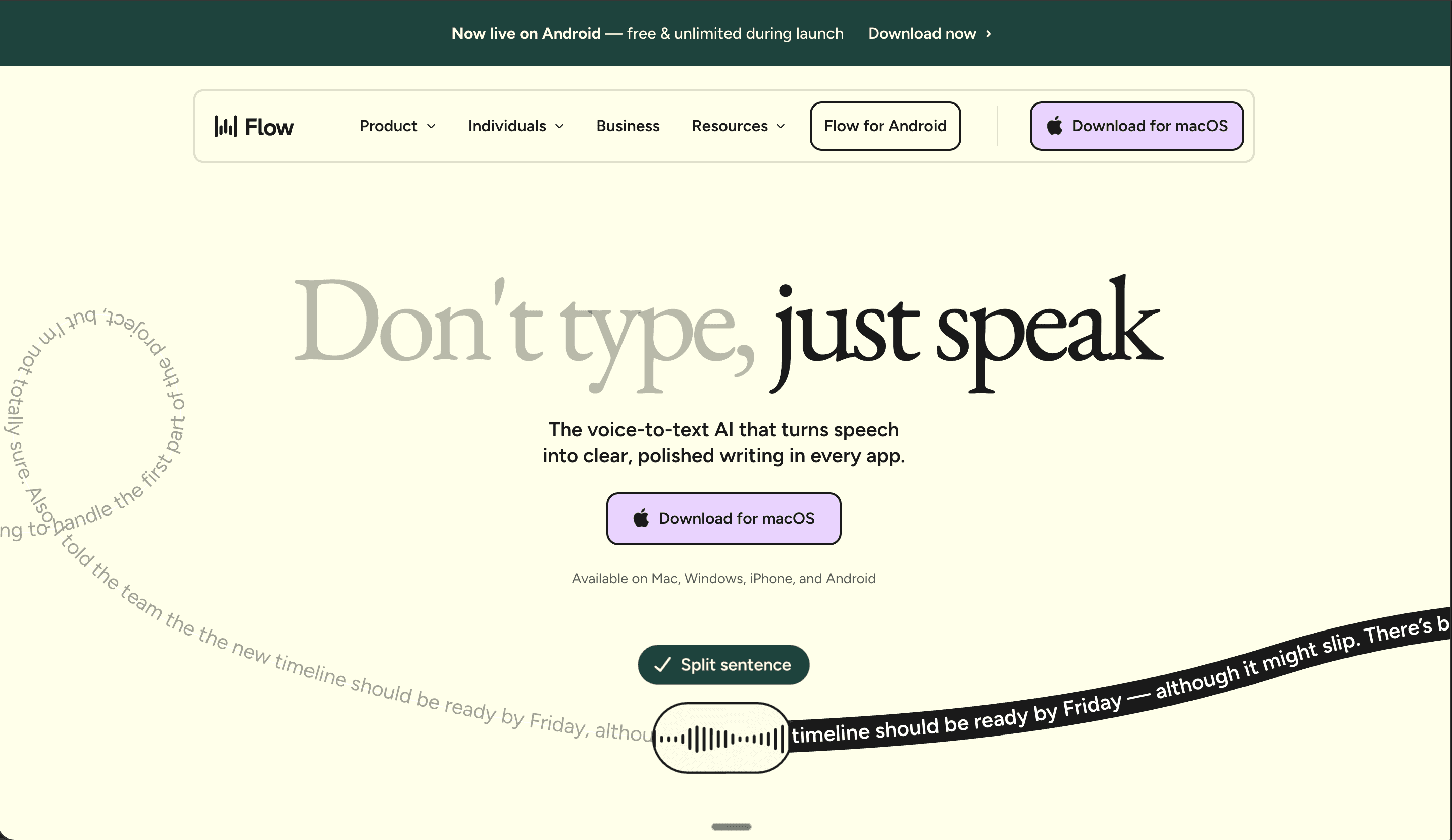
Wispr Flow turns speech into polished text across any app on your device. With $81M in funding and cross-platform support (Mac, Windows, iPhone, Android), they're the market leader in consumer dictation, and their website shows it.
What stands out:
Before/after hero showing messy spoken input cleaned into polished text, communicates the core value before a visitor reads a single word
Speed comparison: keyboard at 45 WPM vs Flow at 220 WPM, concrete, visual, impossible to ignore
Nav segmented by persona: developers, creators, students, lawyers, sales, customer support, each with tailored use cases and dedicated pages
"Ask ChatGPT / Claude / Perplexity about us" section at the bottom, a sharp AEO play that turns answer engines into conversion tools
Pros:
Strongest overall visual identity of any consumer voice product site on this list
Massive logo bar immediately below the fold, Lovable, Vercel, Nvidia, Amazon, Replit, Notion
Named testimonials from real professionals, not anonymous reviews or placeholder quotes
Cons:
Pricing lives inside the Product dropdown, not top-level nav, some visitors will miss it entirely
The depth of content (persona pages, case studies, features) can overwhelm on first visit
Steal this if: You're building any consumer-facing voice product. The before/after text hero is the single most effective pattern in this category, it makes the core value proposition visual without asking the visitor to understand any technology.
2. Superwhisper: Best Custom Mode System for Power Users
URL: superwhisper.com
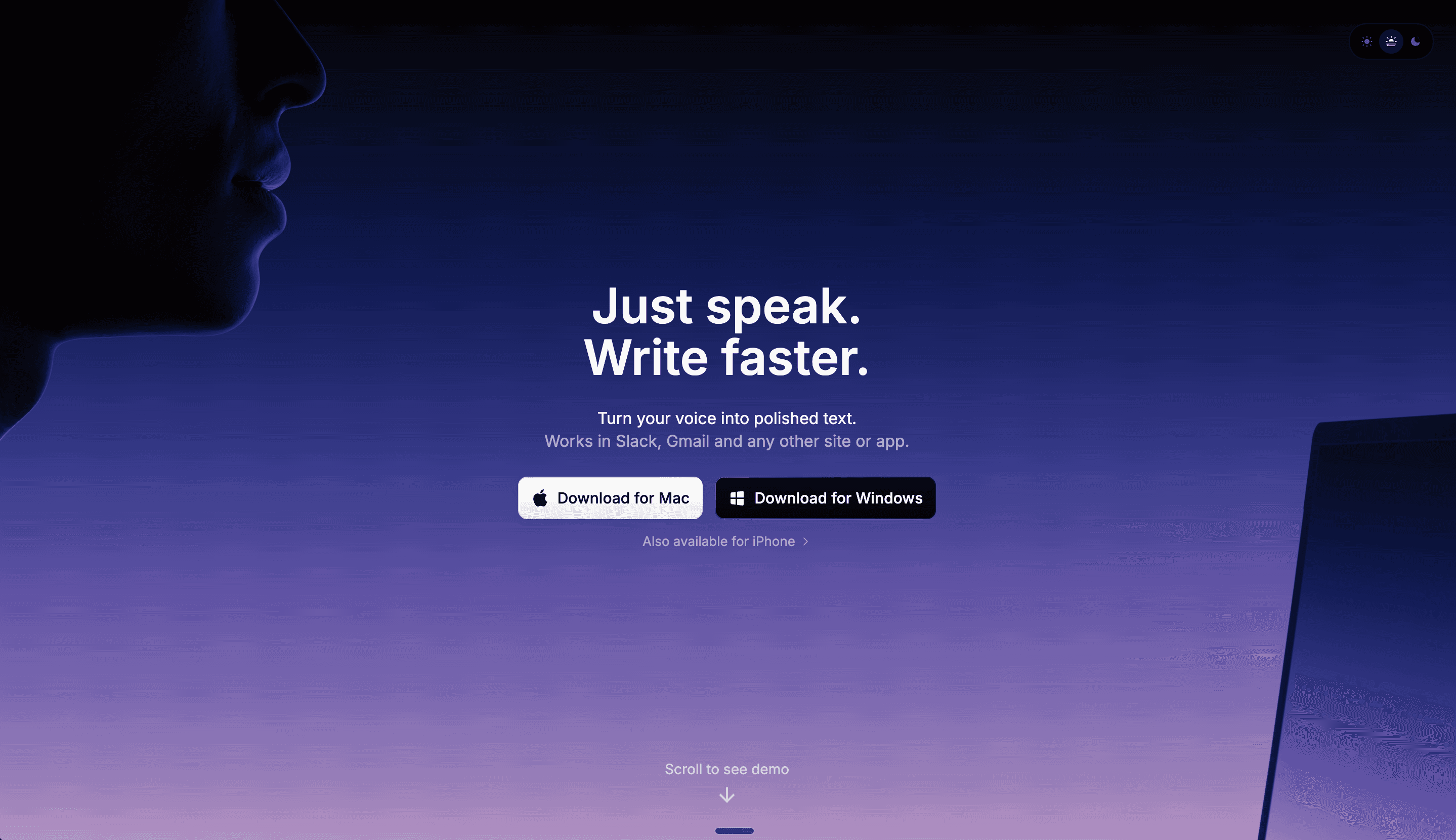
Superwhisper is a voice dictation tool for Mac and iOS that adapts its output based on context, formal for email, casual for chat, legal for contracts. The website mirrors that adaptability with an immersive, interactive design.
What stands out:
Keyboard visualization where app icons replace keys, "works everywhere you type" without saying it
Tone adaptation demo: the same spoken input rendered in Formal, Casual, Legal, and Chat styles side by side
Endorsements from Andrej Karpathy (who coined "vibe coding"), Pieter Levels, Guillermo Rauch, and Andrew Wilkinson
Custom mode builder front and center, users can choose GPT-5, Claude, Llama, or Grok per task
Pros:
Most interactive product demonstration on this list, the tone comparison section is the kind of thing that makes visitors stop scrolling
Testimonials from people who are genuinely famous in tech, not "CEO of a startup you've never heard of"
Clean pricing with a lifetime option at the top, respects both budget-conscious and enterprise buyers
Cons:
Dark, dense design can feel heavy on slower connections
Meeting assistant and file transcription features are mentioned but under-demonstrated compared to the core dictation experience
Steal this if: Your voice product has multiple modes or output styles. Show the same input rendered differently, it's the most effective way to demonstrate adaptability without requiring a free trial.
3. Aqua Voice: Best Developer-Focused Voice Product Website
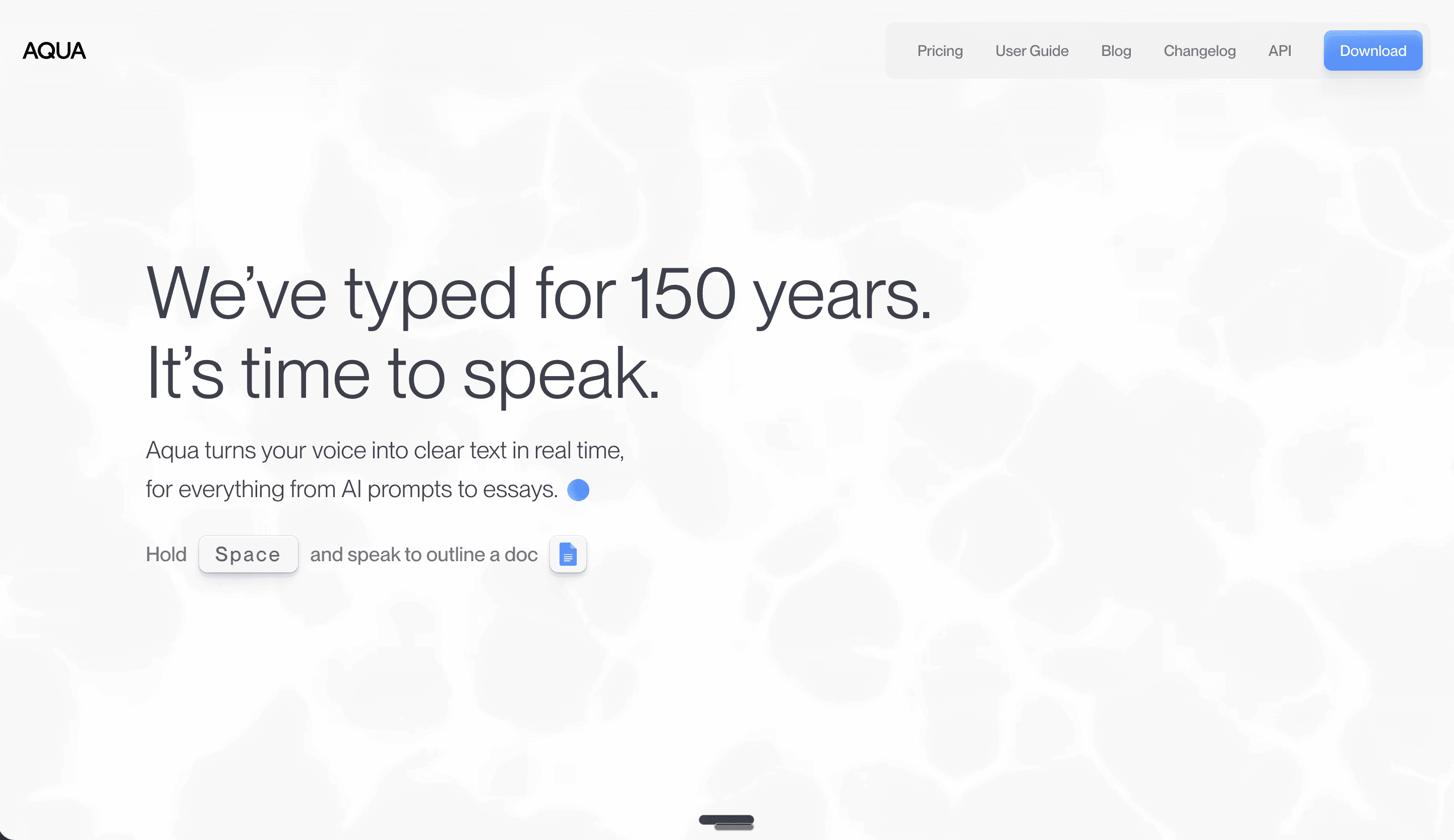
URL: aquavoice.com
Aqua Voice is a YC W24 dictation app for Mac and Windows that specifically targets developers. Their own model, Avalon, is tuned for technical vocabulary, and the site, built in Framer, is tuned for the same audience.
What stands out:
Three dedicated developer demo sections: prompting with technical accuracy (for Claude/ChatGPT), syntax highlighting (for code editors), and "prompt at the speed of thought" (for Cursor and agentic tools)
Accuracy benchmark showing Avalon beating NVIDIA, Whisper, ElevenLabs, and AssemblyAI
Speed comparison: 40 WPM typing vs 230 WPM with Aqua
Dark, polished Framer-native interactions, one of the best examples of what a Framer-built voice site can look like
Pros:
Sharpest audience positioning on this list, every section speaks directly to developers, zero "works for everyone" hedging
Benchmark data builds trust the way enterprise API sites do, applied to a consumer product context
"Your screen is its dictionary" is a standout one-liner
Cons:
The developer focus means non-technical visitors will feel excluded immediately
Pricing could be more prominent, it's buried below several content sections
Steal this if: You have a technical audience and you're tempted to write "works great with code." Don't. Show the product inside VS Code, Cursor, and Claude Code. Developer trust comes from specificity, not claims.
4. Willow Voice: Best Founder Social Proof Wall
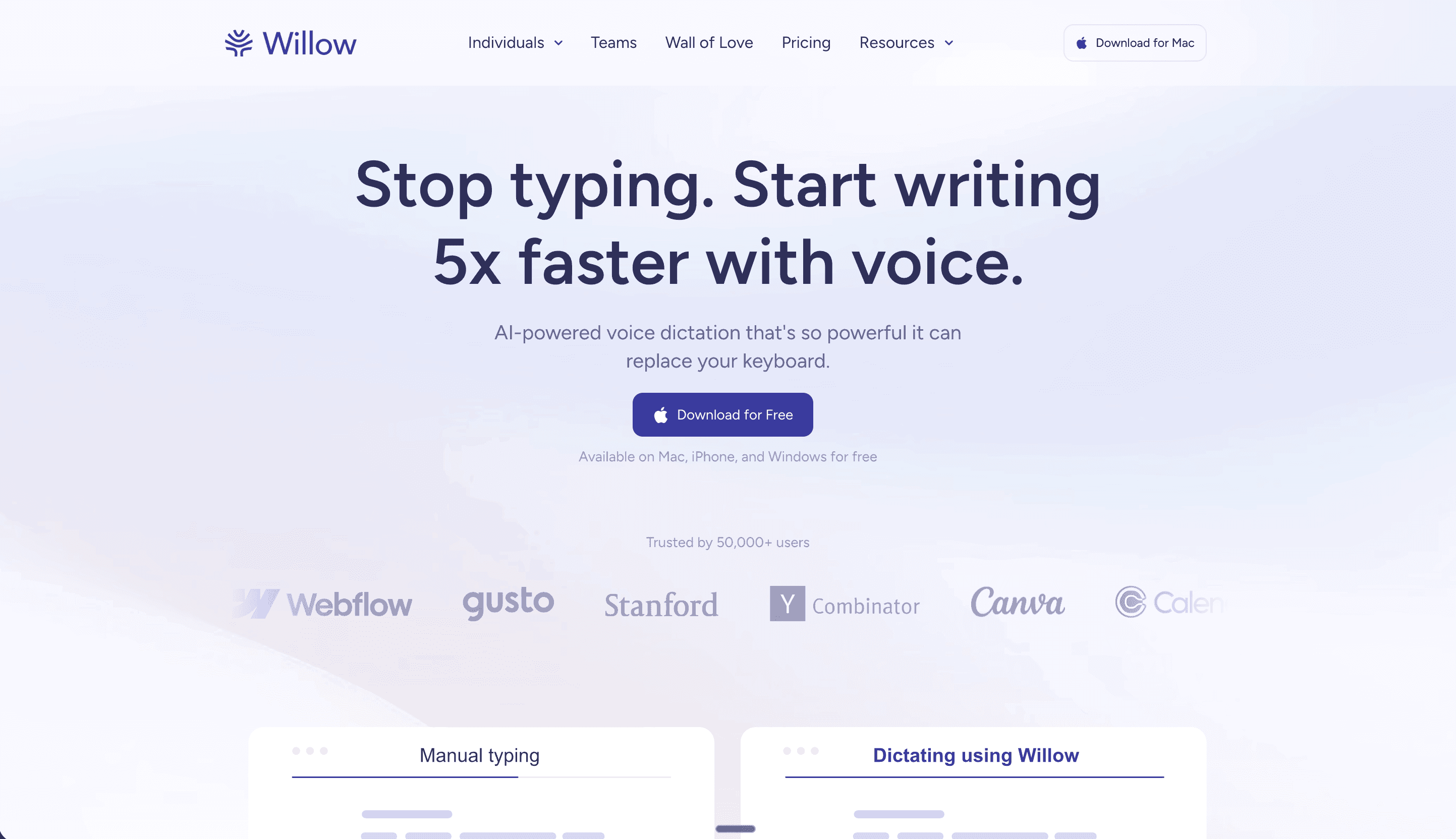
URL: willowvoice.com
Willow Voice is a YC X25 voice dictation app for Mac, Windows, and iOS with 50,000+ users. Built in Framer, their site makes one bet: if the right people endorse you, the product sells itself.
What stands out:
Founder social proof wall featuring Alexis Ohanian (Reddit), Harry Stebbings (20VC), Max Mullen (Instacart), Kipp Bodnar (HubSpot CMO), Tomer London (Gusto), and Geoff Donaker (former Yelp COO), each with a photo and a specific quote
Three-step "how it works" flow: press hotkey, speak naturally, perfect text appears, the absolute minimum explanation
Feature cards for style-matching, context awareness, AI mode, and whisper optimization, each with a visual mockup
Comparison table: Willow vs native dictation across six criteria
Pros:
The social proof strategy is a masterclass, these aren't logos, they're named founders with photos saying specific things
SOC 2, HIPAA, and zero data retention badges handle enterprise objections without a dedicated page
Built on Framer, smooth animations and responsive design out of the box
Cons:
Heavy reliance on social proof means the product demonstration is lighter than Superwhisper or Aqua Voice
Light UI with gradient backgrounds is clean but less visually distinctive than dark-themed competitors
Steal this if: You have founder-level endorsements and you're burying them in a testimonials section. Named, photographed quotes from recognizable people belong above the fold, for consumer voice products, "who uses it" often converts better than "how it works."
5. Monologue: Cleanest Minimal Design in the Category
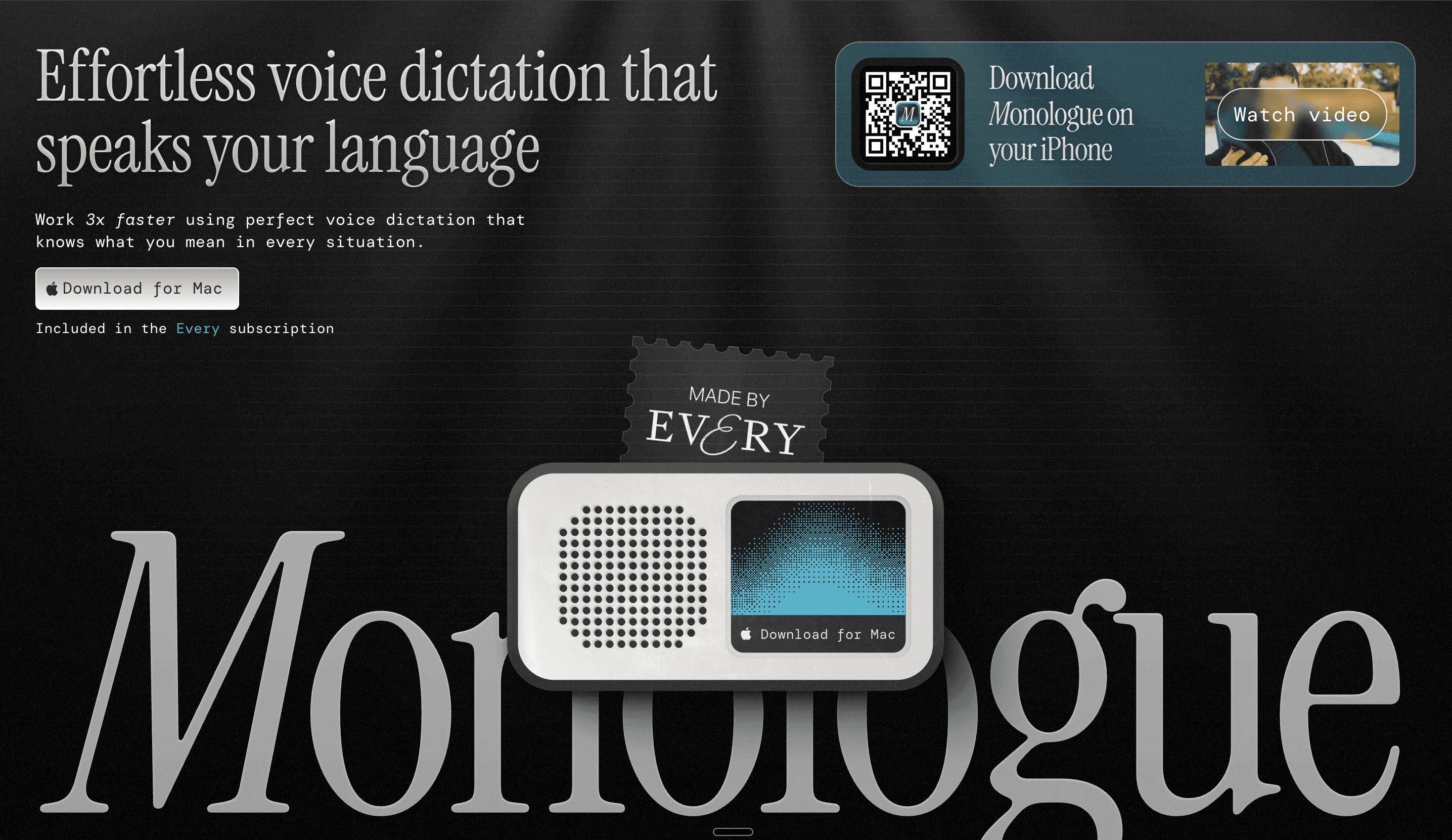
URL: monologue.to
Monologue is a Mac and iOS voice dictation app built by Every, the writer-focused platform. Included with Every subscriptions. Also built in Framer, and it's the most visually restrained site on this list.
What stands out:
"The shortest distance between talking and typing", one of the best one-liners in this entire category
Role-based demo showing the same tool adapted for customer support, designers, and other workflows
Hugging Face CTO endorsement positioned prominently
iOS keyboard integration shown clearly, Monologue replaces your default keyboard, not just a Mac menu bar app
Pros:
Most polished minimal design on this list, proves voice product sites don't need waveform animations and dark themes to feel premium
Every subscription integration is framed as bundled value, not a limitation
100+ language support displayed as a flag grid, visual, scannable, no bullet points needed
Cons:
Fewer interactive elements means visitors don't "experience" the product on the homepage the way they do with Superwhisper or Aqua Voice
Lower social proof volume than Wispr Flow or Willow Voice
Steal this if: You want a voice product site that earns its premium feel through restraint. Not every voice AI landing page needs to be dark and dense. Sometimes the best design decision is knowing what to leave out.
6. TurboWhisper: Best Privacy-First Positioning
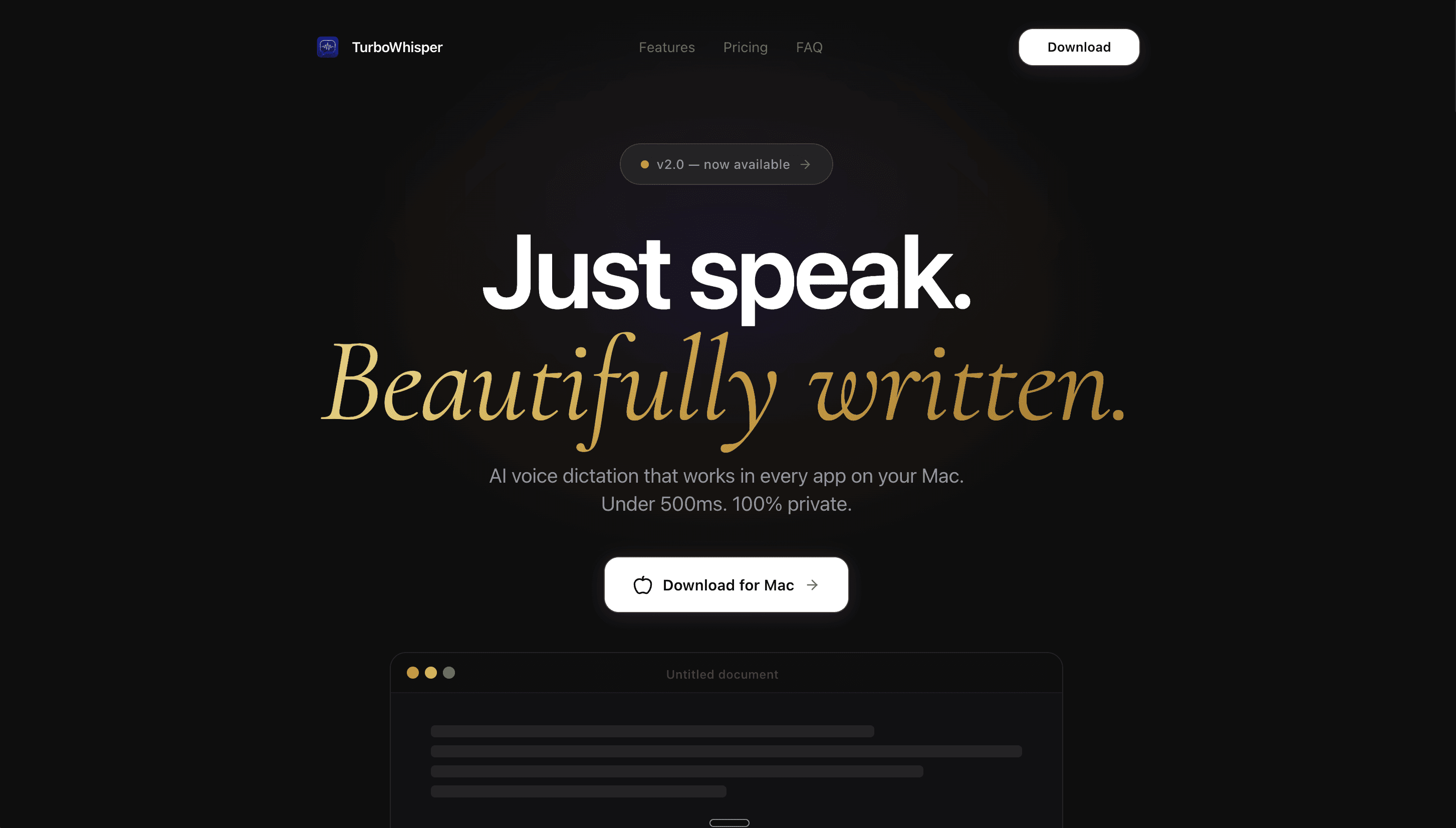
URL: turbowhisper.com
TurboWhisper is a Mac-only dictation app that processes everything locally, no cloud, no accounts, no telemetry. Lean, fast, and built around a single differentiator.
What stands out:
"Just speak. Beautifully written." with a live before/after: messy spoken input on the left, clean output on the right
Three-step flow with a sub-500ms latency claim front and center
Six feature cards where every feature ties back to either speed or privacy, no bloat
Lifetime pricing ($29-$69 one-time) displayed cleanly, no "contact sales" anywhere
Pros:
Tightest messaging on this list, every word earns its place
Lifetime pricing is a genuine differentiator in a category where competitors charge $8-15/month
Excellent typography and whitespace management throughout
Cons:
Testimonials feel less verified than competitors with named, photographed endorsers
Mac-only limits the addressable audience
Steal this if: Privacy is your core differentiator, build the entire homepage around it. Don't bury "100% local processing" on a features page. In a post-cloud world, "your data never leaves your device" is a hero-worthy statement.
7. Whisper by Omakase: The Only Framer Template Built for Voice SaaS
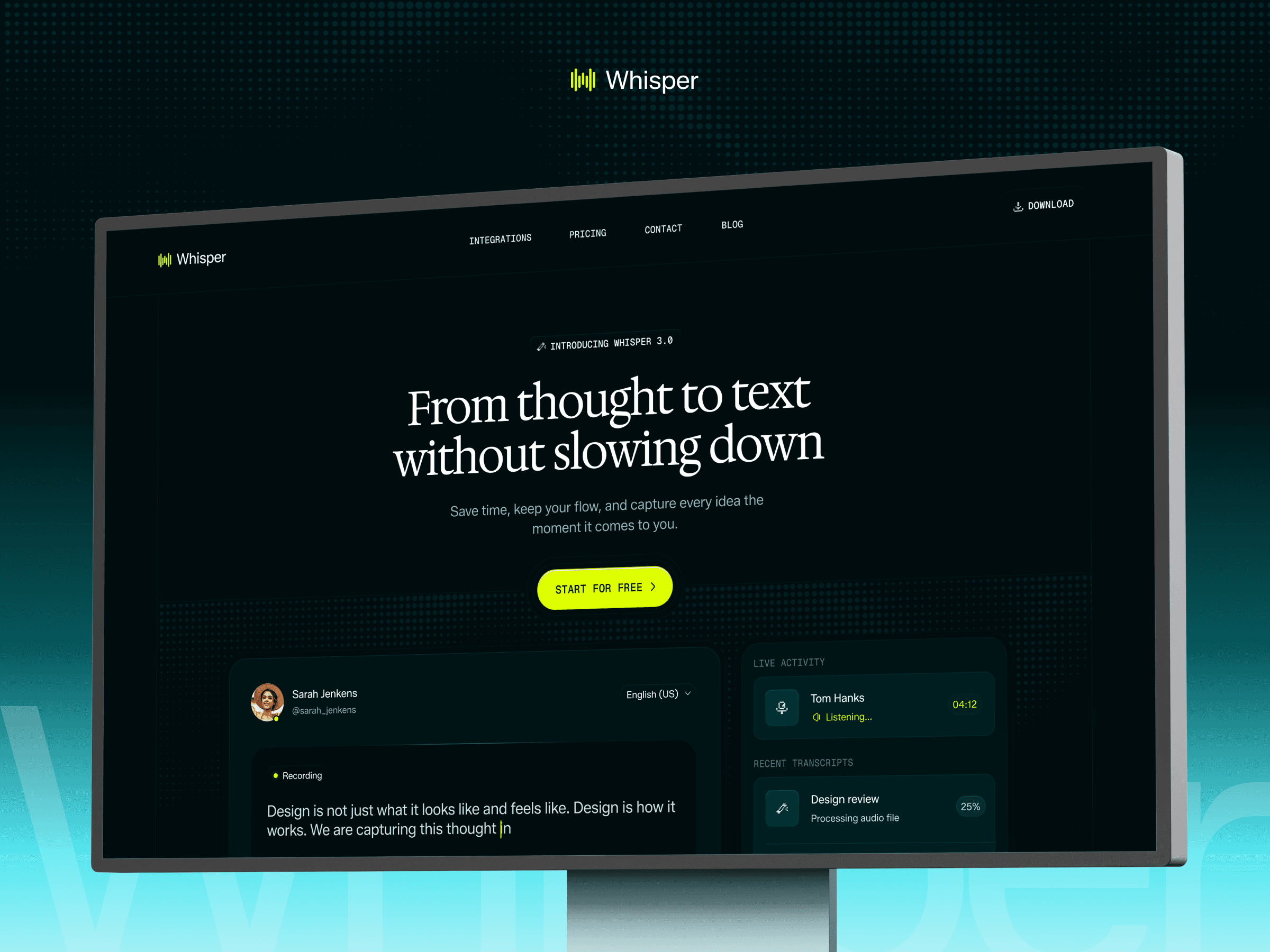
URL: oma-kase.com/templates/whisper
Live preview: oma-whisper.framer.website
This one's mine, so I'm biased, but it's also the only entry on this list you can actually use as your starting point. I built Whisper after studying every site above and noticing that no existing Framer template was built for this niche. The patterns are obvious once you see them side by side. No founder should have to reinvent them from scratch.
What's included:
Homepage, Integrations, Pricing, Contact, Blog (CMS), five pages covering the full voice SaaS site structure
Dark UI with waveform visuals throughout, matching the visual language the top players use
Before/after speed comparison section (40 WPM typing vs 200 WPM voice)
Feature blocks mapped to voice SaaS messaging: "Listens wherever you write," "Keeps up with your thoughts," "Understands what you're working on"
CMS-ready blog, fully responsive, quick to customize
Pros:
Only Framer template designed specifically for voice-to-text and speech AI SaaS
Speed comparison pattern makes the core benefit visual, more effective than copy alone
Full site structure means you skip the "stare at a blank canvas" phase entirely
Cons:
It's a template, not a custom site, you'll still need to adapt copy, branding, and imagery for your specific product
Best suited for voice-to-text and speech AI products specifically, less versatile than a generic SaaS template
Choose this if: You're a founder building a voice-to-text product and you want a production-ready starting point that already follows the design patterns proven by the biggest players in this space.
8. FluidVoice: Best Open-Source Voice Product Page
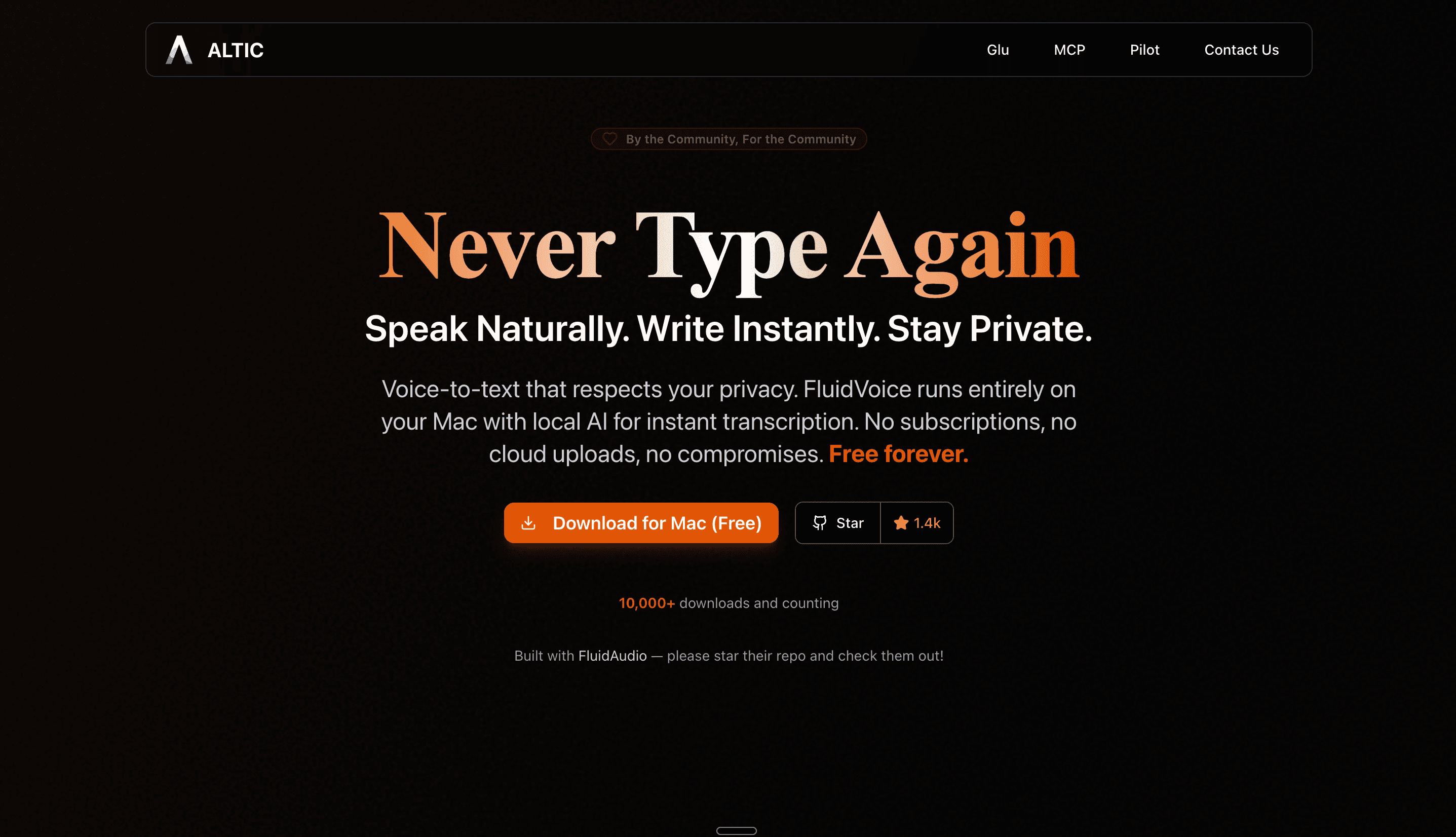
URL: altic.dev/fluid
FluidVoice is a free, open-source (Apache 2.0) voice-to-text app for Mac built on the FluidAudio SDK. The page makes the open-source pitch without sacrificing design quality.
What stands out:
Performance benchmarks as the hero proof: "3,380x real-time factor", processes 56 minutes of audio in one second
Speed comparison bar: typing at 40 WPM vs speaking at 150 WPM, simple, visual, no explanation needed
Four interactive mode tabs (Dictation, Command, Write, History) letting visitors preview different use cases
Community testimonials pulled directly from forum and Discord comments, authentic, unpolished, and it works
Pros:
"Free forever" is a real differentiator in a space where competitors charge $8-15/month or $29+ lifetime
The performance stats give technical visitors what they actually want, not "fast," but "3,380x real-time"
Clean, developer-friendly design that doesn't try to be something it's not
Cons:
Lives under altic.dev/fluid rather than its own domain, slightly less brandable
Less visual polish than funded competitors like Wispr Flow or Aqua Voice
Steal this if: You're building an open-source voice tool. Lead with performance benchmarks and community testimonials. Open-source users trust numbers and real users more than any marketing copy you could write.
9. open-wispr: Best Competitor Comparison Table in the Category
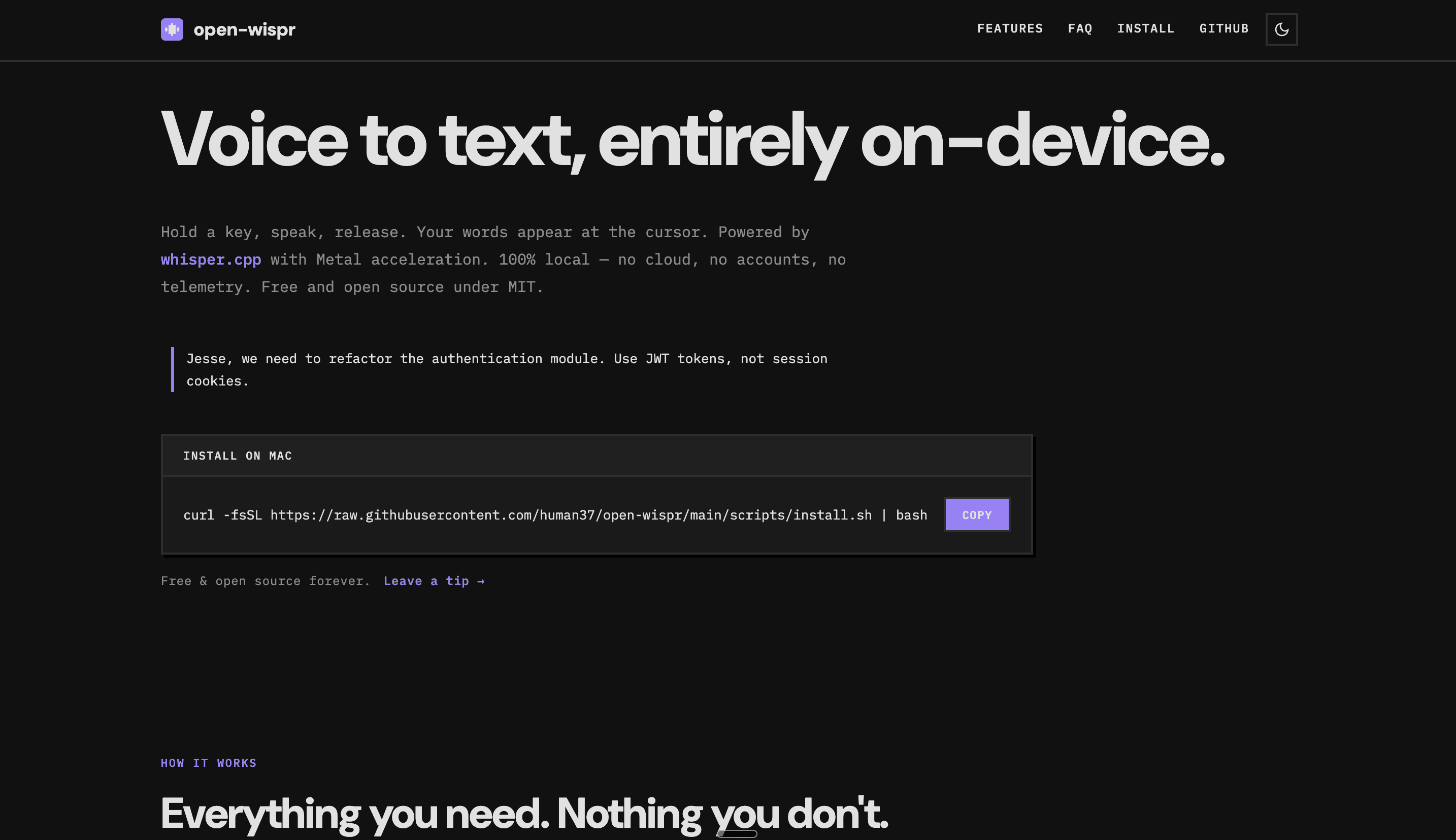
URL: open-wispr.com
open-wispr is a free, MIT-licensed voice dictation tool for macOS that installs via Homebrew. Single page, zero fluff, and the best competitor comparison table I've seen in this entire niche.
What stands out:
Competitor comparison table: open-wispr vs VoiceInk, Wispr Flow, Superwhisper, MacWhisper, and Apple Dictation, across 10 criteria including price, open-source status, and account requirements
Terminal-first install flow:
curl -fsSL ... | bashright on the homepageJSON config snippet showing exactly what's customizable, hotkey, model size, language, punctuation mode
"Everything you need. Nothing you don't." as the feature section header
Pros:
The comparison table answers "why this over the alternatives?" in ten seconds flat, the single most effective conversion element for open-source developers
Zero-UI philosophy: Homebrew install, config file, menu bar icon. The site mirrors the product's minimalism exactly
MIT license, most permissive option on this list, no restrictions for commercial use
Cons:
Apple Silicon only, no Intel Mac or Windows support
Extreme minimalism means non-developers will bounce immediately, and that's fine, that's the point
Steal this if: You're an open-source alternative to a funded competitor. Build a comparison table that's honest about where you win (price, openness, privacy) and where you don't (AI features, polish). Developers respect transparency more than marketing.
FAQ
What design patterns work best for voice-to-text SaaS websites?
Before/after text demonstrations. Messy spoken input on the left, polished output on the right, it makes the core value proposition visual without requiring a demo. Speed comparisons (typing WPM vs speaking WPM) appear on nearly every top site in this category and work because the gap is genuinely dramatic. Named social proof with photographs converts better than anonymous reviews. And interactive tone demos, like Superwhisper's Formal/Casual/Legal comparison, are the strongest engagement element for products with multiple modes.
Should a voice dictation website target developers or general users?
Pick one as your primary audience and build the whole homepage for them. Aqua Voice, open-wispr, and VibeWhisper go developer-first: code editor demos, terminal install commands, API-level pricing transparency. Wispr Flow and Willow Voice go broad-professional with persona-based nav. If you genuinely serve both, use segmented entry points like Wispr Flow does, separate paths that route each visitor to the right content. Trying to speak to everyone at once in the hero is how you end up speaking to no one.
How important is an interactive demo for voice product conversion?
It's the single biggest lever you have. Voice-to-text is invisible, you can't screenshot audio. Superwhisper's tone adaptation demo and Aqua Voice's developer playgrounds are the strongest examples on this list. Even a static before/after text comparison (TurboWhisper, Wispr Flow) significantly outperforms copy alone. If your site has no product demonstration, that's the first thing to fix.
What's the best way to show speed on a voice AI landing page?
Specific numbers, not vague claims. Wispr Flow shows 45 WPM typing vs 220 WPM voice. Aqua Voice claims 230 WPM with a 5x faster headline. FluidVoice uses a visual bar chart. "Write faster with your voice" does nothing. A number does everything. If you have the data, put it above the fold.
Can I build a voice-to-text SaaS website with Framer?
Yes, and several of the top products already have. Aqua Voice, Willow Voice, and Monologue are all Framer-built. The platform handles the animations, interactions, and responsive design that voice SaaS sites rely on without needing a developer. The Whisper template is built specifically for this niche, with all five essential pages (homepage, integrations, pricing, contact, blog) and CMS-ready blog functionality, so you're not starting from a blank canvas.
Conclusion
Voice-to-text is one of the rare SaaS categories where the website has to solve a fundamental design problem before it can sell anything. Sound doesn't have a screenshot. You can't show a before-and-after the way a photo editor or design tool can.
The companies winning this space figured that out early. Wispr Flow uses before/after text comparisons. Superwhisper lets you see the same input rendered in four different tones. Aqua Voice shows the product inside the developer's actual workflow. Every approach is different, but they all do the same thing. They make voice technology tangible before the visitor signs up.
If I had to pick one site to study first, it depends on your audience. For broad consumer voice products, study Wispr Flow, the before/after hero and persona-based nav are the benchmark. For developer-facing tools, study Aqua Voice, technical specificity beats generic claims every time. For open-source projects, study open-wispr, the competitor comparison table is the single best conversion element for that audience. And if you want a production-ready starting point rather than a month of research, Whisper is built for exactly this.
This niche is only getting bigger. AI prompting is turning dictation from a convenience into a productivity necessity. Vibe coding requires fast, accurate voice input. Every one of these use cases needs a company behind it, and every company needs a website that makes sound feel real on a screen.
That's a design problem worth solving well.