


Every solar installer I've worked with thinks their website problem is a design problem.
It almost never is.
Solar companies know exactly who their buyer is. A residential installer isn't confused about their customer. The problem is subtler: their site doesn't surface the value propositions that actually move that specific buyer to act. Knowing your audience and building a site that speaks to what that audience needs to see, feel, and verify before they convert are two completely different things.
In the past year I've built three Framer templates specifically for solar and renewable energy companies. Most of them are bought by non-technical founders shipping no-code solar websites without a developer in the loop. The pattern I kept seeing: founders obsessing over color palettes while their site failed to answer the one question their buyer was actually asking.
This blueprint fixes that.
Key Takeaways
Solar buyers in different segments respond to completely different value propositions. Homeowners need local trust and savings proof. Commercial buyers need engineering credentials and ROI data. Biogas buyers need environmental impact and educational content. Your site needs to lead with the right one for your specific buyer.
The homepage section order that actually converts: hero, trust strip, 3-step process, services, savings calculator, case studies, reviews, FAQ, quote form. Calculator comes before case studies. Buyers care about their own savings before they care about your past projects.
The 6-field quote form (name, email, phone, address, roof type, monthly electricity bill) outperforms longer forms. Anything beyond 7 fields measurably drops completion rate. "Get a custom quote" beats "Contact us" every time.
Solar is one of the highest AI-query categories on the web: incentives, payback periods, panel types. Sites with FAQ schema get cited in ChatGPT and AI Overviews within weeks. Most solar sites have neither.
If you're building in Framer: set up CMS collections for projects, FAQs, and regional incentives before touching design. Structured content is what makes the site scale past launch.
Why Most Solar Company Websites Don't Convert
The failure pattern is consistent.
Most solar sites fail for one of three reasons. First: they know their buyer but don't lead with what that buyer actually needs to see. A homeowner visiting a solar installer's site has one question above everything else: "Can I trust these people in my home, and will this actually save me money?" A site that leads with the company's founding story, a generic clean energy mission, or an awards section is answering a question nobody asked. The value proposition is there somewhere on the page. It's just not where the buyer is looking.
Second: the hero says nothing specific. "Clean energy for a better tomorrow" is not a headline. It's a placeholder that survived the design review because everyone was focused on the gradient. The hero's job is to surface your most important value proposition immediately, for the exact buyer who landed on the page. In under 8 seconds.
Third: the site has no structure for AI search. Solar buyers increasingly ask ChatGPT and Google AI Overviews about incentives, payback periods, and financing options before they contact a single installer. Sites without direct-answer content and proper schema get skipped entirely. I cover this in detail below.
The Solar Company Website Blueprint: Section by Section
Here's the section order that converts, and what each section actually needs to do.
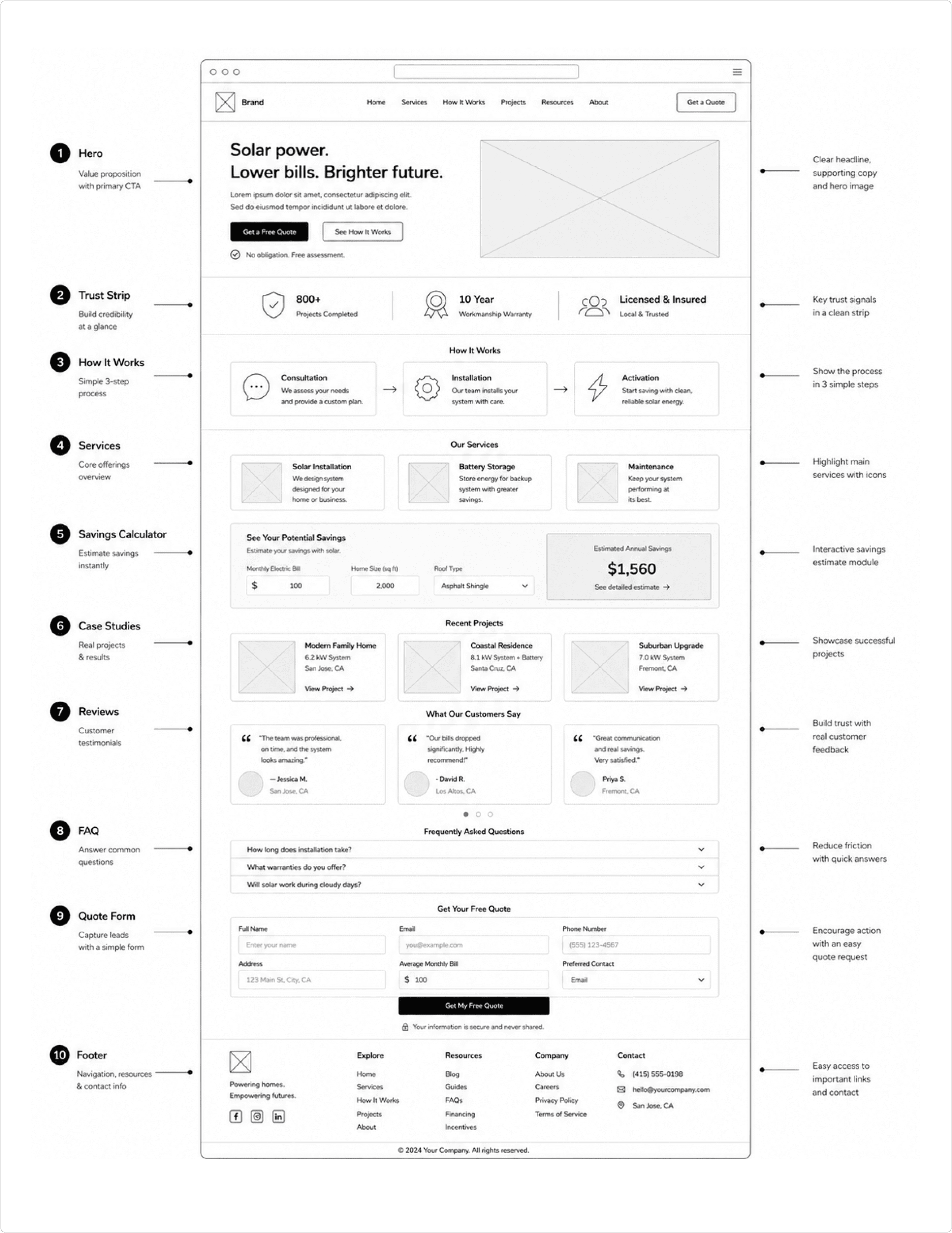
Section 1: Hero
Purpose: Establish goal completion and trigger the primary CTA within 8 seconds.
What to include:
Headline naming what you do and where: "Solar Panel Installation in Austin, TX"
Subheadline with the outcome and credibility signal: "We've installed 800+ systems across Central Texas. Most jobs done in 3 days."
Primary CTA: "Get a custom quote"
Secondary CTA: "See how it works"
Phone number visible without scrolling
Copy note: The city or region must be in the headline, not the subheadline. This is where Google and AI search extract the location signal. "Solar installation" alone is not enough. "Solar installation in [City]" is a complete statement of intent.
Section 2: Trust Strip
Purpose: Give credibility-seekers a fast validation layer before they read anything else.
What to include:
Total installs completed (a number, not a range)
Years in operation
Certifications and manufacturer partner logos
Service area summary: "Serving Austin, Round Rock, and Cedar Park"
Copy note: One specific number beats vague claims every time. "800 installations completed" outperforms "hundreds of happy customers."
Section 3: How It Works (3-Step Process)
Purpose: Reduce perceived complexity and make the purchase feel manageable.
What to include:
Three labeled steps: e.g., "1. Free Assessment, 2. Installation, 3. Start Saving"
One sentence per step explaining what happens
A timeline indicator if you have one: "Most installs completed within 5 business days"
Copy note: This section is consistently cited by AI search. Structured steps with clear labels are easy for models to extract. Write each step as a complete sentence, not a fragment.
Section 4: Services
Purpose: Show the range of what you offer and route buyers to dedicated service pages.
What to include:
Each service as a card or row: name, 2-sentence description, link to service page
Icon or image per service
Keep to 3 to 5 services maximum on the homepage
Copy note: Don't list every variation of every service. Pick your core offerings and link deeper. A buyer who wants detail will click through. A buyer overwhelmed by twelve options leaves.
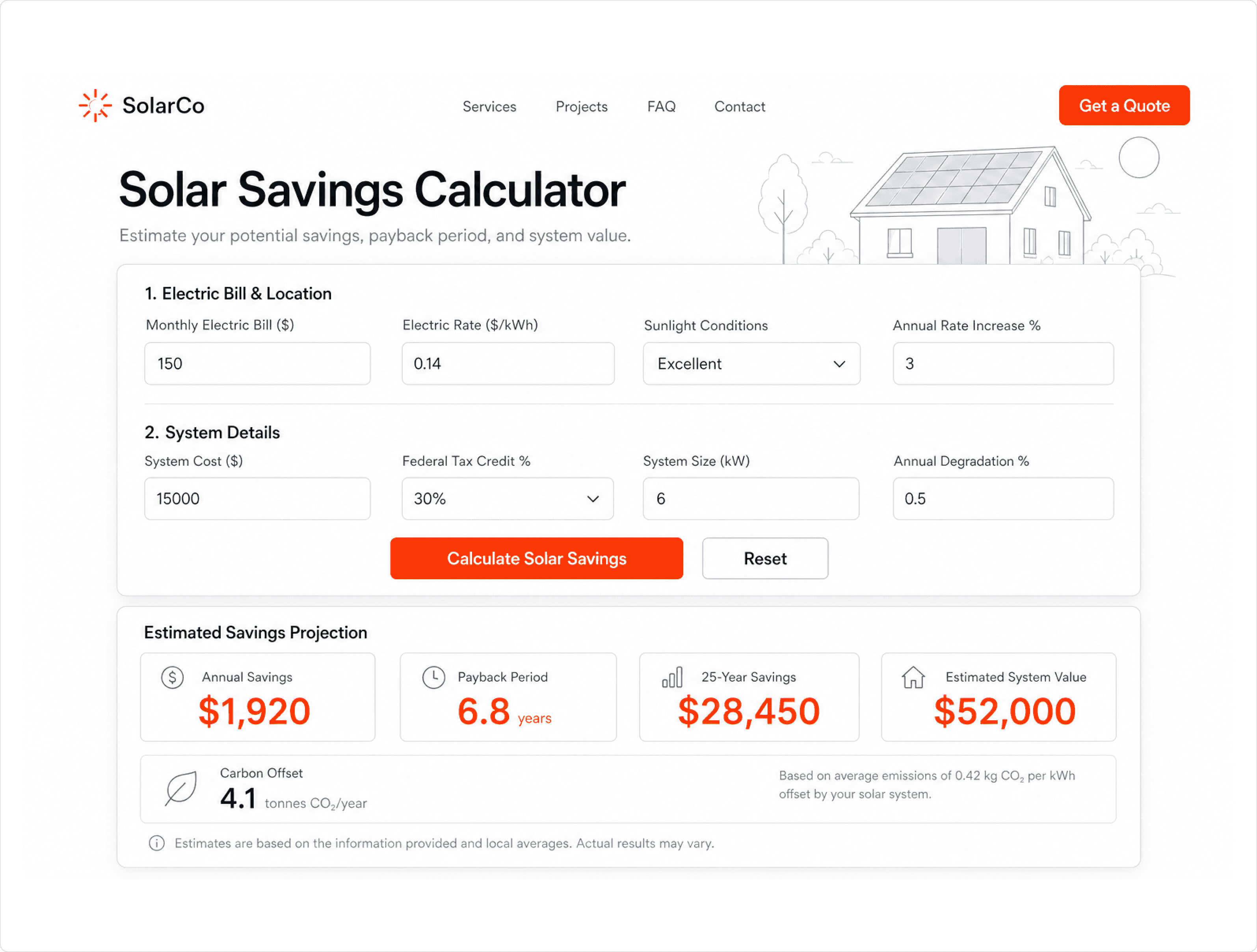
Section 5: Savings Calculator
Purpose: Give buyers a personalised savings estimate before they've had to trust you.
What to include:
Input: monthly electricity bill (one field is enough to start)
Output: estimated annual savings, estimated payback period, estimated system size
CTA below the output: "Get your exact quote"
Copy note: Position this above case studies. Buyers engage with their own numbers before they care about yours. Even a directional estimate, not a precise one, increases time on page and form completions. The calculator doesn't need to be exact. It needs to be personally relevant.
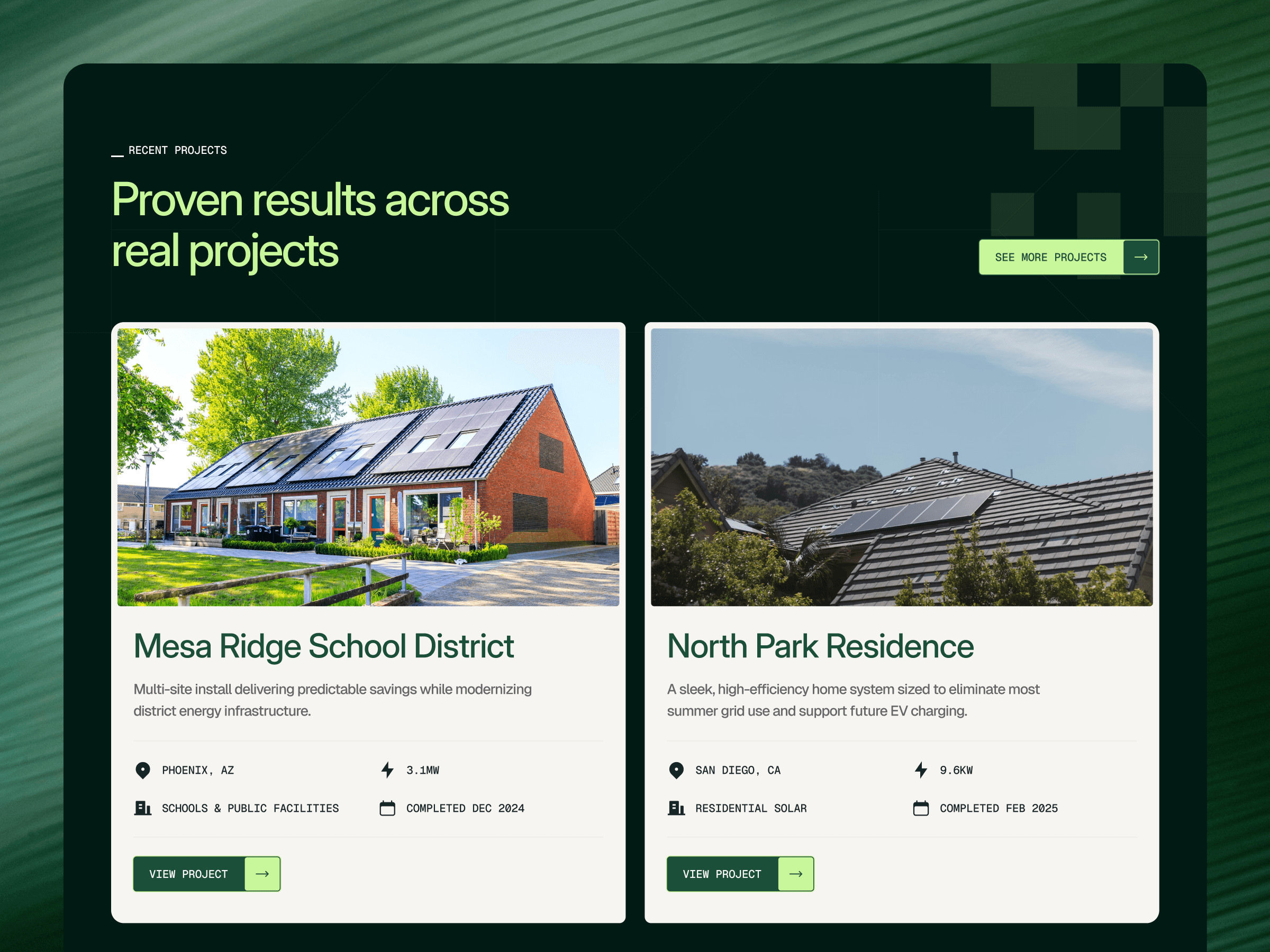
Section 6: Case Studies
Purpose: Prove the savings are real with project-specific evidence.
What to include:
3 to 5 featured projects (pull from your Projects CMS, filtered by the Featured toggle)
Per project: location, system size, annual savings, payback period, one-line client quote
Link to the full Projects page
Copy note: "Reduced annual energy costs by $2,800 for a 4-bedroom home in Brisbane" beats "happy customer" every time. Specificity is the proof. Generic outcomes are dismissed as marketing copy. Real numbers from real addresses are not.
Section 7: Reviews and Testimonials
Purpose: Provide social proof at the point where buyers are evaluating trust.
What to include:
Video testimonials if available (even two or three)
Written reviews with real full names, photos, and suburb/city
A star rating aggregate if you have a verified review source (Google, Trustpilot)
Copy note: "He finished two days early and cleaned up after himself" outperforms "great service, highly recommend." Specific, mundane detail builds more trust than polished praise because it sounds like something a real person would say.
Section 8: FAQ
Purpose: Handle objections before they become exit events, and structure content for AI search citation.
What to include:
5 to 7 questions covering: total cost, timeline, available incentives, financing options, what happens if they sell the house, how long panels last
Each answer leads with a direct response in the first sentence
Mark up with FAQ schema (JSON-LD)
Copy note: This section does double duty. It converts skeptical buyers and it gets your site cited in ChatGPT and AI Overviews. Both jobs require the same thing: direct answers in the first sentence of every response.
Section 9: Quote Form
Purpose: Capture a qualified lead with the minimum friction required.
What to include:
6 fields: name, email, phone, address, roof type, monthly electricity bill
CTA label: "Get your custom quote"
A one-line reassurance below the button: "No pushy sales calls. We'll send your estimate by email within 24 hours."
Copy note: Nothing beyond 7 fields. Everything else gets collected on the follow-up call. "Get your custom quote" outperforms "Contact us" because it names what the buyer receives, not what they're doing.
Section 10: Footer
Purpose: Extend trust to buyers who scroll past the form, and provide navigation for everyone else.
What to include:
Phone number repeated
Primary CTA repeated
License or registration number if applicable
Navigation links: Services, Projects, About, Blog, Contact
Service area listed explicitly
Copy note: A meaningful number of buyers scroll to the footer specifically looking for license numbers, physical address, or phone numbers to verify legitimacy. Don't let the footer be an afterthought.
The Rest of the Site: Page Map
The homepage converts. The rest of the site supports, educates, and captures buyers who need more before they're ready to fill out the form.
Page | Purpose | Priority |
Services (per service) | One page per core offering: residential solar, battery storage, EV charging. Each mirrors the homepage blueprint at a smaller scale: what it is, how it works, cost range, case study, CTA. | High |
Projects | Full case study archive, filterable by project type and location. This is where buyers go after the homepage sells them on the category and they want proof at scale. | High |
Project Detail (CMS) | Individual project page: system size, location, savings outcome, client quote, photos. Linked from the Projects page and from homepage case study cards. | High |
About | Company story, team credentials, certifications, years in business. Don't build this page until you have real photos and a real story. A placeholder About page hurts more than no About page. | Medium |
Blog | Educational content targeting incentive, cost, and comparison queries. High-intent buyers research before they convert. A blog that answers real questions keeps them on your site instead of a competitor's. | Medium |
FAQ (standalone) | Expanded FAQ beyond the homepage section. Target long-tail queries: "Is solar worth it in [State] in 2026?", "What happens to my solar panels if I move?" Structured for AI search citation with full FAQ schema. | Medium |
Contact | Simple. Name, email, phone, message. Physical address and map embed if you have an office. License number. No friction. | High |
Location Pages | One page per city or suburb you serve, once you have real project data for that area. This is the foundation of local SEO for solar installers: "Solar Installation in [City]" pages with real local case studies convert significantly better than generic service area pages. Add after launch. | Low at launch, High later |
Legal | Terms and privacy policy. Required. Not optional. | High |
Three Archetypes, Three Different Solar Sites
Most solar website guides treat every solar company the same. But the value propositions that convert a homeowner are completely different from the ones that convert a procurement lead at a manufacturing facility, which are completely different again from what moves an agritech operator evaluating biogas systems.
Same niche, different buyers, different purchase triggers. Your site architecture needs to reflect that.
Here are the three archetypes and what changes between them.
Residential Installer | Commercial/Utility EPC | Biogas/Adjacent Renewables | |
Buyer | Homeowner | Facility manager, procurement, municipal | Farmer, agritech operator, sustainability lead |
Primary proof | Neighbor testimonials, bill savings | MW installed, engineering credentials, ROI projections | Project maps, waste-to-energy outcomes, environmental impact |
Hero headline angle | Outcome-first ("Cut your bill by 70%") | Track record-first ("320 installs across 14 states") | Mission-first ("Turning farm waste into clean energy") |
CTA | "Get a free home assessment" | "Request a feasibility study" | "Book an energy assessment" |
Calculator type | Monthly savings estimator | ROI / payback period calculator | Biogas yield / waste input estimator |
Archetype 1: Residential Solar Installer
Your buyer is a homeowner. The value propositions that move them are local trust, proven savings, and low friction. They want to know this contractor won't disappear after installation, that the savings are real and specific to their situation, and that the process won't turn their home into a construction site for three weeks.
That means: testimonials from named neighbors in recognizable suburbs, a map showing your exact service area, financing options visible above the fold, and a calculator that shows savings in their currency. The hero leads with the outcome, not your company story.
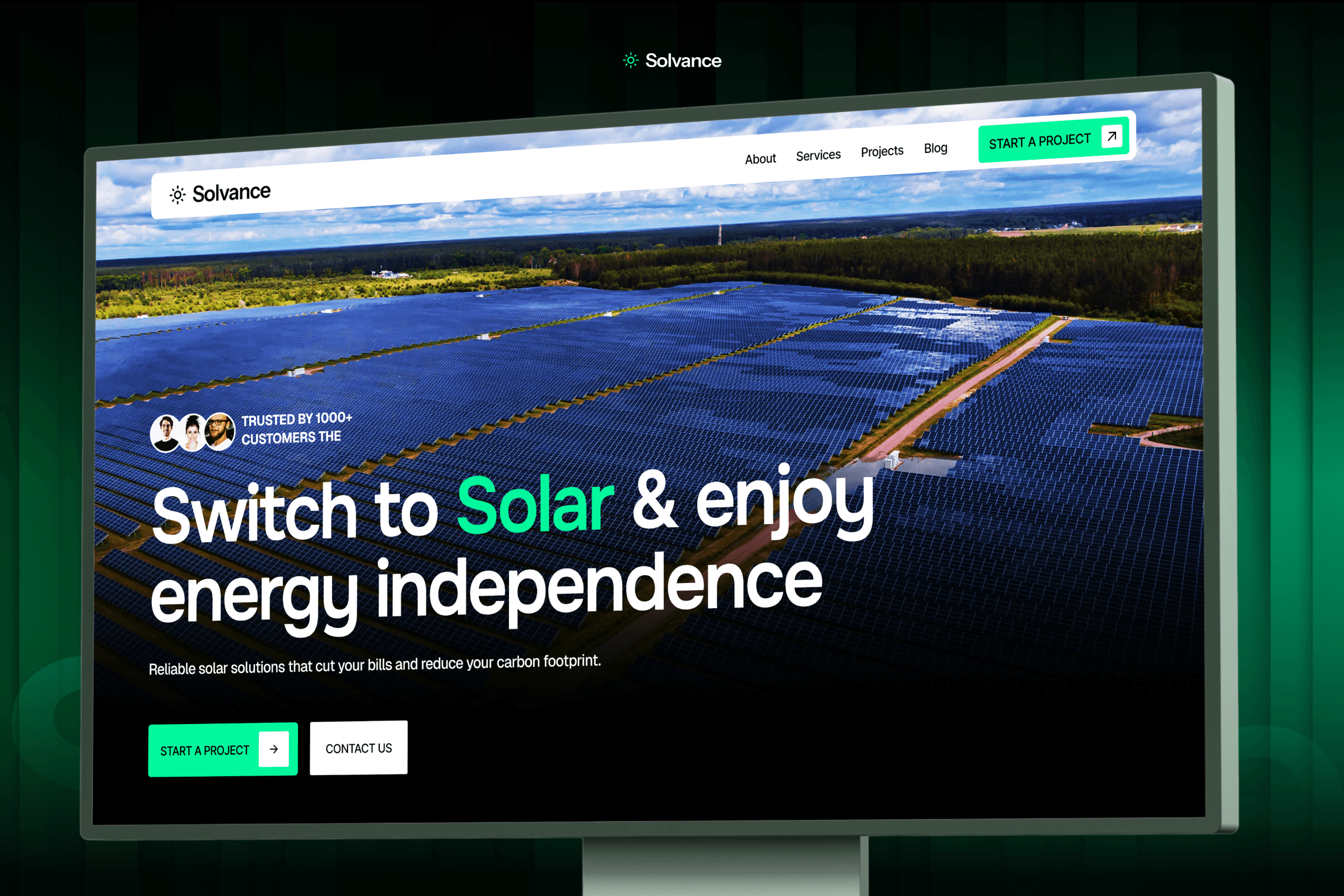
I built Solvance specifically for this archetype. It ships with the homepage structure I described above: trust strip, savings-first layout, case study pages with built-in outcome fields, and a quote form pre-configured for residential inquiries. The design is intentionally warm. Residential buyers are making a $15,000 to $30,000 decision, and warm beats corporate.
Archetype 2: Commercial and Utility-Scale Solar / EPC
Your buyer is a facility manager, procurement lead, or municipal decision-maker evaluating you against three other providers. The value propositions that move them are engineering credibility, verifiable track record, and financial justification. They don't need to trust you as a person. They need to justify the decision to a board or a finance team.
That means: case studies organized by project scale, team credentials and certifications front and center, a project gallery that shows variety, and a feasibility study CTA rather than a residential quote form. The hero leads with your track record.
Taayo is built for this. It's the most comprehensive template in our solar lineup: separate pages for residential, commercial, and utility-scale solar, plus certification blocks, a team page, careers section, and EV charging page. It's the only one of our solar templates that handles utility-scale credibility without requiring significant customization.
Archetype 3: Biogas, Agritech, and Adjacent Renewables
Your buyer is a farmer, agritech operator, or sustainability decision-maker. The value propositions that move them are environmental impact alongside financial return, and confidence that this technology works in their specific context. They care about outcomes that speak to their world: waste reduction, soil enrichment, energy independence for the farm.
That means: a project map showing geographic reach, waste-to-energy outcome metrics alongside financial ones, sustainability certifications, and a "Book an assessment" CTA built for a longer sales cycle. The site also needs to explain a more complex product. Biogas requires more buyer education than solar panels. Your content architecture has to reflect that.
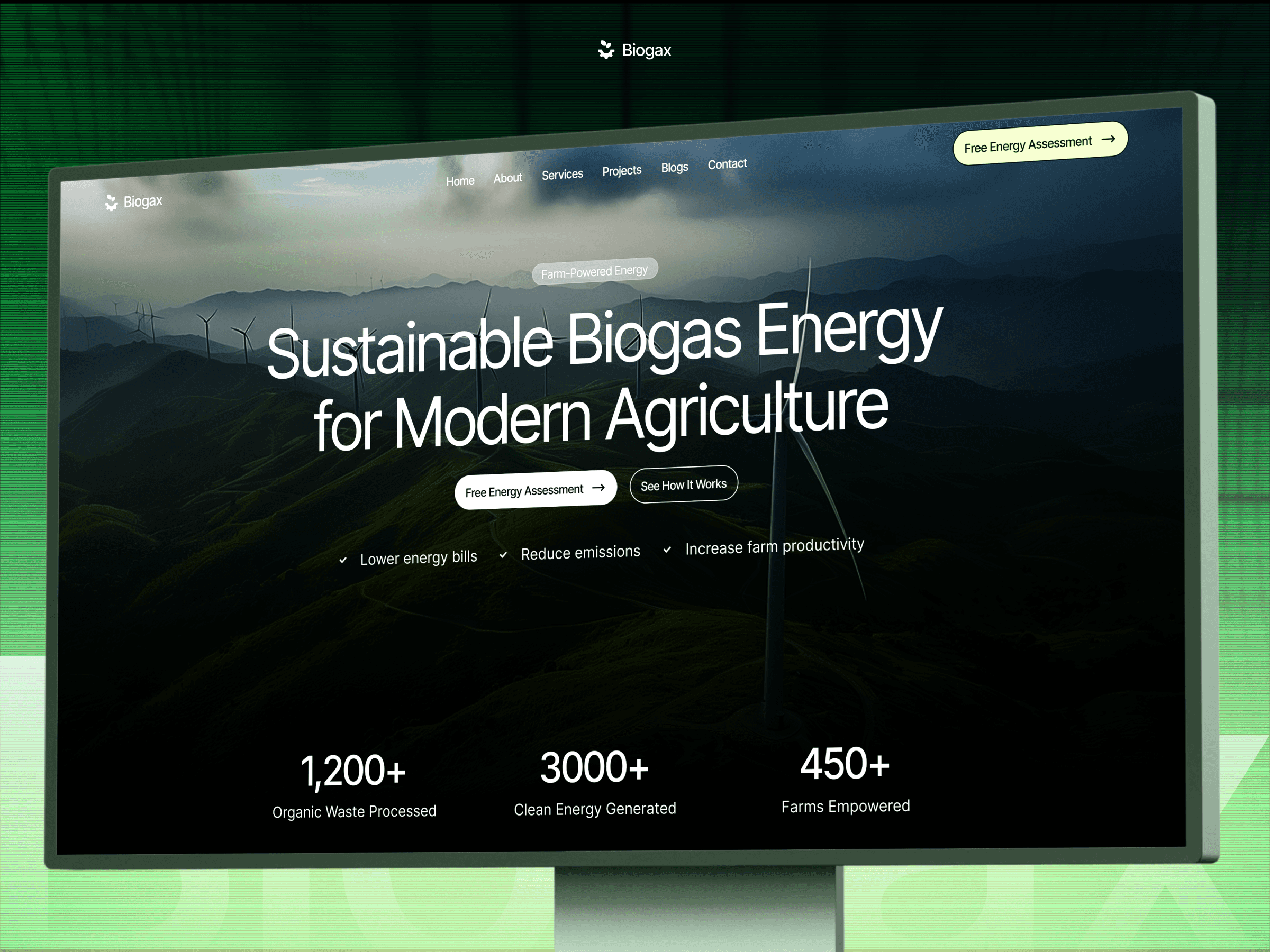
Biogax is purpose-built for this space. The layout centers on impact proof, project documentation with agricultural context, and a blog CMS designed for educating buyers on biogas. It ships with a project CMS that has fields for sustainability outcomes, not just financial ones.
How to Get Your Solar Site Cited by AI Search
Solar is one of the highest AI-query categories on the internet. People ask ChatGPT and Google AI Overviews about solar incentives, payback periods, whether solar is worth it in their state, and which financing options exist, before they ever contact an installer.
Your site can show up in those answers. Most solar sites don't, because they're not structured for it.
Here's what actually matters for AI citation:
Goal completion. This one applies specifically to residential installers, who live and die by local SEO. Your hero section needs to tell the visitor, Google, and AI search engines three things simultaneously: what you do, who you do it for, and which city or region you serve. All three, above the fold, in the first section.
This is called goal completion: the page signals its intent so clearly that Google and AI models can extract it without crawling further. A headline like "Solar Panel Installation in Austin, TX" paired with a subheadline that names your service area does more local SEO work than a full page of generic clean energy content. It removes any ambiguity about what this business is and where it operates.
B2B solar companies don't rely on this as heavily because they target procurement teams and facility managers through longer sales cycles and industry channels. But for residential installers competing in local search, getting goal completion right in the hero section is one of the highest-leverage SEO moves on the site.
Question-based H2s. Write your FAQ and service page headings as real questions: "How much does solar installation cost in [State]?", "What solar incentives are available in 2026?", "How long until solar panels pay for themselves?". Answer engines extract these directly. Clever heading copy ("The Energy Equation") doesn't work. Clarity does.
Direct answers first. Every FAQ answer and every section should lead with the answer in the first one to two sentences. Don't build to it. AI models extract the first clean sentence as the answer to cite. If you bury it in paragraph three, you lose the citation.
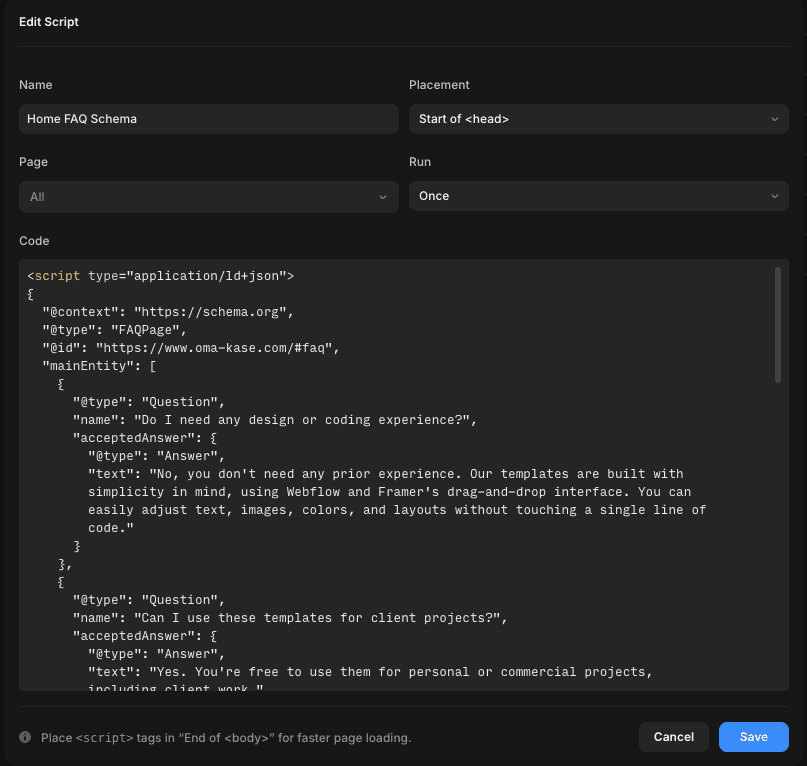
FAQ schema. Mark up your FAQ section with JSON-LD FAQ schema. In Framer, this goes into a custom code embed on the page. It takes about 20 minutes to add and directly increases your chances of appearing in AI Overviews. Most solar sites still don't have it.
LocalBusiness schema. Add LocalBusiness schema with your service area, business hours, and license information. This is the technical backbone of local SEO for solar installers, reinforcing the goal completion signal from your hero section at a structured data level so both Google and AI search understand your geographic relevance without guessing.
Self-contained sections. Write each section so it makes sense standalone. Don't use "as mentioned above" or "as we discussed earlier." AI models may pull a single section without the surrounding context. Every H2 should stand on its own.
Building This in Framer: CMS Setup and Component Structure
If you're building a solar site in Framer from scratch, the order matters. Most people open a blank Framer file and start designing. That's the wrong move. Get your data architecture right first, then design around it.
Step 1: Set Up Your CMS Collections
Three collections cover 90% of what a solar site needs to scale past launch.
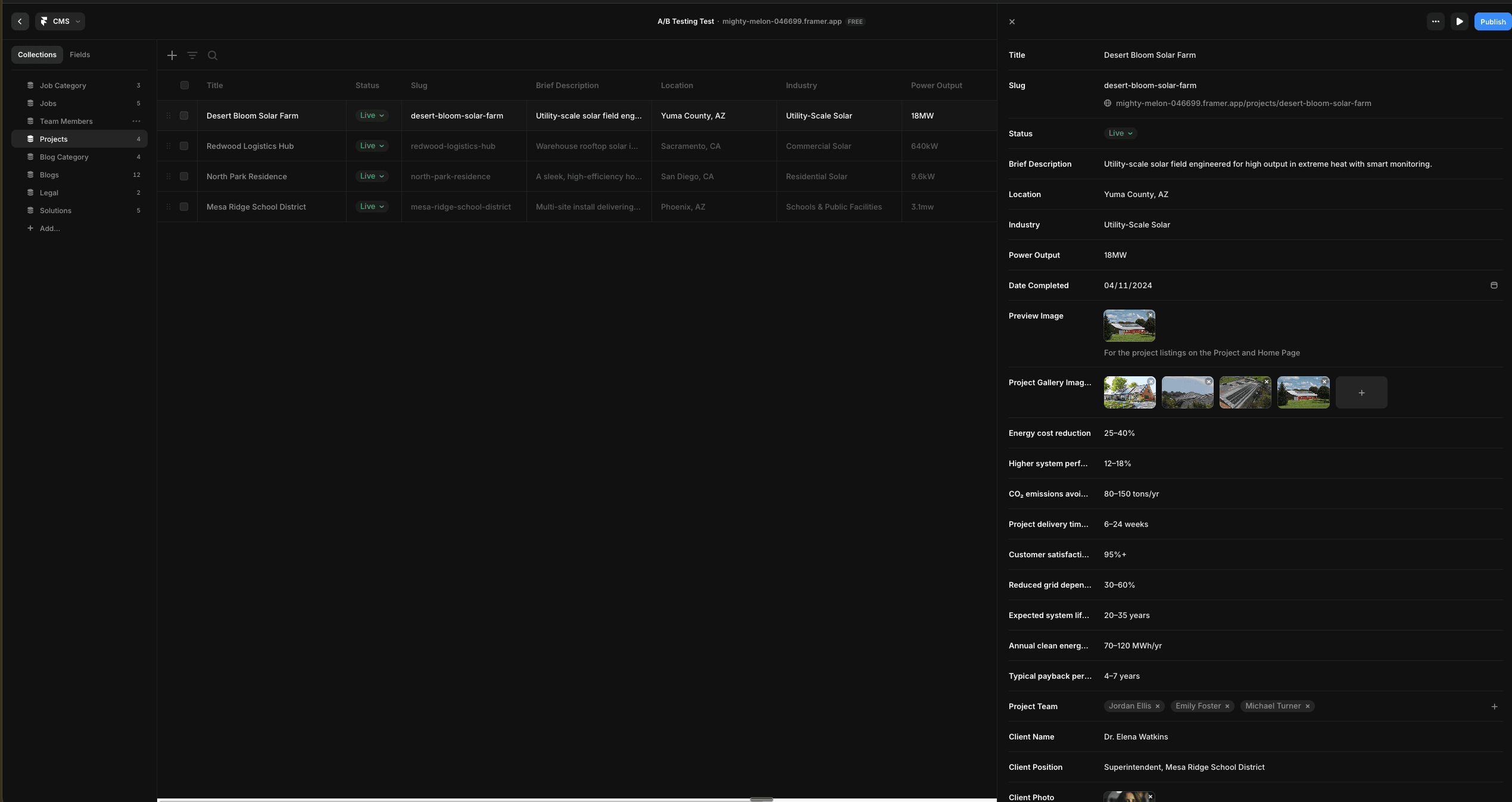
Projects collection
This is the most important one. Every case study, every install, every commercial project lives here. Fields to create:
Field | Type | Purpose |
Project Title | Text | "3-bedroom home in Austin, TX" |
Project Type | Option | Residential / Commercial / Utility / Biogas |
Location | Text | City, State |
System Size | Text | "8.4 kW" |
Annual Savings | Text | "$2,800/year" |
Payback Period | Text | "6.2 years" |
Carbon Offset | Text | "4.1 tonnes CO₂/year" |
Client Testimonial | Text (long) | Full quote |
Client Name | Text | "Sarah M., homeowner" |
Cover Image | Image | Hero visual for project card |
Project Gallery | Image (multi) | Detail page photos |
Featured | Boolean | Controls homepage display |
The Featured boolean is important. It lets you surface three to five projects on the homepage without hardcoding them. Toggle it off when a project is outdated, and a newer one takes its place automatically.
FAQs collection
Fields to create:
Field | Type | Purpose |
Question | Text | The full question string |
Answer | Text (long) | Direct answer, first sentence leads |
Category | Option | Cost / Timeline / Incentives / Technical / Process |
Page | Option | Homepage / Services / Contact (controls where it renders) |
Schema Include | Boolean | Flag for FAQ schema export |
The Category and Page fields let you reuse the FAQ collection across multiple pages without duplicating entries. Your Services page FAQ shows different questions than your homepage FAQ, but it's all one collection.
Incentives collection
This one gets skipped most often and causes the most pain later. Solar incentives change by state, by year, and by installation type. If you hardcode them into your pages, you'll be hunting down outdated figures across the site every time the ITC percentage changes.
Field | Type | Purpose |
Incentive Name | Text | "Federal Solar Tax Credit (ITC)" |
Region | Option | Federal / State name / Local |
Amount | Text | "30% of system cost" |
Eligible For | Option | Residential / Commercial / Both |
Expiry Date | Date | When the incentive changes or ends |
Source URL | Link | Link to official source |
Active | Boolean | Toggle expired incentives off |
Connect this to a dedicated Incentives page and a section on your Services pages. Buyers researching solar incentives are high-intent. Giving them a clean, up-to-date reference on your own site keeps them from leaving to find it elsewhere.
Step 2: Build Your Component System
Before touching page layouts, define these four components. You'll use variants of them across every page on the site.
Hero component
Build one hero component with three variants: Homepage (large, full-width, two CTAs), Service page (medium, with breadcrumb, single CTA), and Landing page (minimal header, no nav, single CTA for paid campaigns). All three share the same underlying structure. Only the sizing, nav visibility, and CTA count change between variants.
Trust strip component
A horizontal row of stats and certification logos. Fields: stat label, stat value, logo slot (repeatable). Build it as a component so you can drop it anywhere without rebuilding. It belongs on the homepage, every service page, and the contact page.
Project card component
Connected to your Projects CMS collection. Fields: cover image, project type badge, location, system size, annual savings, and a link to the project detail page. Build one card, connect it to the CMS, and it renders however many projects you've marked as Featured.
FAQ accordion component
Connected to your FAQs CMS collection, filtered by the Page field. One component, multiple page instances. When you add a new FAQ entry to the collection and tag it for a specific page, it appears automatically. No manual updates required.
Step 3: Page Structure at Launch
Keep the launch set tight: Homepage, Services (one per core service), Project detail (CMS template page), Blog (CMS template page), Contact, FAQ, and Legal. That's seven to nine pages.
Don't build an About page until you have real team photos, a real company story, and someone who will keep it updated. A placeholder About page with stock photos and generic copy hurts trust more than no About page at all.
Add location pages after launch, once you have real project data for each area. A "Solar Installation in Houston" page with three real Houston case studies pulls significantly better than one built on day one with generic copy.
If you want to skip the entire setup above, all three of our solar templates (Solvance, Taayo, and Biogax) ship with these collections and components pre-built. Swap the content, update the images, and you're publishing in a day instead of a week.
Copy Frameworks for the Three Objections That Kill Solar Conversions
Good site structure gets buyers to your content. Good copy gets them to the form. Most solar sites fail at the copy level because they try to sound impressive rather than addressing what buyers are actually worried about.
Three objections kill more solar conversions than anything else: upfront cost, ROI uncertainty, and incentive complexity. Here are the frameworks for each.
Objection 1: "It's too expensive"
The instinct is to justify the price with quality claims. That almost never works. The better move is to reframe the cost as a comparison.
Framework: Cost of inaction
"The average [City] homeowner spends $2,100 per year on electricity. Over 25 years, that's $52,000 going straight to the grid. A solar installation at $18,000 after the federal tax credit pays itself back in under 7 years. The other 18 years are free."
The formula: current annual spend x 25 years = total cost of doing nothing. Then put the installation cost next to it. Buyers understand opportunity cost. They don't respond well to "our panels are premium quality."
Use this framework in your hero subheadline, your pricing section, and your quote form confirmation email.
Framework: Monthly payment anchor
Don't quote the total system cost up front. Quote the monthly financing payment against the monthly electricity bill.
"Most homeowners pay $0 out of pocket at signing and see a net positive from month one. Your $160 electricity bill becomes a $110 solar loan payment. That's $50 back in your pocket immediately."
This reframe works especially well for residential buyers who think in monthly budgets, not lump-sum investments.
Objection 2: "I don't know if I'll actually get ROI"
Vague ROI claims ("save up to 80% on your electricity bill") create skepticism, not confidence. Buyers have seen these numbers before and don't believe them without evidence.
Framework: Named project proof
"In 2024, we installed a 9.2 kW system for a family of four in [Suburb]. Their annual electricity bill dropped from $2,400 to $310. Payback period: 6.8 years. System warranty: 25 years."
Specificity does the work. City, system size, actual dollar amounts, actual payback period. If you have this data from real projects, it's your most powerful conversion asset. It belongs on your homepage, not buried in a case studies page.
Framework: Calculator before claim
Before making any ROI claim, give buyers a way to calculate their own. A simple input field ("Enter your monthly electricity bill") that outputs an estimated annual savings and payback period converts better than any static number you can put on a page.
The psychological reason: buyers trust numbers they calculated themselves more than numbers you gave them. The calculator doesn't need to be precise. It needs to be directionally accurate and personally relevant.
Framework: Objection-first headline
For pages targeting bottom-of-funnel buyers who are comparing options:
"Is solar actually worth it in [State] in 2026?"
Then answer it directly in the first paragraph. Yes or no, with specifics. Buyers searching this query are one good answer away from requesting a quote. Don't make them hunt for the answer.
Objection 3: "The incentives are too complicated"
Solar incentives are genuinely complicated. Federal ITC, state rebates, net metering policies, utility buyback rates, local programs. Buyers don't understand the landscape and they know it. That uncertainty is a conversion killer.
The wrong response is a wall of incentive information. The right response is a simplified promise plus a clear next step.
Framework: We handle it
"There are more than a dozen incentives available to [State] homeowners in 2026. We identify every one you qualify for and apply them to your quote automatically. The average homeowner we work with reduces their net system cost by 38% through incentives alone."
You're not explaining the incentives. You're taking responsibility for navigating them. That's what buyers actually want.
Framework: The one number that matters
Instead of listing every available incentive, collapse them into one number:
"After the 30% federal tax credit, state rebates, and utility incentives, most [City] installations net out between $14,000 and $19,000. We'll give you the exact number for your home in your free assessment."
One number, a range, and a CTA to get the specific figure. This reduces complexity without hiding information.
Use this framework in your FAQ section ("What incentives are available for solar in [State]?"), your Services page, and any paid landing pages where buyers arrive from incentive-related search queries.
Design is the easy part of a solar website. Every decent Framer template looks professional. The part most founders skip is matching the right site architecture to the right buyer, then structuring content so both humans and AI search can actually use it.
Most solar founders agonize over palettes. Almost none get the section order right. Even fewer think about FAQ schema.
Get the structure right first. Then make it beautiful.
Use code OMAKASE20 for 20% off any Omakase solar template.
FAQ
How much does it cost to build a solar company website?
A custom-built solar website from an agency typically runs $5,000 to $25,000 depending on scope and page count. A premium Framer template with full customization gets you to a comparable result for $500 to $2,000 total. The template handles architecture and design, you (or a Framer developer) handle content and branding.
What should be on a solar company homepage?
In order: a specific hero with a clear CTA, a trust strip with certifications and install count, a 3-step process overview, a services section, a savings calculator, project case studies, testimonials, an FAQ section covering the top 5 buyer objections, and a short quote form. The calculator should appear before case studies: buyers engage with their own potential savings before they care about your past projects.
What's the best website builder for a solar company?
Framer for teams that want a fast, design-quality site without a full custom development build. Webflow for teams that need advanced CMS relationships, like a multi-region incentive database with filtering. WordPress if you already have a developer who knows the platform and you need deep plugin support. Don't switch platforms just because someone told you to. The switching cost is almost always higher than expected.
How do I get my solar website to show up in ChatGPT and Google AI Overviews?
Add FAQ schema markup to your FAQ section, write question-based H2 headings across your site, and make sure every FAQ answer starts with a direct response in the first sentence. Add LocalBusiness schema with your service area. These four steps cover 80% of AI citation readiness for a solar installer site.
How long does it take to build a solar company website in Framer?
Using a template: 3 to 7 days for a solo designer handling content, customization, and CMS setup. Custom from scratch: 2 to 4 weeks depending on page count and CMS complexity. The biggest time variable is almost always content. Most founders underestimate how long it takes to write accurate case studies and honest service descriptions.