


Your portfolio's job isn't to look pretty. It's to get you hired.
I've reviewed hundreds of portfolio templates on the Framer Marketplace. Most of them are gorgeous. Most of them are also useless. They showcase work beautifully but have zero structure for actually converting a visitor into a client inquiry.
A portfolio that gets compliments from other designers is not the same thing as a portfolio that gets you booked. The difference comes down to structure: where the contact form sits, whether the CMS supports case studies, whether the template guides visitors from "nice work" to "let's talk."
I ranked these 12 templates on that distinction. Design quality was table stakes. Every template here looks good, whether you want a clean dark mode portfolio or a bold editorial layout. The ranking comes down to which ones help you land work.
Disclosure: Two templates on this list (Nolan Rosser and Rayden Carlson) are built by my team at Omakase. I've flagged both clearly and included honest cons for each. Every other template was evaluated independently.
Key Takeaways
12 Framer portfolio templates reviewed, ranked by design quality AND client-conversion potential
Best for freelancers landing clients: LaunchFolio ($99). Built-in quote generation and CMS-powered blog
Best editorial portfolio: Vertical ($129). Immersive, typography-driven layouts for storytellers
Best for photographers: Aperture ($129). Gallery-first design with SEO optimization
Best for developers: Retro'98 ($59). Stands out in a sea of minimal portfolios
Best dark mode portfolios: TITARVL, Retro'98, and Apollo for designers who want that dark aesthetic
Best free option: Arjuna. Minimal with personality, smooth animations, genuinely good
Price range: Free to $129. Most paid options sit between $49-$59
How I Evaluated These Templates
Four criteria. Weighted toward the ones that actually affect whether you get hired.
Design quality (25%): Does the template have a point of view? A minimal template should feel intentionally restrained, not lazy. An editorial template should feel authored, not cluttered. Generic templates that could belong to any niche scored low.
Client-conversion structure (35%): This got the heaviest weight because it's where most portfolio templates fail. I looked for: clear contact CTAs, quote/inquiry generation, booking links, strategic placement of calls-to-action throughout the site (not just buried in the footer).
CMS and blog support (20%): Can you update your projects without rebuilding layouts? Does it support case study pages with enough depth to tell the story behind your work? A blog section matters too. It signals expertise and improves SEO.
Customization speed (20%): How fast can you go from "I just bought this" to "this is live with my work on it"? Templates with clear component systems, style guides, and logical page structures scored higher. Overly complex templates with dozens of nested layers scored lower.
TLDR Comparison Table
Rank | Template | Best For | Price | Standout Feature |
|---|---|---|---|---|
1 | LaunchFolio | Freelancers landing clients | $99 | Quote generation + full CMS system |
2 | Vertical | Artists & storytellers | $129 | Bold editorial typography + immersive layouts |
3 | TITARVL | UI/UX designers | $49 | Type-driven minimal with strong hierarchy |
4 | Rayden Carlson (Omakase) | Creative directors | $59 | Editorial case studies with storytelling depth |
5 | I—S® | Solo designers/freelancers | $49 | Includes paid components, flexible layout |
6 | Nolan Rosser (Omakase) | Product designers | $59 | Pure minimal; lets work speak entirely |
7 | Studio Think | Process-focused designers | $49 | Analog/craft aesthetic, shows thinking |
8 | Aperture | Photographers | $129 | Gallery-optimized, visual-first |
9 | Retro'98 | Developers wanting personality | $59 | Windows 98 interface; unforgettable |
10 | Apollo | Developers & creators | $49 | Tools/process showcase with space theme |
11 | Arjuna | Budget-conscious designers | Free | Minimal + smooth book-a-call animation |
12 | Webstack | Testing the waters | Free | Clean 5-page starter with testimonials |
Which Type Are You?
Before scrolling through all 12, find your lane:
Product designer who wants the work to speak for itself → Nolan Rosser (#6). Pure minimal. No noise.
Creative director presenting process and big-picture thinking → Rayden Carlson (#4). Editorial depth with storytelling case studies.
Photographer who needs gallery-first layouts → Aperture (#8). Built for visual portfolios with SEO baked in.
Developer who wants to stand out from every other minimal dark-mode portfolio → Retro'98 (#9). Windows 98 interface. People will remember you.
Freelancer actively trying to book clients → LaunchFolio (#1). Quote generation, blog, full CMS. It's a business tool, not just a portfolio.
Testing the waters (free) → Arjuna (#11) for personality, Webstack (#12) for professional simplicity.
The 12 Best Framer Portfolio Templates in 2026
1. LaunchFolio: The Portfolio That Actually Books Clients
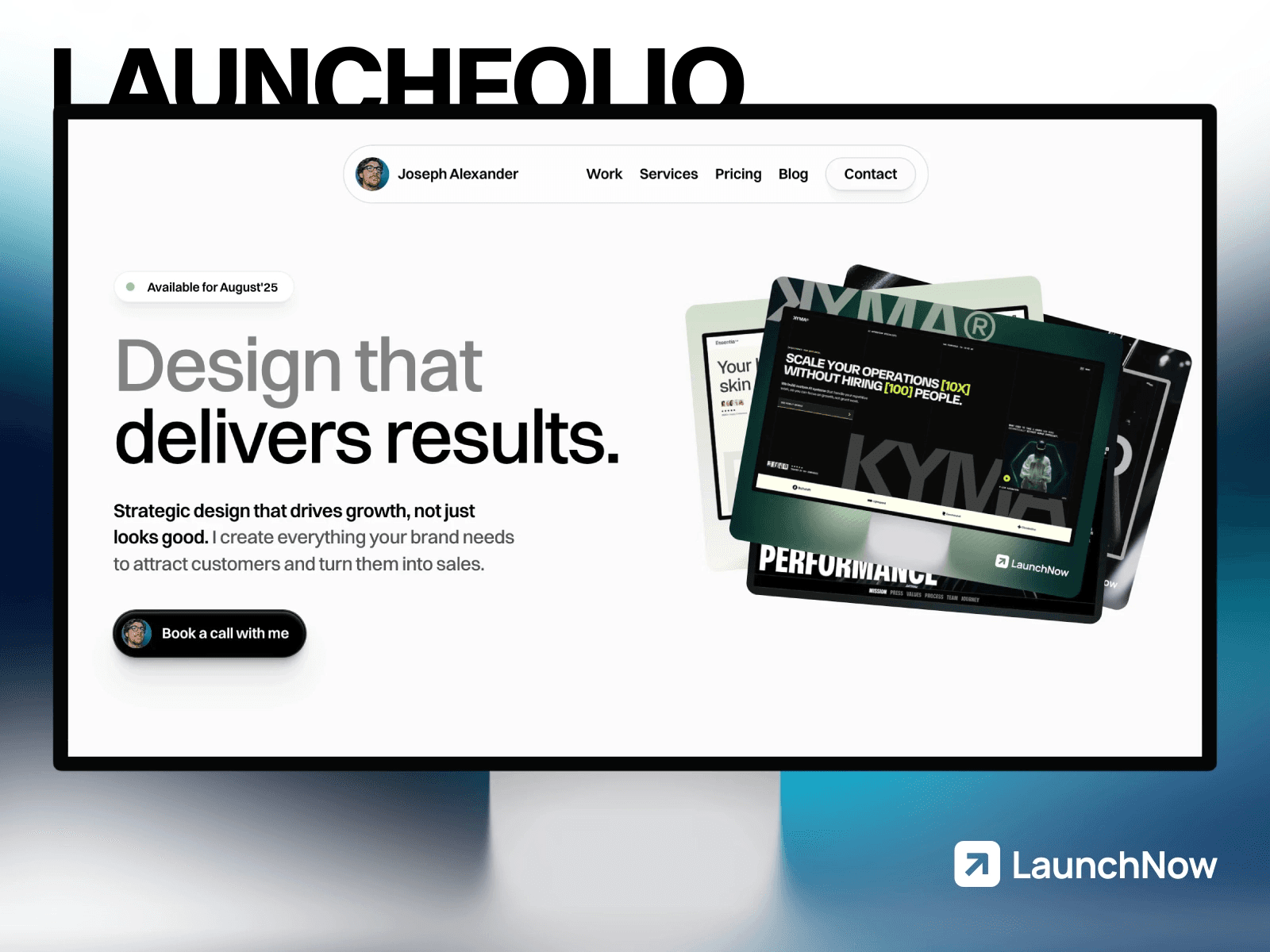
LaunchFolio isn't the prettiest template on this list. It's the most useful one. Built by Joseph Alexander (who also created Mugen), this template treats your portfolio as a business tool rather than a gallery wall.
What stands out:
Built-in quote generation page. Visitors can request a project quote directly from your site
CMS-powered projects, blog, and services. The whole content system is connected
Conversion-focused structure with strategically placed CTAs throughout. Pair it with a Cal.com or SavvyCal embed and you have a full client booking system
51K+ marketplace views, making it one of the most popular portfolio templates on Framer
Pros:
The only template on this list with a quote generation system
Blog integration means your portfolio doubles as a content marketing engine
Everything connects through Framer's CMS. Update once, reflect everywhere
Cons:
At $99, it's pricier than most portfolio templates in the $49-$59 range
The design is functional rather than striking. If you want visual drama, look at Vertical or Rayden Carlson
Might feel over-built if you just want a simple project showcase
Steal this if: You're a freelancer or solo designer who needs a portfolio that generates leads, not just showcases work. The quote generation alone justifies the price if you're actively looking for client work.
2. Vertical: The Editorial Portfolio That Commands Attention
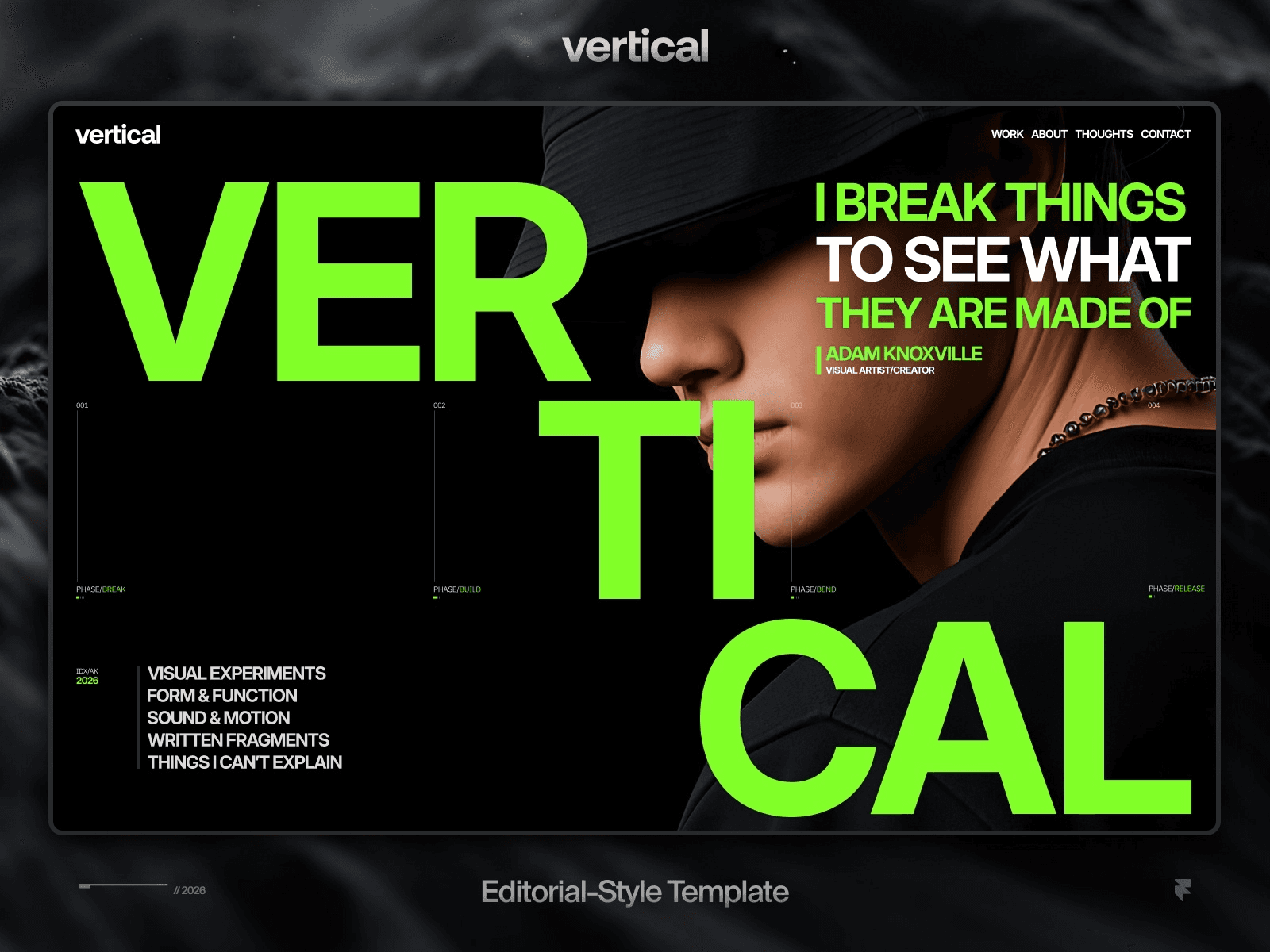
Vertical is what happens when someone applies magazine design principles to a portfolio template. Built by Tamas Bodo, it uses bold typography, disciplined grids, and large-scale imagery to create an immersive browsing experience.
What stands out:
Editorial layout with intentional pacing that guides the viewer through your work like a story
Bold typographic hierarchy that makes every section feel considered
Available in Extended Pro ($129) with Figma source file and unlimited domains
Accessibility optimized with custom cursors, sticky scrolling, and visual breakpoints
Pros:
The strongest visual identity of any template on this list. It doesn't feel like a template
Fully responsive with careful attention to how layouts adapt across breakpoints
Rich feature set: CMS, forms, overlays, micro-interactions, vector sets, project styles. The level of interactive detail here sets it apart from templates that just look good statically
Cons:
$129 puts it at the premium end. You're paying for design quality, not just functionality
The editorial style is opinionated, which means it takes more effort to customize without breaking the design language
Could feel heavy for someone who just wants a clean grid of projects
Steal this if: You're an artist, designer, or creative director who wants your portfolio to feel like a publication. This is for people whose personal brand IS their design taste.
3. TITARVL: Type-Driven Minimal Done Right
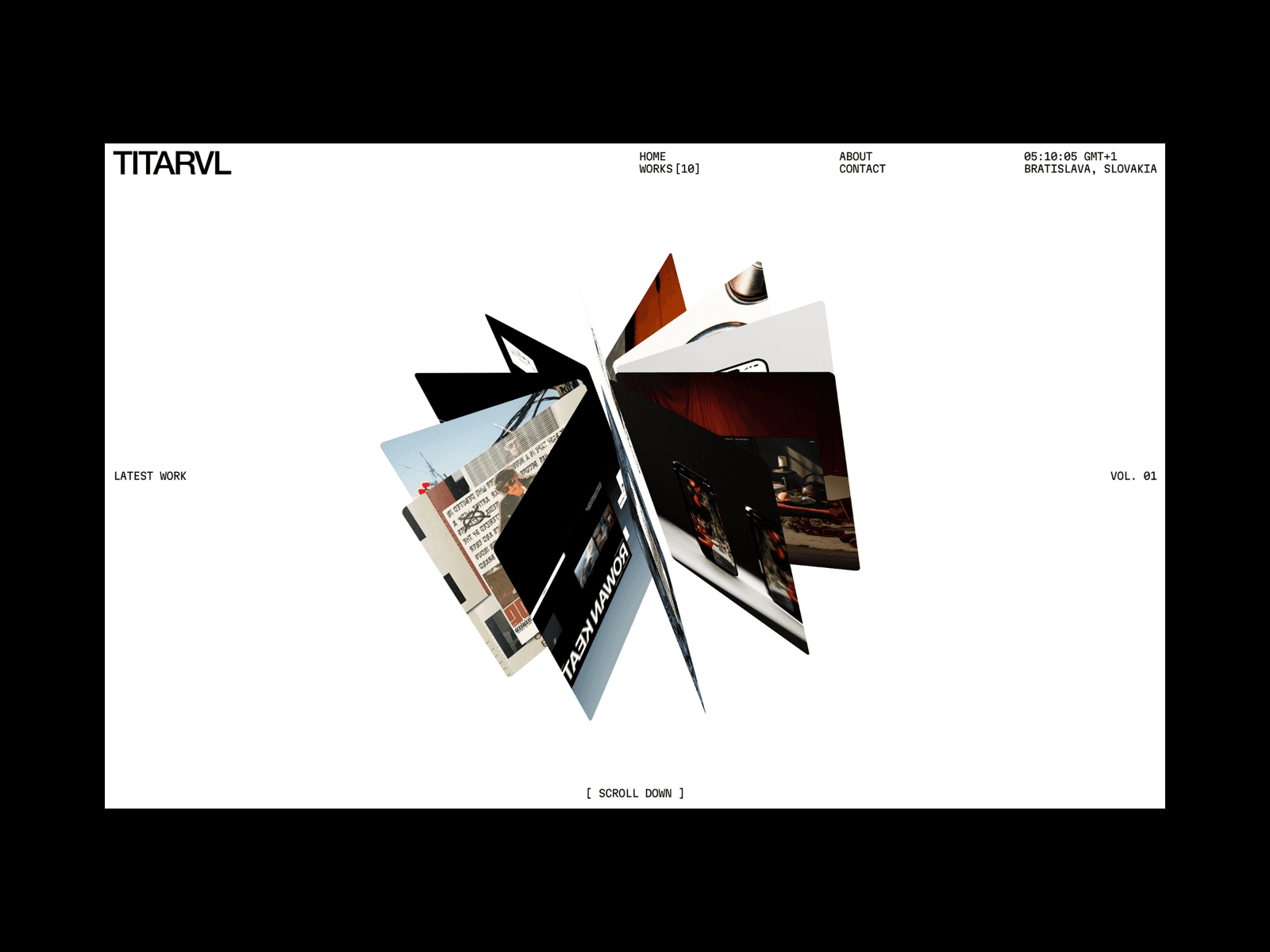
TITARVL strips the portfolio down to what matters: your work, presented through clean typography and tight visual hierarchy. The dark, type-driven aesthetic feels sharp without being heavy. Minimal without being empty.
What stands out:
Type-driven design that puts typography front and center
Built specifically for digital design, branding, and UI/UX work
Clean structure that's easy to customize without breaking the layout
Refined details that make it feel more premium than its $49 price suggests
Pros:
One of the best price-to-quality ratios on this list at $49
The typographic system is strong enough that you can swap fonts and still maintain the design quality
Works equally well for individual designers and small studios
Cons:
Minimal means minimal. If you want scroll animations, parallax effects, or visual drama, this isn't your template
Less personality than options like Retro'98 or Studio Think
The restraint that makes it elegant also makes it easy to blend in with other minimal portfolios
Steal this if: You're a UI/UX designer or brand designer who believes good work doesn't need decoration. Clean, confident, and professional.
4. Rayden Carlson: Editorial Depth at Half the Price
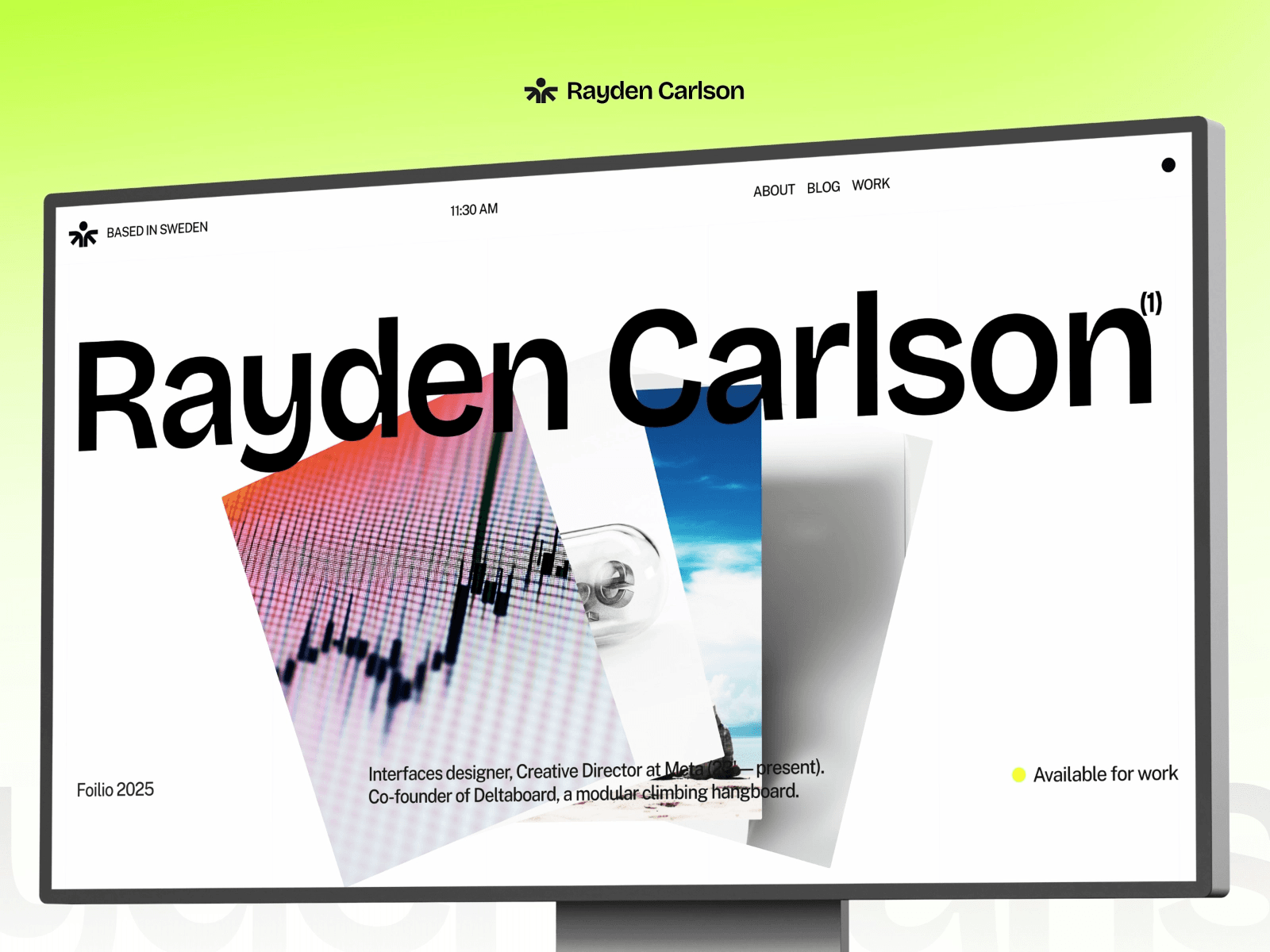
This is one of ours, so factor in my bias. But Rayden Carlson is also the only template under $60 on this list that delivers genuine editorial depth with storytelling-driven case studies.
What's included:
Home, Projects (CMS), Project Detail pages, Blog (CMS), Contact, Legal, and 404 pages
Case study pages designed for narrative depth, not just project grids, but process breakdowns
Calendar link integration on the contact page for direct booking (works with Cal.com, SavvyCal, or Calendly)
Figma file included with the Extended License, so you can customize the layout in Figma before building in Framer
100 SEO score and 92 performance score on Lighthouse
Pros:
Editorial storytelling structure at $59. Vertical offers similar depth at $129
Contact page with integrated calendar link, social profiles, and direct form
Strong case study template that walks visitors through your design process, not just final outputs
Blog section for thought leadership (which helps SEO and positions you as an expert)
Cons:
The editorial weight might feel like too much if you're a developer or someone who prefers project grids over written case studies
Fewer pages than LaunchFolio. No quote generation system
The storytelling structure requires you to actually write about your process. If you're not comfortable writing case studies, a simpler grid template will serve you better
Choose this if: You're a creative director or senior designer who wins work by communicating process and strategic thinking, not just showing screenshots.
5. I—S®: Modern Flexibility with Built-In Extras

I—S® (Intentional Studio) by Federico Esposito is a modern, flexible portfolio that comes with paid components included in the template price. That's a nice touch. Most templates sell components separately.
What stands out:
Includes paid components that would cost extra on other templates
Flexible layout system that adapts to different types of creative work
Quick setup. The template is designed to be customized and live within an hour
Modern, clean design that balances professionalism with personality
Pros:
The included components add real value beyond the base template
Flexible enough to work for both individual designers and small studios
At $49, it's one of the better value propositions on this list
Clean structure means fast customization
Cons:
Categorized as "Agency" on the marketplace, which might cause some solo designers to skip it
Less distinct design identity than templates like Vertical or Retro'98
The flexibility that makes it adaptable also makes it less opinionated. You need to bring your own design direction
Steal this if: You want a solid, modern portfolio foundation at a fair price, with some extra components that save you time.
6. Nolan Rosser: When Less Is Everything
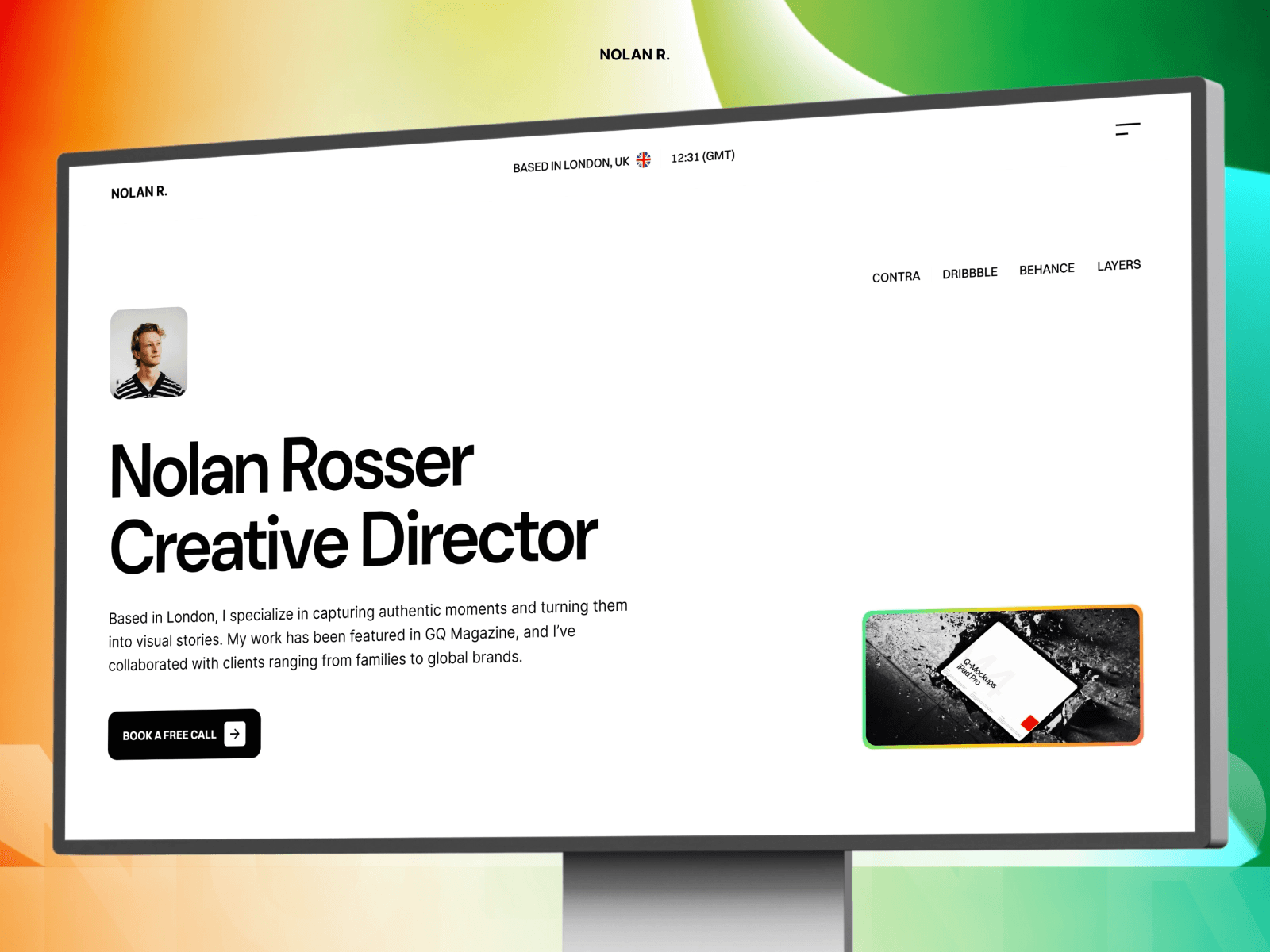
Another one of ours. Nolan Rosser is the portfolio template for people who believe their work should do all the talking. The design gets out of the way entirely.
What's included:
Home, Works (CMS), Work Detail pages, Blog (CMS), Blog Detail, and Legal pages
CMS-powered project gallery with individual case study pages
Built-in blog for sharing design thinking and industry insights
Figma file included with the Extended License for designers who prefer to customize in Figma first
100 SEO score and 92 performance score on Lighthouse
Pros:
The most intentionally restrained template on this list. If TITARVL is minimal, Nolan is ultra-minimal
CMS-powered everything means you can update your portfolio without touching the layout
Blog support adds an SEO and credibility dimension that many minimal templates skip
At $59, well-priced for a template with CMS + blog + case study pages
Cons:
Too minimal for freelancers who need to actively sell services. There's no services section, no quote generation, no pricing page
If your work isn't visually strong enough to carry a stripped-back layout, the minimalism can work against you
Less structural variety than Rayden Carlson. The design is consistent but doesn't give you as many layout options
Choose this if: You're a product designer or visual designer whose work is strong enough to carry the page. Nolan gives your projects room to breathe and doesn't compete with them for attention.
7. Studio Think: The Analog Portfolio
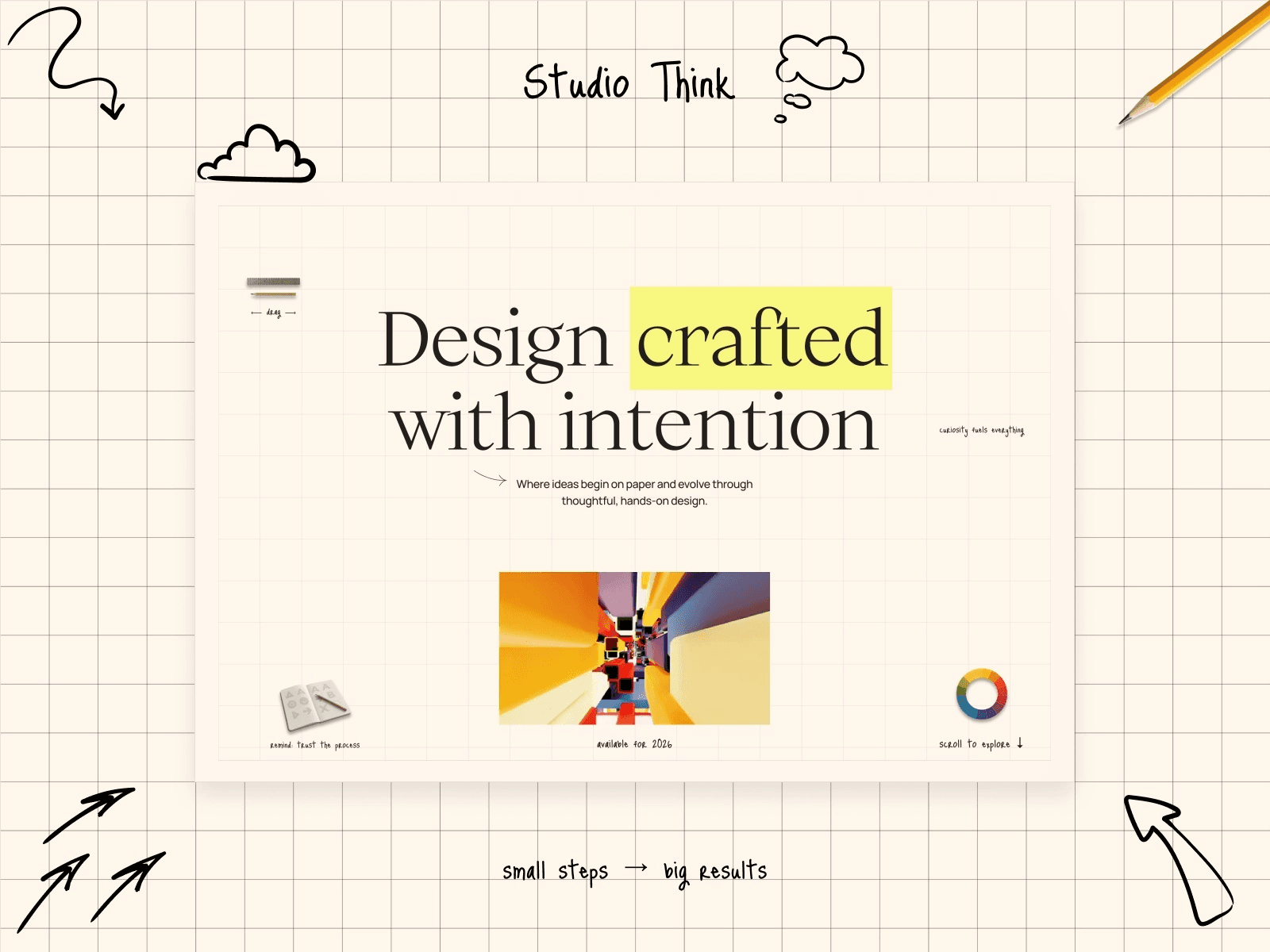
Studio Think does something nobody else on this list does: it makes a digital portfolio feel handmade. Built by Huehaus Studio, the craft-paper textures and analog aesthetic create an intimate, human-centered experience.
What stands out:
Analog-inspired design with craft paper textures and tactile details
Built to showcase process, not just outcomes. The template tells the story of how work gets made
Invitation-based storytelling structure that builds narrative around projects
Unique among portfolio templates. Nothing else on the marketplace looks like this
Pros:
Genuinely distinctive. In a sea of minimal dark-mode portfolios, this stands out immediately
The process-first approach is perfect for designers who win work by showing how they think
At $49, it's affordable for a template with this much personality
Cons:
The analog aesthetic is polarizing. Clients in tech or SaaS might find it disconnected from their industry
Harder to customize without losing the handmade feel. Change the textures and the whole identity shifts
More suited to boutique/indie designers than corporate-facing professionals
Steal this if: You're a designer who values craft and wants your portfolio to reflect how you work, not just what you produce. Not for everyone. And that's the point.
8. Aperture: Built for Visual Portfolios

Aperture is the only template on this list built specifically for photographers. Created by Hamza Ehsan, it prioritizes large-format imagery with an SEO-optimized structure underneath.
What stands out:
Gallery-first layout designed around full-width, high-resolution images
SEO optimization built into the template structure, not bolted on after
Fast loading despite being image-heavy
Clean navigation that keeps the focus on visual work
Pros:
If you're a photographer, this is purpose-built for your needs. Generic portfolio templates always compromise on gallery layout
SEO structure means your portfolio can rank for local photography searches
The template handles large image files well without killing load times
Performance tip: Framer auto-converts images to WEBP, but for a photography portfolio, make sure you're uploading optimized originals. Oversized source files still slow down initial load even with compression. Use BlurHash placeholders to keep the site feeling instant while high-res images load in the background.
Cons:
At $129, it's the priciest option alongside Vertical. Photographers on a budget might start with a free option and upgrade later
Designed for photographers specifically. The layout won't adapt as naturally to UI design work or development portfolios
Less CMS depth than LaunchFolio or Rayden Carlson for written case studies
Steal this if: You're a photographer who needs a portfolio that showcases images at their best while still ranking in search. This is the specialist pick.
9. Retro'98: The Portfolio Nobody Forgets
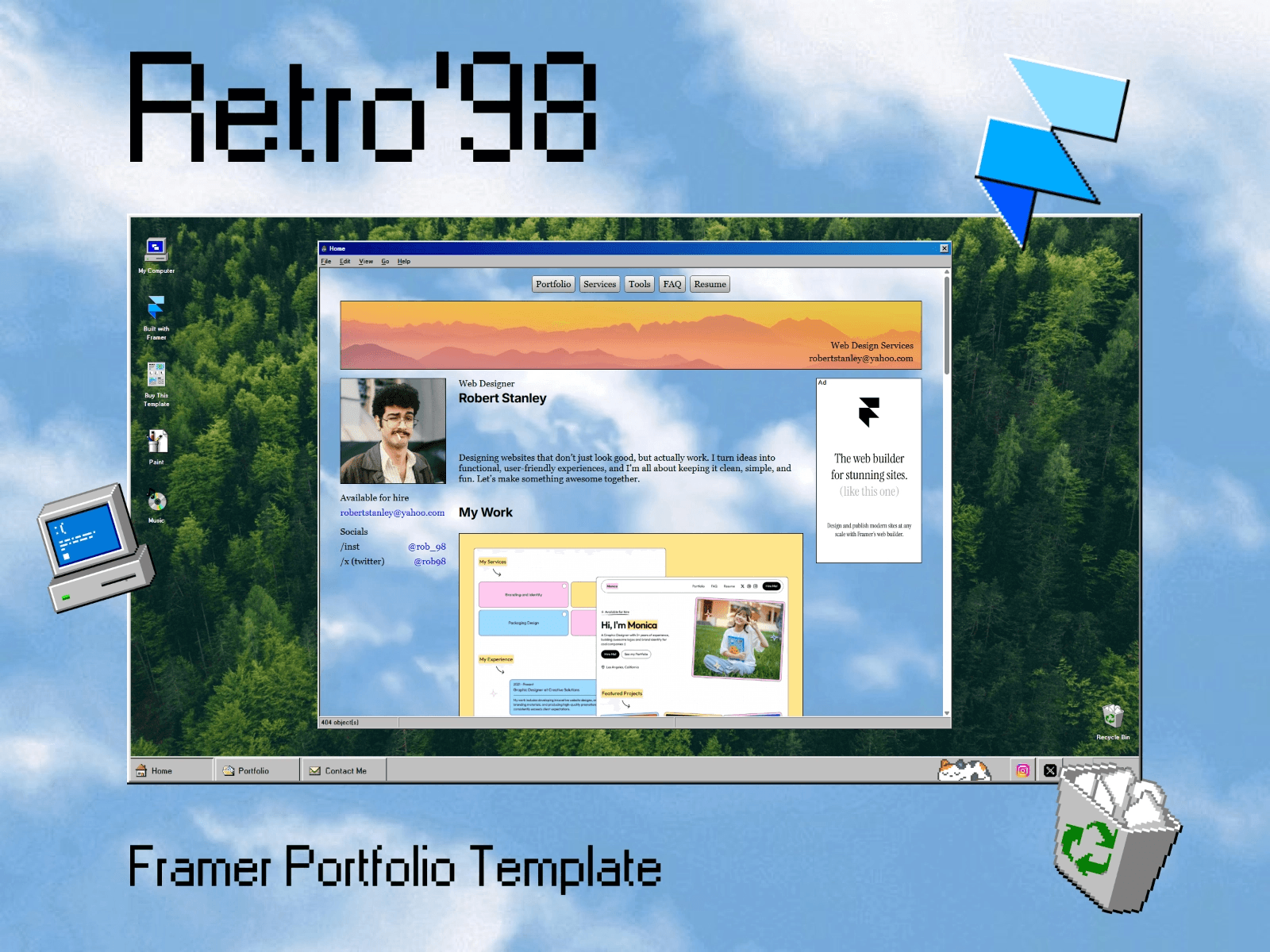
Retro'98 is a Windows 98-inspired dark mode portfolio by Nick404. It's a gamble. But if your personality matches the template's energy, it's the most memorable portfolio on this entire list.
What stands out:
Full Windows 98 desktop interface as a portfolio. Draggable windows, taskbar navigation, retro icons
CMS-powered projects presented through the classic desktop metaphor
Direct client contact through the "desktop" interface
A Framer Marketplace tutorial exists showing how it was built
Pros:
Unforgettable. Nobody visits this portfolio and forgets it. That's worth something in a market full of minimal dark-mode templates
Particularly strong for developers. The retro computing aesthetic signals technical personality
At $59, reasonably priced for a template with this much personality and engineering
Cons:
Extremely niche. Many clients (especially in corporate environments) won't take it seriously
The novelty can overshadow the work itself. If your projects aren't strong, the template becomes the thing people remember instead
Accessibility concerns with the retro interface metaphor. Usability takes a hit for the aesthetic
Steal this if: You're a developer or creative technologist who wants their portfolio to reflect their personality as much as their work. Not for corporate job applications.
10. Apollo: Space-Themed Portfolio for Developers
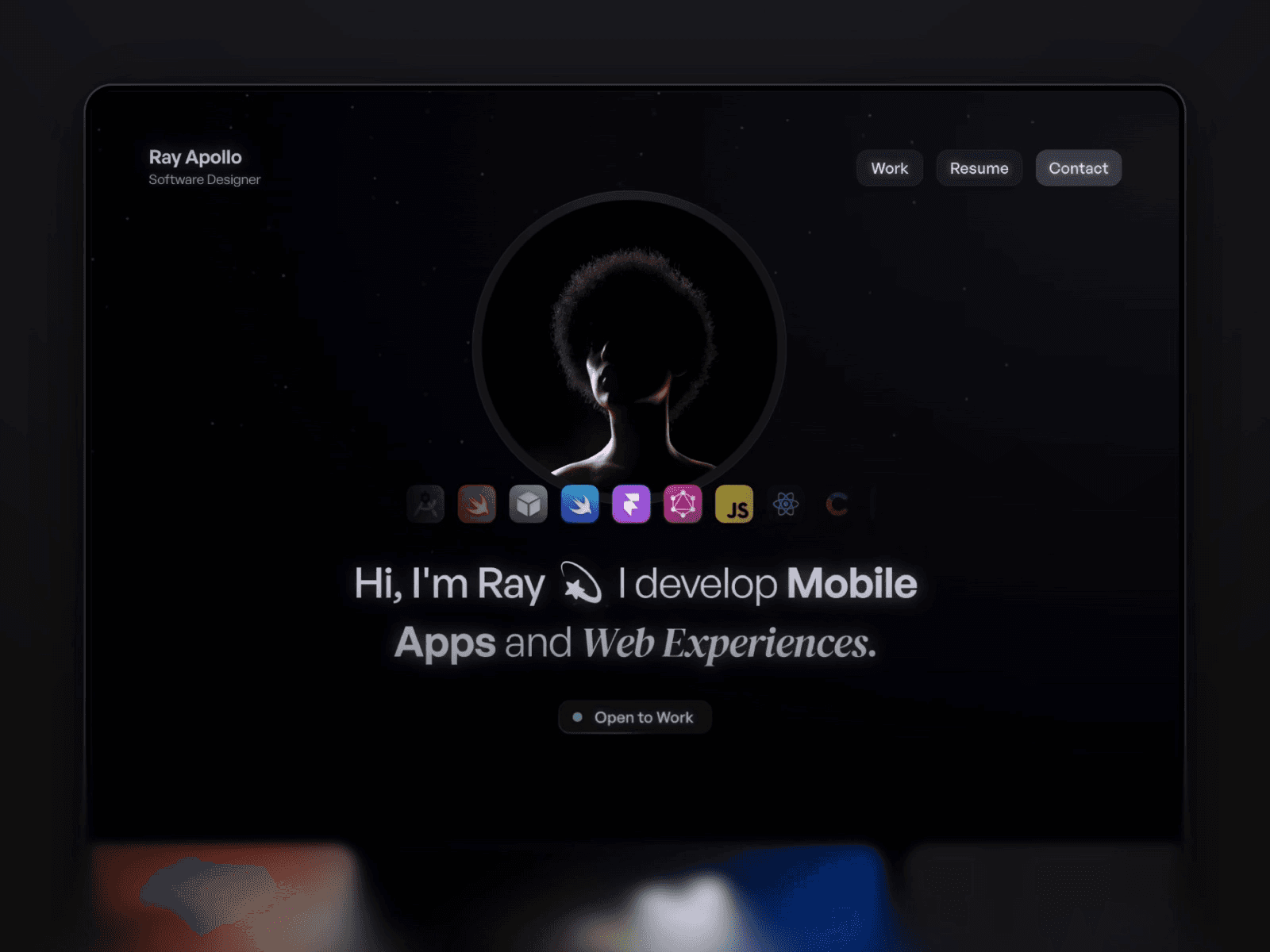
Apollo by Zan Creative leans into a cosmic, dark mode visual theme for developers, designers, and creators who want to highlight their tools and process alongside their work.
What stands out:
Space-themed aesthetic that gives the portfolio a distinct identity
Built-in tools and process showcase, not just what you built, but how you built it
Designed specifically for developers and technical creatives
Clean structure despite the thematic elements
Pros:
One of the few portfolio templates that dedicates space to showcasing your tech stack and process
The cosmic theme is memorable without being as polarizing as Retro'98
At $49, fairly priced for a themed portfolio template
Cons:
The space theme, while distinctive, limits how far you can customize the visual identity before it loses coherence
Less conversion-focused than LaunchFolio or I—S®; more of a showcase than a client-acquisition tool
The themed approach means it ages faster than minimal templates, and trends move on
Steal this if: You're a developer or technical creative who wants personality in your portfolio without going full novelty. Shows off your stack alongside your work.
11. Arjuna: The Best Free Option (And It's Genuinely Good)
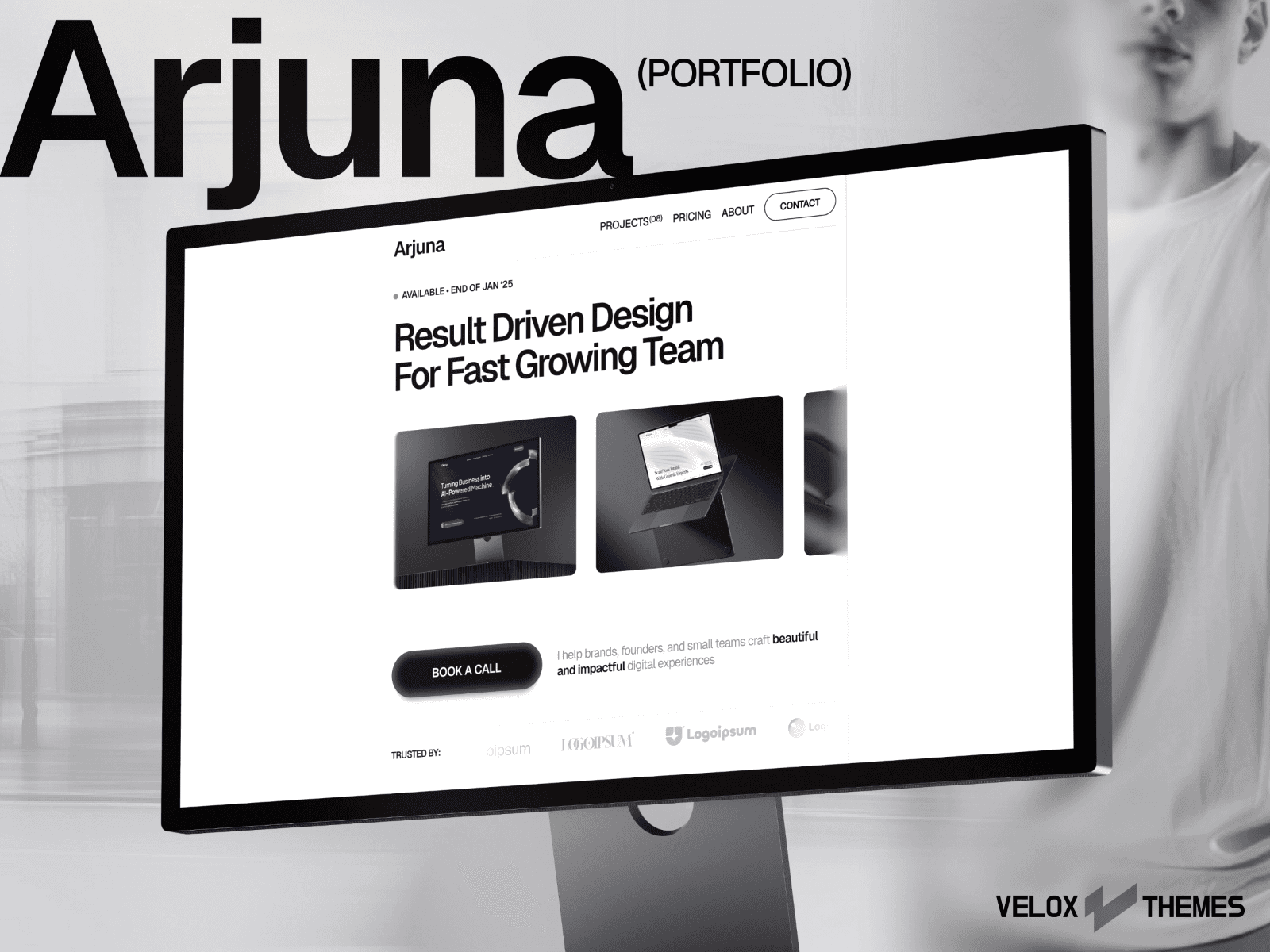
Arjuna by Velox Themes is the rare free template that doesn't feel like a compromise. Minimal layout, smooth animations, and a distinctive book-a-call button animation that adds personality without clutter.
What stands out:
Book-a-call button animation that's become a signature element
Smooth, intentional micro-interactions throughout. Hover states, transitions, and scroll behavior that rival paid templates
Clean layout that balances minimalism with enough personality to feel unique
Completely free on the Framer Marketplace
Pros:
The best free portfolio template I've found. Period
Smooth animations that rival many paid templates
Fast loading, balanced design, and enough structure to launch a real portfolio
Free means zero risk: try it, customize it, upgrade later if you need more
Cons:
No blog or CMS-powered case studies; it's a showcase, not a content system
Limited pages compared to paid options like LaunchFolio or Rayden Carlson
Because it's popular and free, you'll see other portfolios using it. Standing out requires real customization effort
Steal this if: You need a portfolio now, don't want to spend money yet, and want something that actually looks good. Start here, upgrade to a paid template when you're ready.
12. Webstack: The Clean Free Starter

Webstack is a straightforward free portfolio with a professional layout that punches above its weight class. The attention to detail, especially in the footer, makes it feel more refined than most free options.
What stands out:
Skills and tools section with proficiency indicators
Work process breakdown for visitors to understand how you operate
Client testimonials section for social proof
5 essential pages: Home, Projects, Contacts, 404, Project Details
Pros:
Conversion-minded for a free template: testimonials, skills showcase, and contact points placed strategically
Clean, professional typography that works across industries
Good starting point for freelancers who need a professional presence quickly
Cons:
Less personality than Arjuna; it's professional but not distinctive
No blog or CMS-powered case studies
The "proficiency indicators" for skills are a design trend that many hiring managers find meaningless. Consider removing them
Steal this if: You need a professional-looking portfolio fast and free. Less personality than Arjuna but more conversion structure.
Free vs Paid: When to Save and When to Invest
The gap between free and paid portfolio templates is smaller than you'd expect. Arjuna (free) is genuinely good enough for a working portfolio. Webstack has conversion elements that some paid templates lack.
Go free if:
You're a student or just starting out
You want to test whether a portfolio actually gets you work before investing
Your projects are strong enough to carry a simpler layout
Go paid if:
You need CMS-powered case studies (no free template on this list has them)
You want a blog integrated into your portfolio for SEO and thought leadership
You're actively freelancing and need conversion tools like quote generation or booking integration
You want a visual identity that's harder for other people to replicate
The sweet spot for most designers is the $49-$59 range. That gets you CMS, multiple pages, and a design with enough personality to feel custom.
3 Mistakes That Make Portfolio Templates Look Generic
1. Keeping the placeholder content as "inspiration." Every portfolio template ships with perfect fake projects. Your real work should replace 100% of it. If you're leaving any placeholder text or imagery, your portfolio looks like a demo site.
2. Using the default color palette. Five minutes of color customization transforms a template from "I recognize that template" to "that's a custom site." Change the primary color, adjust the background shade, and pick a font that matches your personal brand.
3. Skipping case study pages. A grid of project thumbnails impresses other designers. But clients don't hire based on thumbnails; they hire based on process, thinking, and results. If your template has case study pages (Rayden Carlson, LaunchFolio, Vertical, Nolan Rosser all do), use them.
The Verdict
The right portfolio template depends on what your portfolio needs to do.
If it needs to book clients: LaunchFolio. No contest. The quote generation and CMS-powered blog make it a business tool.
If it needs to showcase editorial-quality case studies: Vertical if budget allows, Rayden Carlson if you want that depth at $59.
If it needs to be clean, sharp, and minimal: TITARVL for type-driven elegance, Nolan Rosser for ultra-minimal restraint.
If it needs personality: Retro'98 for developers, Studio Think for process-focused designers.
If it needs to be free and actually good: Arjuna.
Every template on this list ships with responsive design, SEO-friendly structure, and enough customization options to make it feel like yours. The difference is what happens after the visitor arrives. Pick the template that turns visits into conversations.
Two templates on this list (Rayden Carlson and Nolan Rosser) are ours. Use code OMAKASE20 at checkout for 20% off any Omakase template.
FAQ
Do I need a portfolio website if I'm a developer?
Yes. GitHub profiles show code. A portfolio shows judgment, process, and the ability to communicate your work to non-technical stakeholders. Templates like Retro'98 and Apollo are built specifically for developers who want to showcase more than repositories.
Can I use a Framer portfolio template for multiple client projects?
Check the license. Most templates on this list allow use for a single project under the standard license. Templates like Vertical offer an Extended Pro plan with unlimited domains for multiple projects. Omakase templates allow unlimited project use on the standard license.
Are free Framer portfolio templates good enough for job applications?
Arjuna and Webstack are both strong enough for real job applications. The key is customization: swap every placeholder, change the color palette, and make it feel like your own. A well-customized free template beats a paid template left at defaults.
How long does it take to customize a Framer portfolio template?
Most templates on this list can go from purchase to live site in a weekend. The actual bottleneck isn't the template; it's your content. Having your project images, case study text, and bio written before you start customizing cuts the timeline in half.
Can I add a blog to my Framer portfolio?
Several templates on this list include blog functionality out of the box: LaunchFolio, Nolan Rosser, Rayden Carlson, and Vertical all ship with CMS-powered blog sections. If your chosen template doesn't include a blog, you can add one manually through Framer's CMS, but it takes more setup.
Looking for templates in other categories? Check out our SaaS templates, course templates, or browse the full Omakase catalog. -e