


Most Framer sites never run a single A/B test. The site goes live, the team celebrates, and then everyone just... hopes the headline is working.
That's a problem. Because the difference between a landing page that converts at 2% and one that converts at 5% isn't design talent, it's testing. And Framer now makes it genuinely easy to test, whether you use the built-in tools, a plugin, or an external platform.
Key Takeaways
Framer's built-in A/B testing (Convert add-on) lets you create up to 5 page variants, track conversions without code, and now supports CMS pages and custom traffic distribution as of March 2026
Convert is available on Pro ($30/mo), Scale ($100/mo), and Enterprise plans, billed at $50 per 500K events on top of your plan
Three plugin alternatives exist: Simple A/B Testing (free, basic), GrowthBook (free, no-code, sophisticated targeting), and Humblytics (from $19/mo, privacy-first with heatmaps)
PostHog is the most powerful external option but requires writing JavaScript in Framer's code editor and a Basic plan minimum
Framer's native testing is page-level only, cookieless, and identifiers reset daily, so it can't track multi-day user journeys or swap individual components across pages
You realistically need 1,000+ monthly visitors and roughly 200+ conversions per variant (a general CRO rule of thumb) before A/B test results mean anything
Start by testing your hero headline, it's the highest-impact, lowest-effort test on any Framer site
What You Can (and Can't) A/B Test in Framer
Before you set anything up, here's what you're working with after the March 2026 updates.
Framer's native A/B testing lets you:
Test page-level variants (different versions of the same page)
Test CMS/collection pages (added March 2026)
Create up to 5 variants per page
Track conversions on link clicks, form submissions, and page views
Split traffic evenly across variants, or set custom distributions to roll out a variant to a smaller audience first
Run tests across multiple locales
View results with Bayesian statistical analysis
What it still can't do:
Track multi-day journeys. Framer uses cookieless tracking tied to anonymous identifiers based on IP and browser info. These reset daily. If someone visits Monday and converts Wednesday, that's two separate visitors in the data. Framer has said a cookie-based system for longer conversion windows is planned, but it's not shipped.
Segment by traffic source. You can't compare how Google visitors respond versus social visitors. All traffic gets lumped together.
Test individual components in isolation. It's page-level only. You can't isolate a button or a hero component and swap it across multiple pages in one test. More on this limitation and how to work around it later in the guide.
These are real limitations, but they're narrower than they were six months ago. If you need multi-day attribution, source-level segmentation, or component-level swaps, the plugin and external tool sections below cover your options.
Method 1: Framer's Built-In A/B Testing
This is the path of least resistance. No external tools, no code, everything lives inside Framer.
What You Need
Framer Pro, Scale, or Enterprise plan. Convert is not available on Free or Basic tiers. Pro starts at $30/mo, Scale at $100/mo.
Convert add-on. Billed at $50 per 500,000 events/month (events = page views + tracked link clicks + tracked form submissions).
A page with a defined conversion goal (a link click, form submission, or subsequent page view).
Minimum cost: $80/month (Pro $30 + Convert $50). On Scale it's $150/month. Know your budget before committing.
Step-by-Step Setup
1. Create your variant.
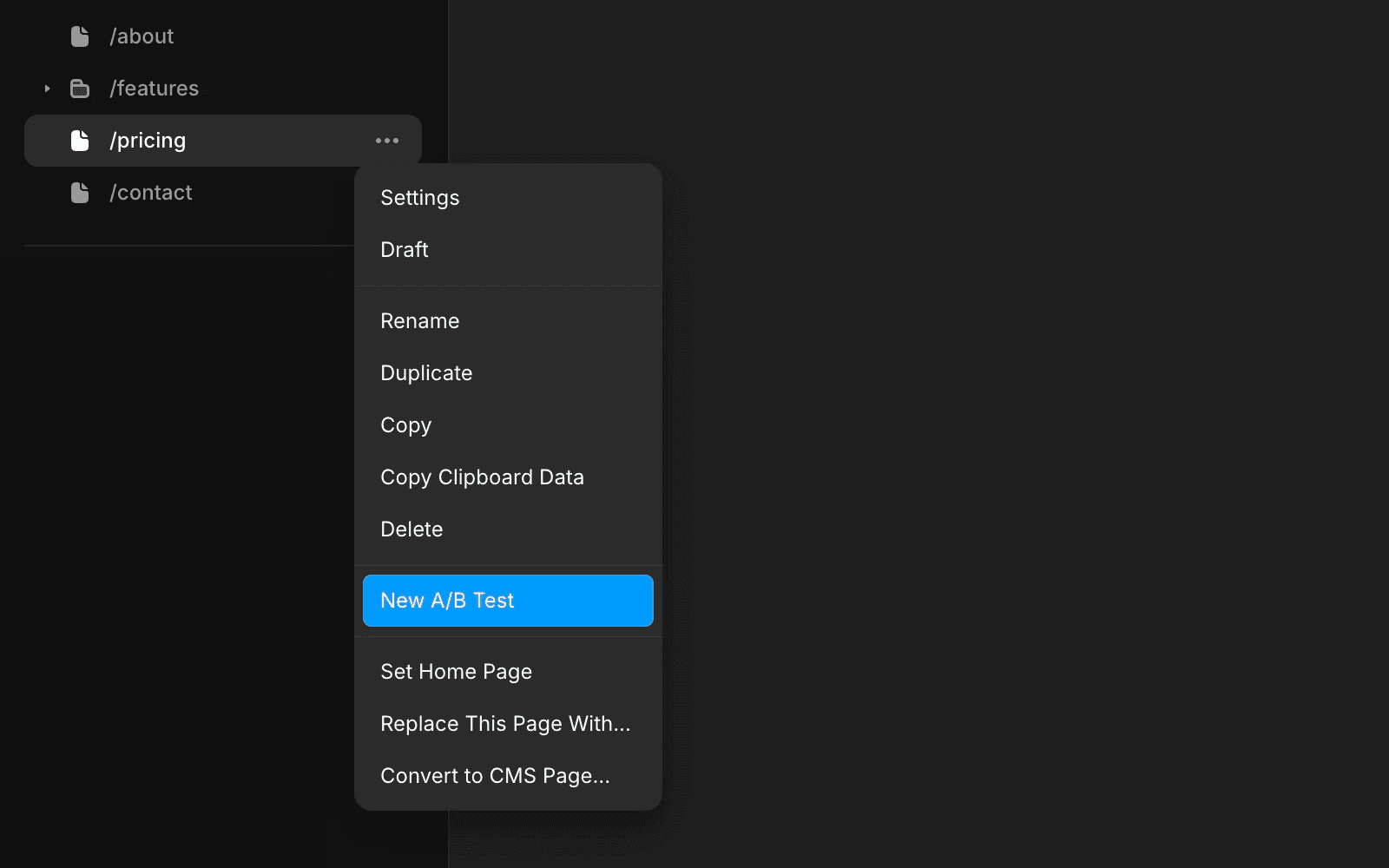
Right-click the page you want to test in the left panel and select New A/B Test. Framer duplicates your page automatically. This copy is your variant, the original stays as your control.
2. Make one change.
Edit the variant. Change one element: the headline, the CTA button text, the hero image, or the layout. Resist the urge to change everything at once. If you test three changes simultaneously and the variant wins, you won't know which change caused it.
3. Add tracking IDs.
On both the control and variant pages, add a tracking ID to the element you're measuring, typically a CTA button, a form, or a link. This ID must be identical across all variants so Framer knows what counts as a conversion.
To add a tracking ID: select the link or form element, open the properties panel, and find the Tracking ID field. Give it a descriptive name like hero-cta-click.
4. Configure the conversion step.
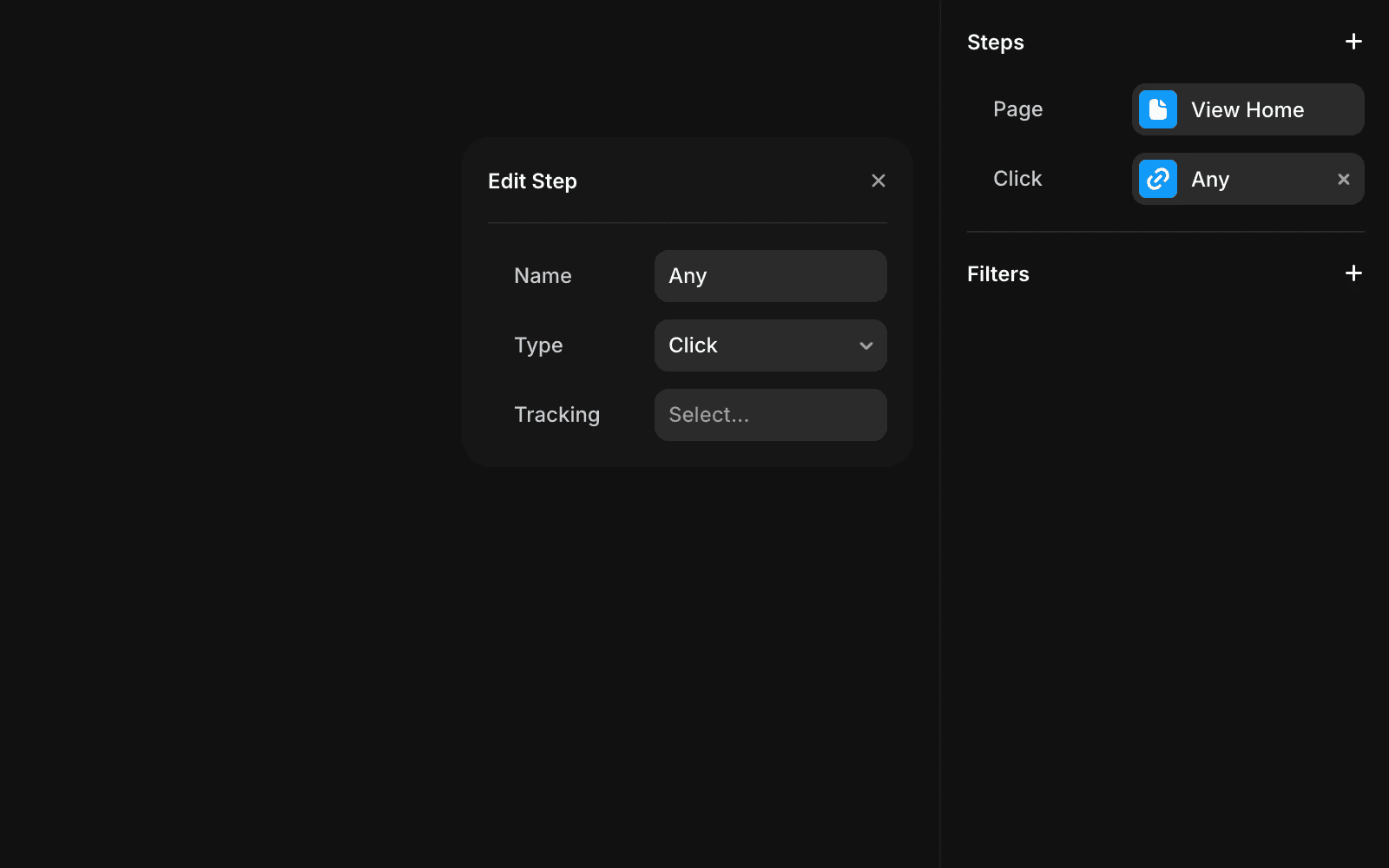
Click the Configure button on the A/B test banner at the top of your editor. This opens the Analytics tab. Click the + icon next to "Steps" and select the tracking event you just created as your conversion step. You can add multiple steps, but the last step is what Framer uses to calculate the conversion rate.
5. (Optional) Set custom distribution.
If you don't want a pure 50/50 split, you can now set custom distribution ratios. This is useful when you want to roll out a variant to a smaller audience first, say 10% of traffic, before committing to a wider test.
6. Launch.
Click Start, then publish your site. Framer begins recording page views and events for the test. If you're using staging, deploy the site as well.
Reading Your Results
Framer shows three metrics that matter:
Metric | What It Means | What to Look For |
Conversion Rate | % of unique visitors who completed the conversion step | Higher is better, but small differences might not be meaningful |
Lift | % improvement (or decline) compared to the control | Shows the magnitude of the difference between variants |
Probability of Being Best (PBB) | How confident Framer is that a variant is genuinely winning | When this exceeds 90% and enough data is collected, Framer declares a winner |
Framer uses a Bayesian approach, which continuously updates confidence as data comes in. Unlike traditional frequentist testing that relies on fixed sample sizes or p-values, Bayesian testing gives you a running probability that one variant is better than another.
Framer also shows a graph of test performance over time, with credibility interval bands around each line. The narrower the bands, the more reliable the results. Look for lines that stabilize and show clear separation between variants.
When to Stop the Test
Framer declares a winner when a variant hits 90% PBB AND meets its internal threshold for visits. Framer doesn't publish that threshold as a specific number, but as a general CRO rule of thumb, you want at least 200 conversions per variant before you trust the data. Don't peek after day one and call it, early results are noisy and unreliable.
When you're ready, click Stop Test. Framer will prompt you to replace the control with the winning variant. Publish again to deploy.
If no variant reaches 90% PBB after several weeks, the test is likely inconclusive. The difference between variants is too small to matter. That's still useful information. Keep the original and test something else.
Method 2: A/B Testing Plugins for Framer
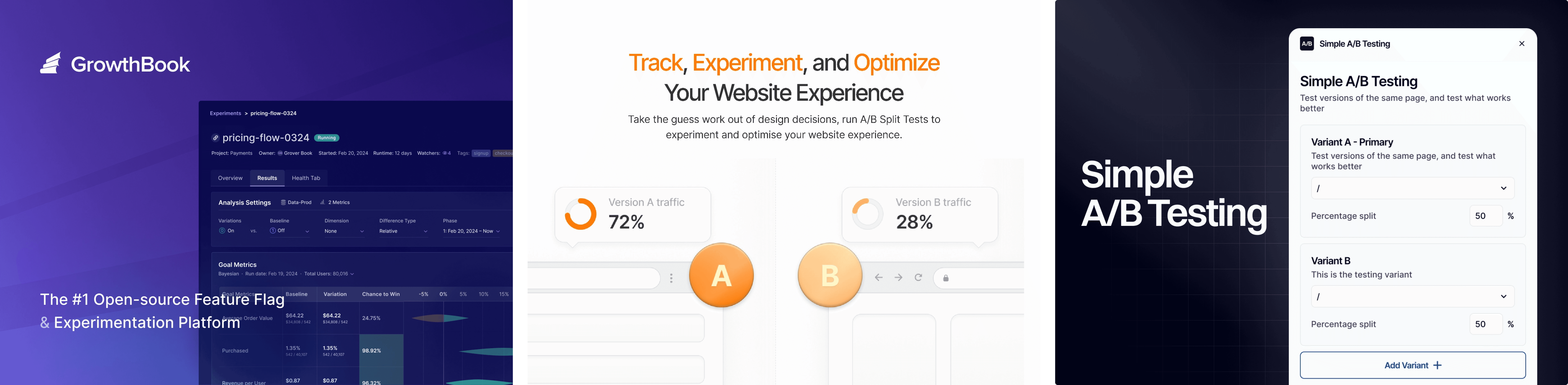
If Framer's native testing doesn't fit, maybe you're on a Basic plan, need privacy compliance, or want heatmaps bundled in, three plugins are worth knowing.
Plugin | Price | Best For | Limitations |
Simple A/B Testing | Free | Budget-conscious, basic split tests | No built-in analytics, you need GA4 or similar to track results |
GrowthBook | Free plugin; GrowthBook pricing separate | Teams wanting targeting rules and centralized experiment management | Requires a GrowthBook account, slightly more setup than the simplest option |
Humblytics | From $19/mo (7-day free trial) | Privacy-first testing with heatmaps and funnels in one tool | Less granular than GrowthBook for complex experiments |
Simple A/B Testing by Yishay Shalev
The simplest option. Install the plugin, set traffic split percentages for each variant, and you're running. It even includes a code snippet to prevent test variants from getting indexed by search engines, a detail most guides don't mention but matters for SEO.
The catch: there's no built-in conversion tracking. You need to connect Google Analytics or another analytics tool yourself to measure which variant actually performs better. This is fine if you already use GA4. It's a hassle if you don't.
Best for: Sites on any Framer plan that already have GA4 set up and just need traffic splitting.
GrowthBook
The most sophisticated plugin option. GrowthBook is an open-source experimentation platform, and their Framer plugin is explicitly marketed as no-code. It syncs feature flags and experiments from your GrowthBook account directly into your Framer site.
What sets it apart is audience targeting. You can show different variants to different user segments. It also integrates with Google Analytics for result tracking and offers a proper experiment management dashboard across all your experiments.
Best for: Teams running multiple experiments across their site who need targeting and centralized management. Overkill for a single landing page test, but worth it if you're running a real CRO program.
Humblytics
The all-in-one option. Humblytics bundles A/B testing with cookie-free analytics, heatmaps, scroll tracking, and funnel analysis. If you care about GDPR compliance and don't want to deal with consent banners, this is the cleanest solution.
Their A/B testing includes built-in statistical significance measurement, so unlike Simple A/B Testing, you don't need a separate analytics tool. They also offer AI-powered test hypothesis generation, which is a nice starting point if you're not sure what to test.
Best for: Privacy-conscious sites that want analytics + testing + heatmaps in one tool without cookie consent headaches.
What's coming from Omakase
That gap is exactly what we're fixing. We're building an A/B testing plugin purpose-built for Framer. Not a generic tool ported over, but something designed around how Framer actually works: components, CMS collections, the whole thing.
The specific problem it solves: testing a shared component once, across every page it lives on, without setting up five separate page-level tests. One experiment. Aggregated traffic. Real results.
Method 3: External Tools (PostHog, GA4)
For teams that need segment analysis, multi-step funnel tracking, session replay, or code-level control over experiments.
PostHog is the strongest external option for Framer. It offers a generous free tier (1 million events/month), and beyond A/B testing, you get session recordings, feature flags, and detailed user analytics.
The trade-off: it requires code. You'll paste PostHog's JavaScript snippet into Framer's Custom Code section (Site Settings > General > Custom Code > end of <head> tag). For A/B testing specifically, you need to create a Code Component in Framer that checks window.posthog.isFeatureEnabled() and conditionally renders different UI. This means writing JavaScript, not a no-code workflow.
Custom code is gated behind a paid plan. Framer's Free plan doesn't allow custom code, so Basic ($10/mo) is the realistic minimum to make PostHog work.
Best for: Developer-comfortable teams that need deep analytics, session replay, and segment-level testing. Not the right fit if you chose Framer specifically to avoid code.
GA4 can also handle basic A/B testing through Google Optimize's successor tools, but the setup is fragmented and less Framer-native. If you're already deep in the Google ecosystem, it works. Otherwise, PostHog offers a better developer experience.
Which Method Should You Use?
Here's how each option stacks up:
Framer Convert | Simple A/B | GrowthBook | Humblytics | PostHog | |
Cost | $50/500K events + Pro plan ($80/mo min) | Free | Free plugin; GrowthBook free tier available | From $19/mo | Free tier (1M events) |
Setup time | 5-10 minutes | 5 min + GA4 config | 15-30 minutes | 10 minutes | 30-60 min (code) |
Code required? | No | No | No | No | Yes |
Built-in analytics? | Yes | No | Via GrowthBook dashboard | Yes | Yes |
Heatmaps? | No | No | No | Yes | Yes (session replay) |
Audience targeting? | Custom distribution only | No | Yes | No | Yes |
CMS page testing? | Yes | Yes | Yes | Yes | Yes |
Component-level swaps? | No | No | Yes (via flags) | No | Yes (via flags) |
Privacy-first? | Yes (cookieless) | Depends on tool | Depends on setup | Yes (cookieless) | Configurable |
Best for | Most Framer users on Pro/Scale | Budget sites with GA4 | Multi-experiment teams | Privacy + CRO in one | Dev teams needing depth |
My recommendation by situation:
"I just want to test my landing page headline." Framer Convert. It's native, takes 10 minutes, and the results live right in your dashboard.
"I'm on a Basic plan and can't afford Convert." Simple A/B Testing plugin + GA4. Free, gets the job done.
"I need GDPR compliance and don't want cookie banners." Humblytics. Privacy-first with built-in analytics.
"I'm running a growth team with multiple experiments." GrowthBook. Proper experiment management and targeting.
"I need segment analysis and session recordings." PostHog. Most powerful option, but you'll write code.
Can You Test a Single Component Across Pages?
Here's a limitation nobody else in the SERP talks about, and it matters if you're running a real CRO program.
Framer's built-in A/B testing is page-level only. When you click "New A/B Test," Framer duplicates the entire page. Your variant lives as a full page copy, not as a single component that swaps out. That has two real consequences.
Consequence 1: You can technically test a single component, but only on one page at a time.
If you want to test two versions of a hero component, the workflow is: create a page-level A/B test, leave everything on the variant identical except the hero, and run it. Mechanically it's a page test. Functionally you're isolating a single change. Clean enough for most cases.
Consequence 2: You cannot reuse that component test across multiple pages.
If the same hero component lives on your homepage, pricing page, and three landing pages, you can't run one test that swaps it everywhere and aggregates the results. You'd have to set up 5 separate page-level tests, each with its own traffic requirement, each with its own inconclusive risk. For lower-traffic sites this is a dealbreaker. You'll never hit significance on any individual page.
The workarounds
Option 1: Accept page-level testing and test your highest-traffic page first. Fine for most small sites. You'll learn something even if it's not fully portable.
Option 2: Use GrowthBook or PostHog with feature flags. Both let you define a variant assignment once and read it from a code component. Your developer wraps the shared component in a flag check, then you can toggle variants across every page that uses that component, with traffic aggregated. Real component-level testing, but it requires writing code and maintaining the integration.
Option 3: Wait for a native component swap tool. This is a real gap in the Framer ecosystem. We're building an A/B testing plugin at Omakase that handles component-level swaps across pages without writing code, so you can test a shared hero, CTA, or pricing component in one experiment instead of five. It's in development right now. If you want early access when it ships, reach out.
If your CRO program involves shared components across multiple pages, this gap is the single biggest reason to consider a plugin or external tool over Framer's native Convert.
What to Test First on Your Framer Site
Knowing how to test is step one. Knowing what to test is where the ROI lives.
Here's a prioritization framework, ranked by typical impact for Framer landing pages:
1. Hero headline and value proposition.
The single highest-impact test you can run. Most visitors decide within 3 seconds whether to keep scrolling. A headline that speaks to their specific problem converts dramatically better than a generic one. Test two different angles, not two different wordings of the same angle.
2. CTA button text and placement.
"Get Started" vs "Start Your Free Trial" vs "See Pricing", these aren't interchangeable. The CTA tells visitors what happens next, and specificity usually wins. Also test placement: above the fold only, or repeated after each section?
3. Social proof positioning.
Logos, testimonials, case study links, where you put them changes how they perform. Test social proof directly below the hero versus further down the page. Most Framer sites bury social proof too deep.
4. Page length and layout.
Long-form pages with detailed feature breakdowns vs. short, punchy above-the-fold pages. The right answer depends entirely on your audience and what you're selling. Don't guess, test it.
5. Form fields.
Fewer fields almost always means higher conversion. But not always. If you're qualifying leads, removing fields might give you more submissions but worse leads. Test the trade-off.
One test at a time. Run them sequentially, not simultaneously. Each test should isolate a single variable so you know exactly what caused the change.
The Traffic Reality Check
Here's what nobody tells you: A/B testing is useless without enough traffic.
Every method above needs a minimum volume of visitors before results mean anything. The real numbers:
Minimum viable traffic: ~1,000 unique visitors per month to the page you're testing. Below this, tests take so long that external factors (seasonality, marketing campaigns) contaminate your results.
Minimum conversions: As a general CRO rule of thumb, 200+ conversions per variant before you can trust the data. If your page converts at 3%, that's roughly 6,700 visitors per variant, or 13,400 total for a two-variant test.
Minimum duration: 2-4 weeks, even with high traffic. You need to capture different days of the week and different traffic patterns. A test that runs Monday through Wednesday doesn't represent your full audience.
What if you have less than 1,000 visitors/month?
Don't run A/B tests yet. Seriously. Instead:
Use heatmaps (Humblytics or PostHog) to see where visitors click and how far they scroll
Run 5-second tests with real users, show them your page for 5 seconds and ask what they remember
Get qualitative feedback from your target audience on specific elements
Focus your energy on driving more traffic first, SEO, content, outreach
Once you cross that traffic threshold, come back and start testing. The framework above will be waiting.
Test More, Guess Less
A/B testing in Framer has matured fast. A year ago you couldn't test CMS pages or set custom distributions natively. Now, between Convert, three solid plugins, and external integrations, there's an option for every budget and skill level.
The biggest mistake isn't picking the wrong tool, it's never testing at all. Every day your landing page runs without data, you're leaving conversions on the table.
Pick a method from this guide. Start with your headline. Run the test for at least two weeks. Let the data tell you what works.
FAQ
Does Framer's A/B testing work without cookies?
Yes. Framer uses cookieless tracking based on anonymous visitor identifiers (IP + browser info). No cookie consent banners required. The trade-off is that these identifiers reset daily, so Framer can't track the same visitor across multiple days. A visitor on Monday and the same person on Tuesday are counted as two separate visitors. Framer has said a cookie-based system for longer conversion windows is planned.
How much traffic do I need to run an A/B test in Framer?
At minimum, around 1,000 unique visitors per month to the page being tested. As a general CRO rule of thumb, you also want at least 200 conversions per variant for reliable results. If your page converts at 3%, that means roughly 13,000+ total visitors for a two-variant test. Below these thresholds, your results will be noisy and unreliable.
Can I A/B test CMS pages in Framer?
Yes, as of March 2026. Framer added CMS page A/B testing in their Custom Distribution update. Before that, you had to use an external tool or a static page variant as a workaround. That limitation is now gone.
Can I test a single component across multiple pages in Framer?
Not with Framer's native A/B testing. Convert is page-level only, so testing a shared component means setting up a separate page-level test for every page it lives on. For true component-level testing across pages, you need GrowthBook or PostHog with feature flags, or a dedicated plugin. This is a real gap in the Framer ecosystem and one we're actively working on filling with our own plugin at Omakase.
Is Framer's built-in A/B testing free?
No. It requires the Convert add-on, which costs $50 per 500,000 events/month. You also need to be on a Pro ($30/mo), Scale ($100/mo), or Enterprise plan. The minimum total cost is $80/month on Pro. If that's too steep, the Simple A/B Testing plugin is free.
Can I run multiple A/B tests at the same time in Framer?
You can run tests on different pages simultaneously, but be cautious. If a visitor sees variant A on your homepage and variant B on your pricing page, the interactions can influence each other. For clean results, run one test at a time, especially on pages that are part of the same user flow.
Can I set custom traffic distribution instead of a 50/50 split?
Yes. Framer added Custom Distribution for A/B tests in March 2026. You can now roll out a variant to a smaller slice of traffic first, say 10%, before committing to a wider test. Useful for cautious rollouts or redesign tests where you want to limit risk.