


Introduction
Most Framer SEO guides are stuck in 2024.
They focus on meta tags and sitemaps. That is the bare minimum. In 2026, that is not enough. You are not only building for human visitors. You are also building for AI agents that research, compare, and often rule you out before a person ever lands on your site.
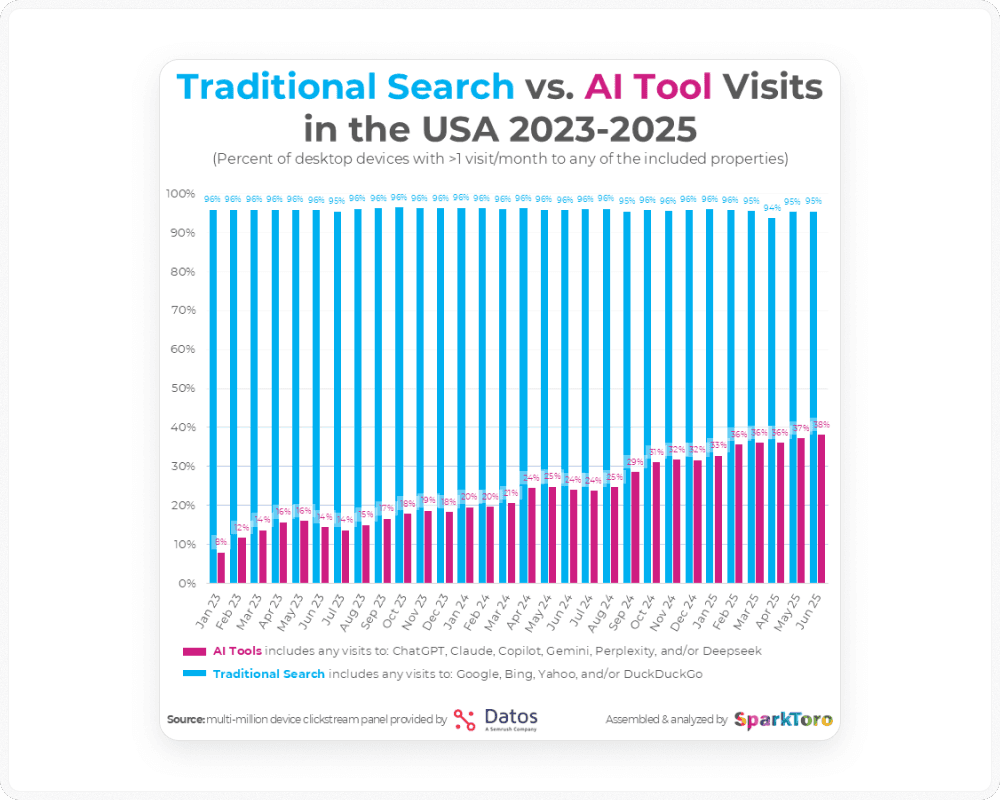
Organic traffic is shrinking. Answer Engine (AEO) search is rising. The traffic you do get carries higher intent, but there is less of it.
To win, your Framer site has to serve two audiences:
Humans who need emotion, speed, clarity, and easy conversion.
AI agents who need structured facts, clean signals, and verifiable citations.
Here is the plan:
First, you build a non-negotiable SEO foundation in Framer so you can rank in traditional search.
Then you layer AEO and
llms.txton top of that base so both Google and AI agents can reliably use you as a source.
How to Build a Non-Negotiable Technical Base in Framer (Launch or Migration)
If your foundation is weak, neither Google nor any LLM will treat your site with respect. This part is boring. You still need to do it.
Connect Your Domain and Verify Security
In Framer:
Custom domain and HTTPS
Connect your custom domain and confirm the live site loads on
https://.Framer issues SSL automatically, but you still check it on the live URL.
Sitemap and robots.txt
Visit:
https://yourdomain.com/sitemap.xmlhttps://yourdomain.com/robots.txt
Make sure the sitemap loads and robots.txt does not block your main pages.
The index toggle
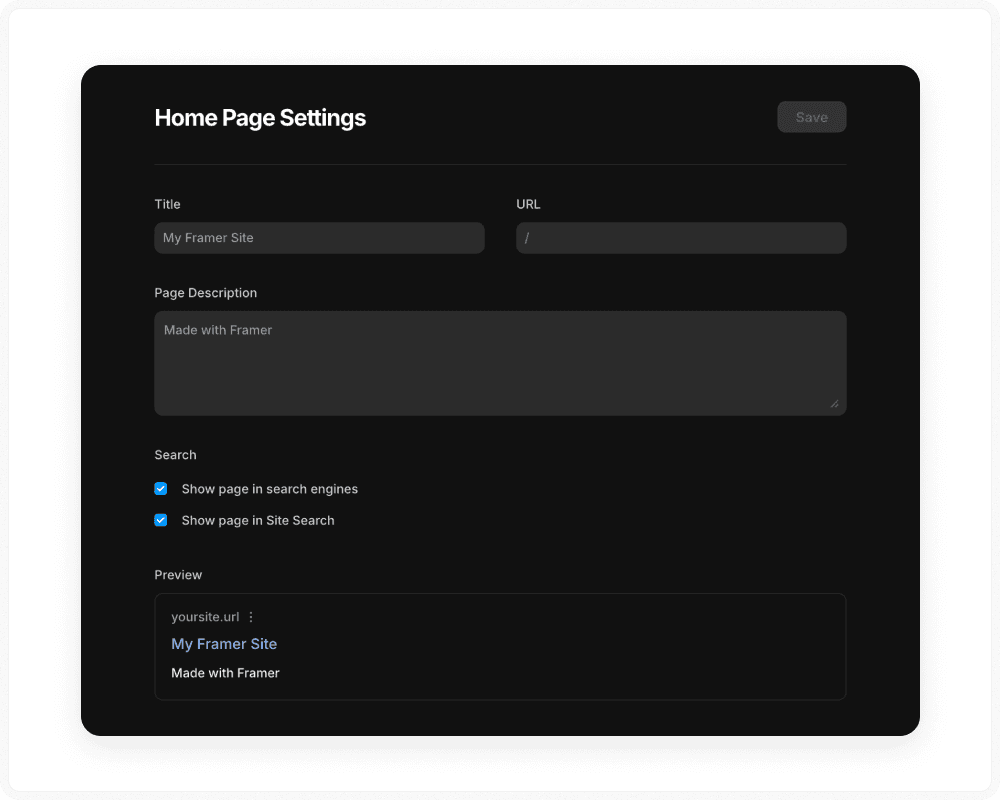
In Framer → Site Settings / Page SEO, check that important pages are set to be indexed.
A stray
noindexis one of the most common reasons a Framer site never appears in search.
Connect Data Pipes for the Connected Web
A Framer site that sits alone with no data feeds creates marketing amnesia. Every visit looks like a stranger.
Set this up:
Google Search Console
Add your domain, verify it, and submit your sitemap.
Use this to track coverage, queries, and crawl issues.
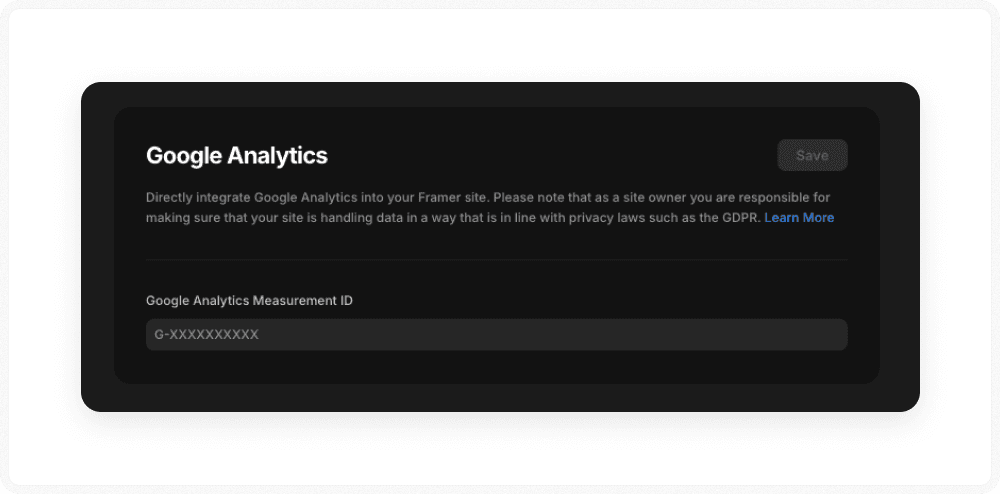
Analytics (GA4, Plausible, or similar)
Add your tracking script in Site Settings → Custom Code.
Track organic conversions by page or template, not just pageviews.
CRM connection
Do not let Framer form submissions rot in your inbox.
Use webhooks, Zapier, Make, or native tools to send leads into a CRM such as HubSpot or Salesforce.
This gives both humans and agents a consistent view of contacts and deal stages.
Set Performance Baselines on Framer
AI agents and humans both punish slow sites. Here is why. Speed affects bounce rate, crawl budget, and even how often people share your pages.
For the panel paths, token syntax, and AI-crawler directives underneath these targets, see our Framer technical SEO checklist."
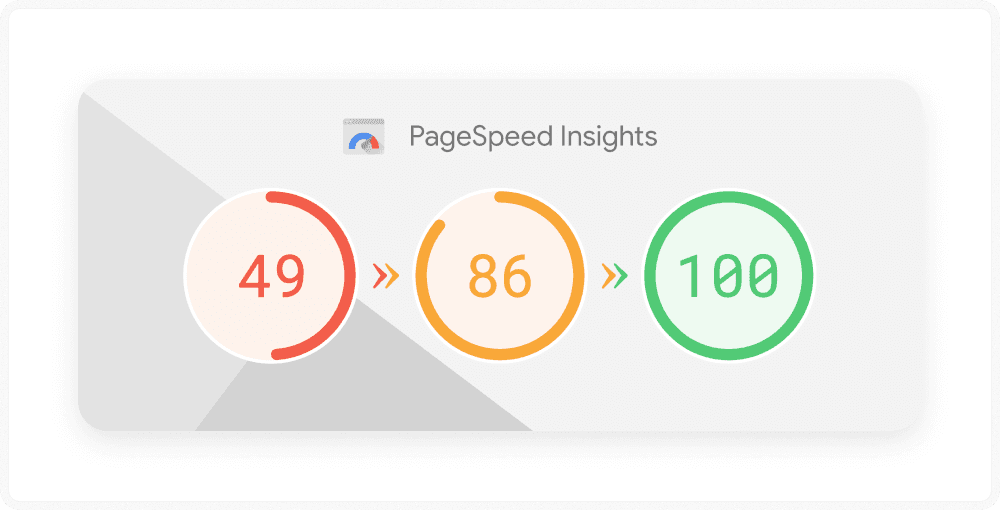
Run PageSpeed Insights on your main Framer pages and aim for:
Largest Contentful Paint (LCP) 2.5 seconds or less
Interaction to Next Paint (INP) 200 ms or less
Cumulative Layout Shift (CLS) 0.1 or less
Practical Framer steps:
Use Framer image tools and avoid raw multi-megabyte PNGs.
Remove third-party scripts you do not truly need. Chat widgets, trackers, and random embeds often wreck INP.
Avoid heavy video or WebGL in the hero on mobile. Place them lower on the page or on separate showcase pages.
Design Framer Pages for Speed and Conversion
Performance is part of your technical base. Design can help or harm.
On your main Framer pages such as home, pricing, main templates, and main landing pages:
Above the fold on mobile
Skip full-screen background video or heavy 3D scenes in the hero.
Use a static hero image or light motion by default.
Fonts and assets
Stick to one or two font families.
Compress SVGs and images before you upload them.
Scripts
Limit third-party widgets on money pages.
If you add one, test its impact on performance metrics.
For layout:
Make main calls to action obvious and above the fold.
Keep navigation simple on desktop and mobile.
Let visuals support the copy, not replace it. Models cannot see your art direction. They only read the DOM.
Lock In the On-Page SEO That Works
For every important page in your Framer project such as home, services, templates, and main blog posts:
Unique titles and meta descriptions
Set them in the page SEO settings.
Do not leave revenue pages on default patterns.
Clean slugs
Use readable URLs such as
/framer-seo-guide, not/page-123.
Clear headings
Use one H1 that matches the main intent of the page.
Use H2 and H3 headings to break down sections.
Real content
A pretty hero and two lines of copy will not rank.
Make sure there is enough text for a person and a crawler to know what the page covers.
Protect Existing SEO When You Migrate to Framer
If you move from Webflow, WordPress, or any other platform:
Crawl your old site and export all URLs.
Map each old URL to a new Framer URL in a spreadsheet.
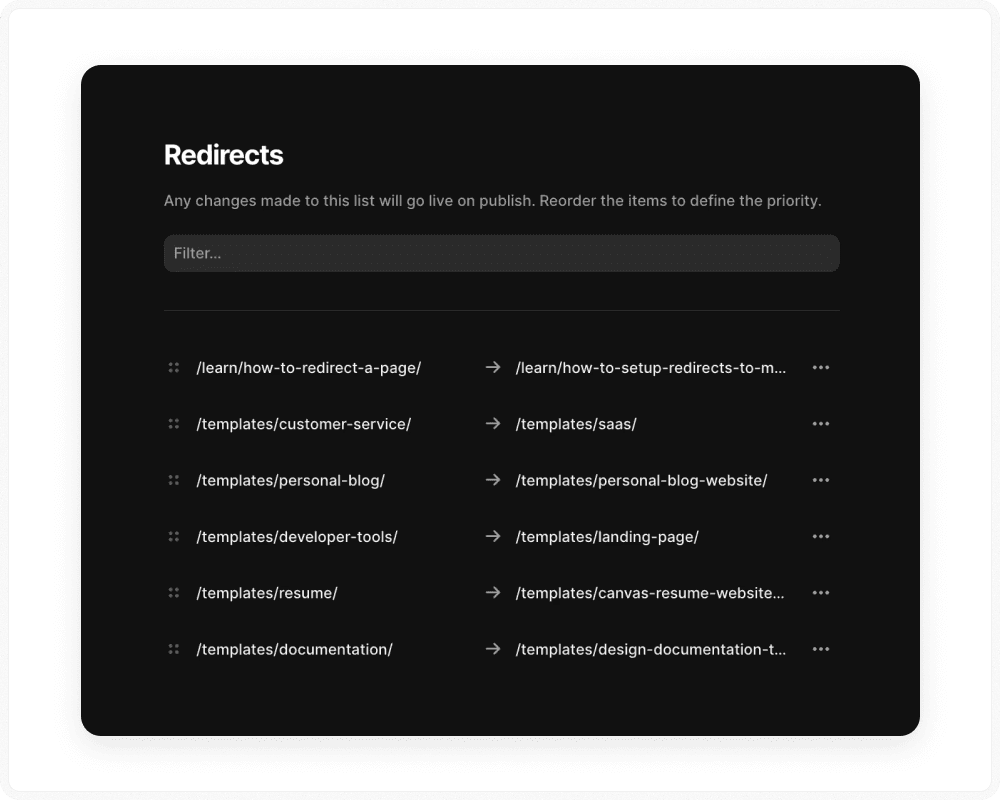
In Framer, set up 301 redirects for all changed URLs.
After launch, open Search Console:
Check Coverage for 404s.
Fix internal links that still point to old paths.
Once this technical base is in place, you can move on to structure and AEO.
How to Design a Framer Site Structure That Google and Agents Understand
Random single pages confuse crawlers and LLMs. Framer CMS turns your site into a system instead of a loose pile of layouts.
Map Structure to Real Search Intent
Think around use cases and questions instead of pages.
For a SaaS or productized service you might have:
/features/.../use-cases/.../industries/.../pricing/
For an agency or freelancer you might have:
/services/.../industries/.../case-studies/.../locations/...
For a template or digital product site you might have:
/templates/.../categories/.../use-cases/...comparison pages such as “best Framer templates for X”
Build this in Framer CMS:
Create collections for templates, use cases, industries, locations, blog posts, and FAQs.
Use CMS fields inside titles, headings, meta tags, and JSON-LD where it makes sense.
Aim for the Long Tail of AEO
Classic SEO chases broad head terms. AEO is won on specific questions.
The broad term might be “best CRM”. Big review sites usually dominate that.
The long tail looks more like “best CRM for small creative agencies that use Framer”. That is where a focused page can win.
In Framer:
Build CMS collections that target mid and long tail questions directly:
“Framer SEO for [industry]”
“Framer templates for [use case]”
“How to do [X] in Framer for [Y]”
Each template or use case page should answer a narrow question and show how you solve it.
Make Content Easy for Machines to Read
AI systems need clear structure to quote you as a source.
Use Framer CMS to create “source pages” such as:
glossaries
data or benchmark pages
feature comparison tables
FAQ hubs
On these pages:
Use headings like “What is [term]?” and “How does [feature] work in Framer?”
Answer in the first one or two sentences.
Use bullet lists and tables when you share steps or options.
Let models see clear questions and clear answers in your HTML.
How to Turn Framer Into a Local and Service Area Revenue Engine
If you work with local businesses, this is where most Framer content falls short. Google and agents both need clean location signals.
Build a CMS Based Location System
In Framer CMS:
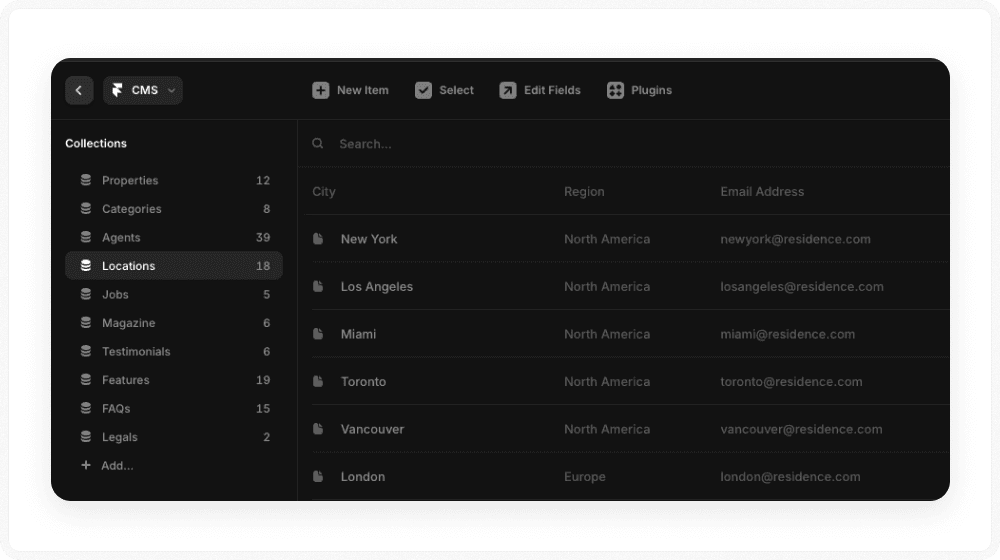
Create a Locations collection with fields for:
city, region, country
services offered
local testimonials
local projects
Use URL patterns such as:
/city/service/service/city
Avoid copy and paste jobs:
Use conditional visibility in Framer to swap testimonials, projects, and team members per location.
Use AI to help write localized intros that mention local areas, common problems, and client types.
Add LocalBusiness Schema From Inside Framer
On your main location pages:
In page level Custom Code, add JSON-LD for
LocalBusinessor a more specific type.Pull fields from CMS so name, address, and phone stay in sync.
Match your Google Business Profile exactly.
This makes it easy for search engines and agents to know who you are, where you work, and what you do in each place.
How to Tune Your Framer Site for LLMs With llms.txt and AEO
Traditional SEO cares about which link appears. AEO cares about who holds the answer behind that link.
Use llms.txt as a Map for Agents
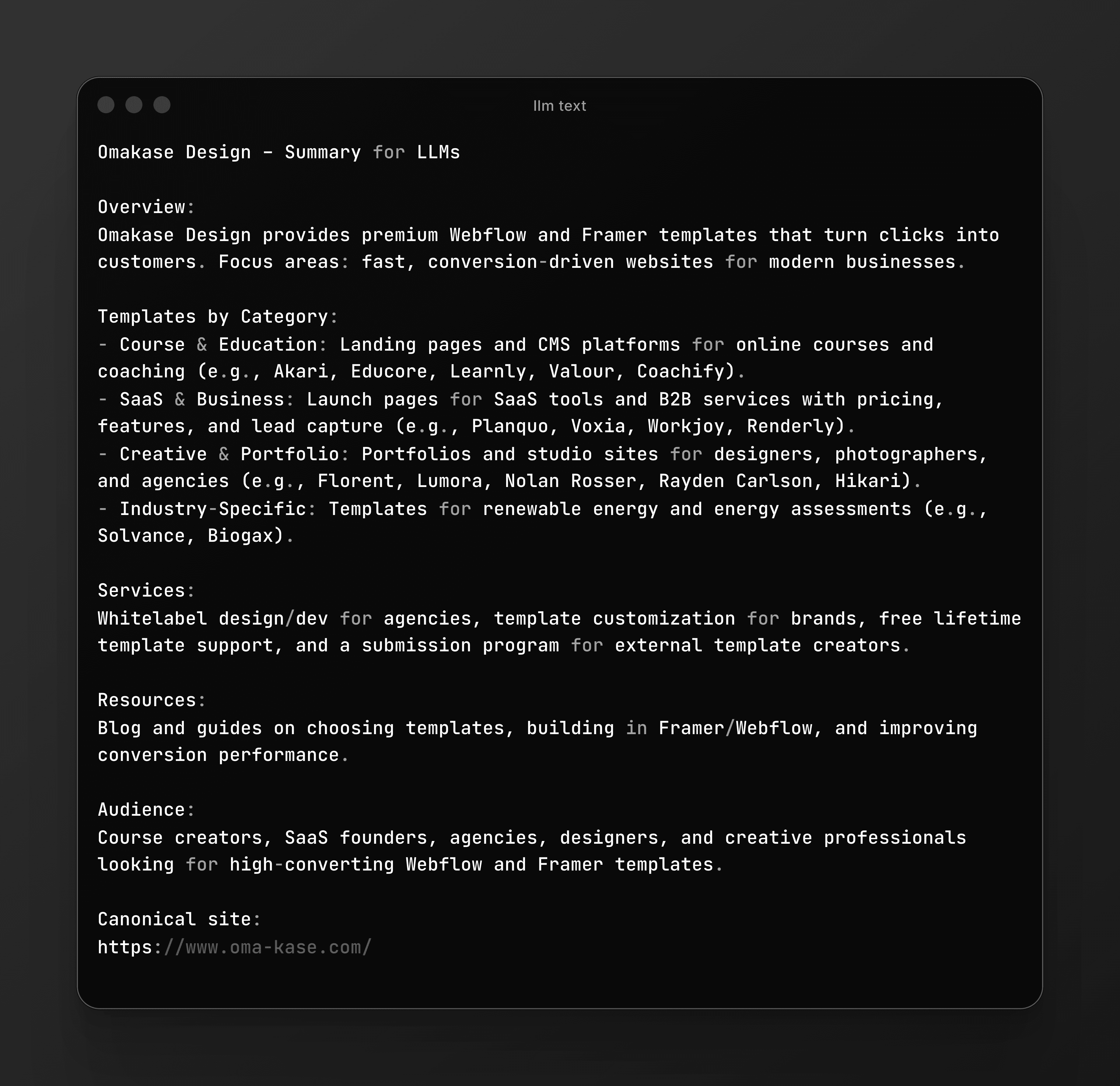
llms.txt works a bit like robots.txt for LLM crawlers. It tells them where the good material lives.
For a Framer site:
Host
llms.txtat the root, such ashttps://yourdomain.com/llms.txt. On a Framer site, that upload now happens in the Files tab under Domains, and how to add an llms.txt file to your Framer site walks through the exact steps.In that file:
List high value pages such as:
docs and guides
pricing breakdowns
comparison pages
main FAQs and glossary pages
Group pages by topic if that feels helpful.
Leave out thin landing pages, login or account screens, and anything with little factual content.
You are not trying to game anything. You are simply giving agents a clear index of your best work.
Aim for Share of Answers, Not Only Share of Voice
Ranks matter. Answers matter more.
On your Framer pages:
Answer obvious follow up questions on the page, not in a separate orphan article.
Group questions into FAQ sections and mark them up with
FAQPageschema.
Away from your site:
Earn mentions in places models lean on such as Reddit threads, G2 reviews, YouTube descriptions, and niche blogs.
Link back to the same Framer “source pages” that you list in
llms.txt.
You want different sources on the web to point to the same URLs when they repeat the same fact.
How to Use Structured Data and E-E-A-T on Framer
Search engines and models will not quote you if they do not trust you.
Add Main Schema in Framer Custom Code
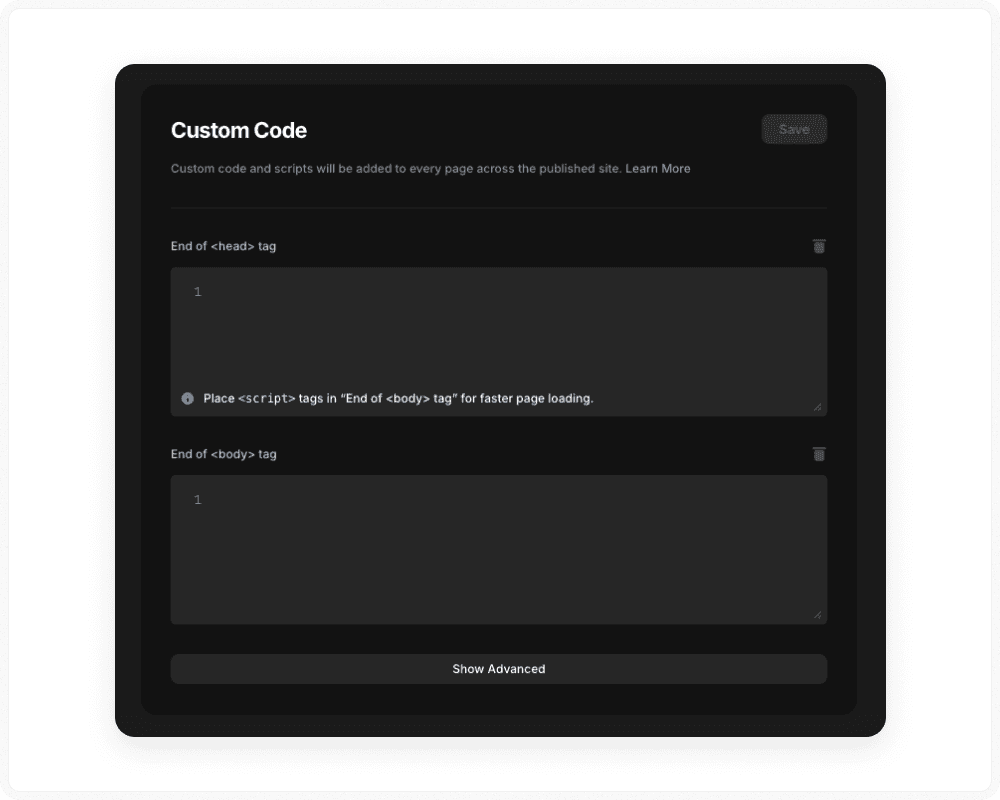
Framer does not yet ship a schema UI, so you use JSON-LD in custom code.
Add site wide schema:
In global head code, add
OrganizationorLocalBusiness.Include brand name, URL, logo, and
sameAslinks to main profiles.
Add page level schema:
Productfor templates, SaaS features, or service pages.Articlefor guides and blogs.FAQPagefor FAQ sections.
Pull values from CMS fields so schema stays in sync when content changes.
Full token syntax ({{Field_Name | json}}), the five CMS field types that interpolate, and the two that don't, are in the technical SEO walkthrough.
Bake E-E-A-T Into Your CMS
Treat E-E-A-T as part of how you model content.
Author CMS
Create an Authors collection with bios, roles, headshots, and LinkedIn links.
Attach an Author entry to each article.
Real experience and citations
Show screenshots, project numbers, and steps from real work.
Link to external sources when you quote numbers or standards.
You want it to be clear that skilled people wrote the pages and that they cite reliable sources.
How to Keep SEO and AEO on Framer Moving Each Month
You do not need a big process here. You just need a simple habit.
Here is a light monthly ritual:
Open Search Console and note which queries and URLs are gaining or dropping.
Open analytics and see which Framer pages bring in leads or sales from organic traffic.
Next steps:
Publish new pages where you see clear gaps, such as new use cases, new locations, or new FAQs.
Refresh pages that are slipping by updating content, examples, schema, and internal links.
Update
llms.txtif your set of “source pages” has changed.
That is enough to keep your site and your data fresh.
Frequently Asked Questions
Q1. Is Framer actually good for SEO compared to Webflow or WordPress?
Yes. Framer handles the core technical pieces (hosting, HTTPS, sitemaps, basic SEO controls) well. Your rankings depend far more on architecture, content, links, and performance than on which modern platform you use.
Q2. How long does it take for a new Framer site to start ranking?
Indexing can happen in days. Ranking for competitive queries takes weeks to months, depending on content quality, competition, and links. Migrated domains with existing authority usually see movement faster than brand-new domains.
Q3. Do I need llms.txt if my classic SEO is already good?
You don’t need it, but it’s an edge. llms.txt helps AI tools understand which URLs on your Framer site contain your most reliable facts. It’s an AEO layer on top of traditional SEO, not a replacement.
Q4. Can I do serious local SEO with Framer?
Yes. Use CMS collections for locations and services, structure URLs cleanly, add LocalBusiness schema, and keep NAP consistent with your Google Business Profile. Framer doesn’t limit you here; your implementation does.
Q5. Where do I add structured data / JSON-LD in Framer?
Use Custom Code in Framer: either globally in Site Settings (for Organization/LocalBusiness) or page-level custom code for Product, Article, FAQPage, etc. Use CMS fields to keep schema in sync with your actual content.
Summary: The 2026 Framer Stack
Your Framer project is no longer just a collection of nice layouts. It is a structured dataset that humans and models both read.
Area | Main actions in Framer | Impact on traditional SEO | Impact on AEO and AI agents |
|---|---|---|---|
Technical base | Connect domain and HTTPS, verify sitemap and robots.txt, set index settings, connect Search Console and analytics, control third party scripts. | Lets your pages be crawled, indexed, and measured. Reduces risk when you migrate to Framer. | Gives AI tools a stable, consistent source of truth to read and revisit. |
Design and performance | Use Framer image tools, avoid heavy hero video on mobile, limit fonts and large assets, keep calls to action and navigation clear. | Improves performance metrics and conversion on high intent pages. | Reduces bounces when agents send people to your site. |
Structure and CMS | Model templates, use cases, industries, locations, and FAQs in Framer CMS. Use clean URL patterns and internal linking hubs. | Helps search engines understand topics on your site and how pages relate. | Makes your content easy to map to the questions that models try to answer. |
Local SEO | Create CMS based location pages, use clear URLs such as /city/service, add LocalBusiness schema, keep NAP aligned with Google Business Profile. | Improves visibility for city plus service searches. | Gives agents clear local data so they can pick you for nearby searches. |
AEO and llms.txt | List high value docs, pricing, comparison, FAQ, and glossary pages in llms.txt. Skip thin landers and private areas. | Strengthens long tail search and rich results by pointing to your best content. | Raises the odds your brand is cited as a source in AI answers. |
Structured data and E-E-A-T | Add Organization or LocalBusiness, Product, Article, and FAQPage schema. Build an Author CMS and link articles to real people. | Helps search engines read entities, roles, and page purpose. Builds trust. | Signals authorship and reliability to LLMs that weigh which sources to quote. |
Ongoing habit | Each month, review Search Console and analytics, publish new pages, refresh older ones, and adjust llms.txt. | Prevents decay and lets rankings grow over time. | Keeps your knowledge graph current so models do not repeat old facts. |