

Building a SaaS in 2026 is the easy part. With AI tools, a solo founder can ship a functional product in a weekend. The bottleneck has flipped. It's no longer "can I build this?" It's "can I market this?"
Marketing starts with a website. Not a vibe-coded landing page that looks like every other AI-generated site. A real marketing site: pricing, features, social proof, blog, docs. The kind that makes visitors trust you enough to pay.
Every other "best Framer template" list is a gallery dump. Pretty screenshots, no data, no framework for choosing. I reviewed 15 templates, pulled page counts and CMS specs, and evaluated each one through a growth lens. Here's the actual buying guide.
Key Takeaways
Best for AI and devtool startups: Suprema ($79). Dark, modular, conversion-focused. 40K+ marketplace views
Best for content-first SaaS: Evolve ($79). Blog + changelog + coming soon page at the lowest price point
Best for voice AI and niche SaaS: Whisper ($79, Omakase). Integrations page, light/dark toggle, blog CMS
Best premium pick: Strativ ($129). Bold animations, dark aesthetic, looks like a $500 custom build
Best for teams hiring: Superior ($149). Only template with a careers page
Best for solo founders on a budget: Melon ($59, Omakase). Feature page + pricing + blog CMS at the lowest paid price
Best free starting point: Blocks (Framer official, 100+ components) for builders, Active for fast validation
15 templates reviewed with builder's notes, honest tradeoffs, and customization timelines for every pick
How I Evaluated These Templates
Six criteria. I remixed or reviewed every template on this list. I didn't just browse demos.
Design quality: Does it look like a real SaaS company or a template?
Page depth + CMS structure: Pages, blog, docs, changelog, CMS collections. A "blog page" is not a blog if it has no CMS behind it.
Customization flexibility: How opinionated is the design system? Will you fight it or work with it?
Performance + SEO readiness: Heading hierarchy, image optimization, meta tags, Lighthouse scores. Bad foundations cost you months of cleanup later.
Growth-stack fit: Can it support a real content strategy? Does the CMS handle categories and tags? Can it scale past 10 pages without breaking?
Marketplace traction: Views, update frequency, active creator support. A template abandoned three months after release is a liability, not an asset.
TLDR: All 15 Templates at a Glance
Template | Price | Best For | Pages | Standout Feature |
|---|---|---|---|---|
CloudCraft | $149 | Funded SaaS doing content marketing | 20+ | 3 CMS collections, blog + changelog |
Superior | $149 | Startups hiring a team | 15+ | Only template with a careers page |
Suprema | $79 | AI tool and devtool founders | Multi | 40K+ views, dark modular layout |
Evolve | $79 | Solo founders building in public | 10 | Blog + changelog + coming soon at $79 |
Whisper | $79 | Voice AI and API-first SaaS | 9+ | Integrations page + light/dark toggle |
Strativ | $129 | Founders who want a premium look | Multi | Bold animations, dark AI aesthetic |
Platform | $129 | Builders who hate rigid templates | Multi | Modular section system, total flexibility |
Cassis | $79 | B2B founders who value clean copy | Multi | Typography-first, timeless minimal |
Pandawa | $129 | AI researchers and technical founders | Multi | ASCII-inspired design, built-in dark mode |
Taskhub | $79 | Project management SaaS founders | Multi | Niche-specific conversion sections |
Melon | $59 | Solo founders on a tight budget | 6+ | Feature page + pricing + blog CMS at $59 |
Planquo | $59 | Founders with a desktop/mobile app | 5+ | Dedicated download page |
Blocks | Free | Designers who want total control | Modular | 100+ components, Framer official |
Active | Free | Founders validating an idea fast | ~4 | Fastest free setup |
Peachio | Free | Founders launching a first landing page | ~3-4 | Clean minimal free option |
Best Framer Templates for SaaS Startups
1. Melon ($59): Affordable AI productivity landing page
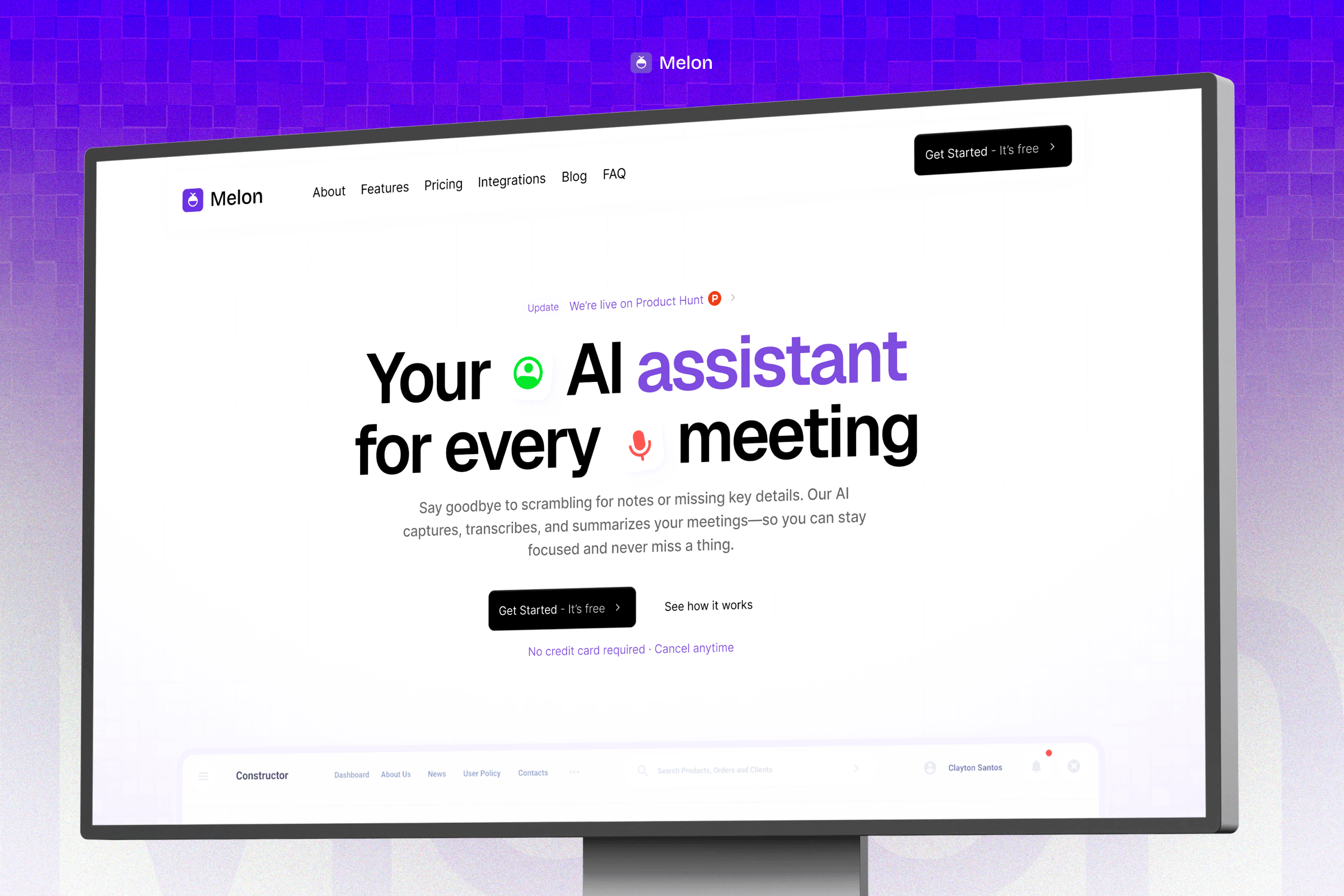
This one is ours. Take my bias into account. Melon is a focused landing page for AI productivity tools: AI meeting notes, transcription, summaries, that kind of product. It's not a full site. It's a tight, six-page setup for launching fast and converting well.
View Live Demo → | View on Framer Marketplace →
What's included:
Home, Features, Pricing, Contact, Legal, 404
Structured feature page, not just a features section on the homepage
Tiered pricing section built for SaaS pricing models
Pros:
$59 is the lowest price point for a structured multi-page SaaS launch kit that includes blog CMS
Feature page and pricing page separate, better for SEO and buyer journey
Blog CMS means you can start content marketing from day one without a rebuild
Cons:
No changelog. Not designed for product update communication.
Fewer pages than Whisper or Evolve
Builder's Notes:
What to prepare: Your feature list, pricing tiers, one strong product visual or GIF, and 2-3 initial blog posts
Customization time: Most buyers take around 7 days from purchase to live site. Factor in content writing, not just design.
Biggest gotcha: The blog CMS is there, but it needs real content to look right. Don't launch with an empty blog section.
Choose this if: You're launching an AI productivity or meeting-notes tool and want a fast, focused site at $59 with blog infrastructure included.
2. Superior ($149): Everything in one package
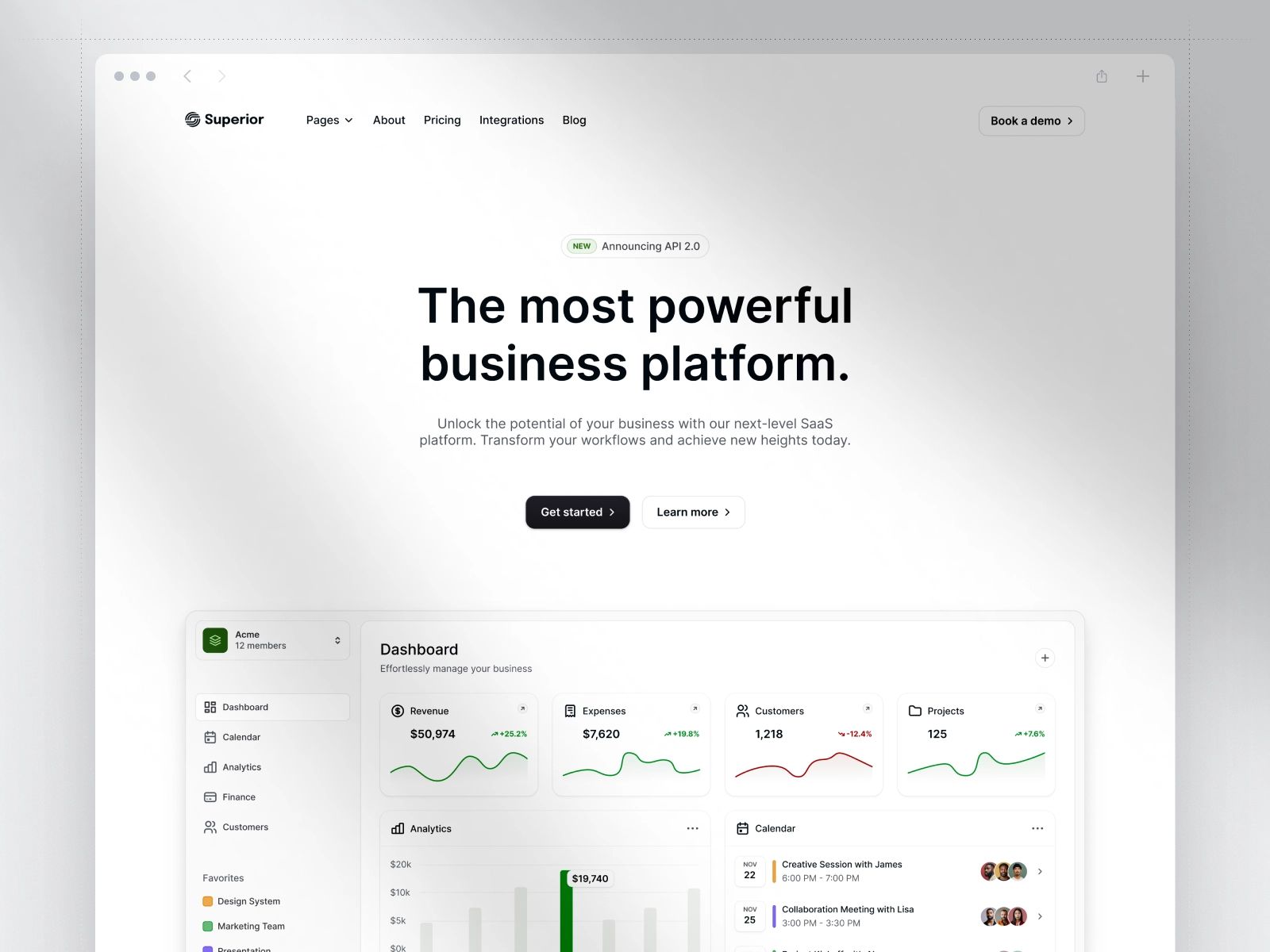
Superior is one of the most complete SaaS templates on Framer. 15+ pages including a careers page, something almost no other template ships with. If your SaaS has a team, investors, and a recruiting pipeline, this is the one.
View Live Demo → | View on Framer Marketplace →
What stands out:
Careers page is genuinely rare at this price point. Saves you building it from scratch.
Blog + changelog CMS, polished animations, clean design system
Covers every SaaS page you'd add in the first 18 months
Pros:
One purchase covers almost everything you'll need through Series A
Polished enough to pass a VC's first impression check
Changelog infrastructure signals product velocity to visitors
Cons:
$149 price matches CloudCraft, so you're choosing between depth (CloudCraft) and completeness (Superior)
Animation-heavy. Needs Lighthouse audit before going live.
Builder's Notes:
What to prepare: Team photos, job descriptions, and brand assets. You'll use all of them.
Customization time: Plan for a full 7 days. 15+ pages with team photos, job listings, and animations takes time to do properly.
Biggest gotcha: The careers page looks empty without real job listings. Prepare content or disable the page at launch.
Steal this if: You're building a funded startup or scaling team and need a site that covers hiring, content, and conversion in one purchase.
3. Suprema ($79): The crowd favorite for a reason
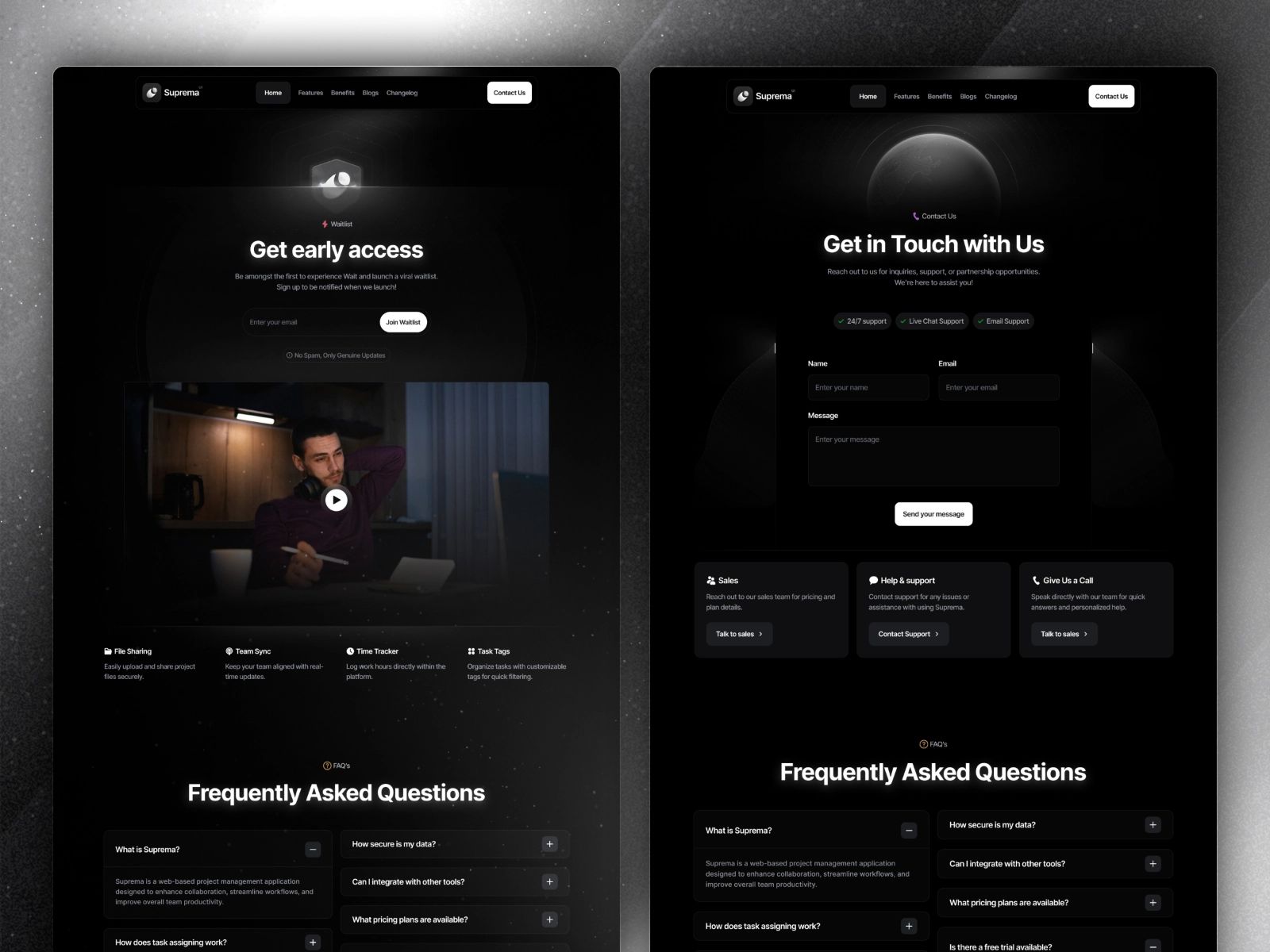
40,000+ marketplace views. That's not luck. Suprema hits the AI/SaaS aesthetic perfectly: dark, modular, conversion-focused. And it does it at a price point that makes the decision easy.
View Live Demo → | View on Framer Marketplace →
What stands out:
40K+ views is the highest traction number on this list by a wide margin
Dark modular layout that works for AI tools, devtools, and B2B SaaS equally
Conversion-focused section structure, not just decoration
Pros:
Best visual-to-price ratio on this list
Modular design means you can reorder sections without breaking anything
Blog CMS included, rare at $79 for a full SaaS site
Cons:
Dark aesthetic is on-trend now. May date faster than a neutral template.
Popular templates start looking familiar across multiple SaaS sites
Builder's Notes:
What to prepare: Brand colors and one strong hero headline. The template's first impression is built around the headline block.
Customization time: Faster than most. 4-5 days is realistic if your brand assets are ready.
Biggest gotcha: The dark mode is the default. Switching to light requires more work than expected.
Steal this if: You're launching an AI tool or devtool and want to look credible fast, without paying $149.
4. Evolve ($79): Best value for content-focused SaaS
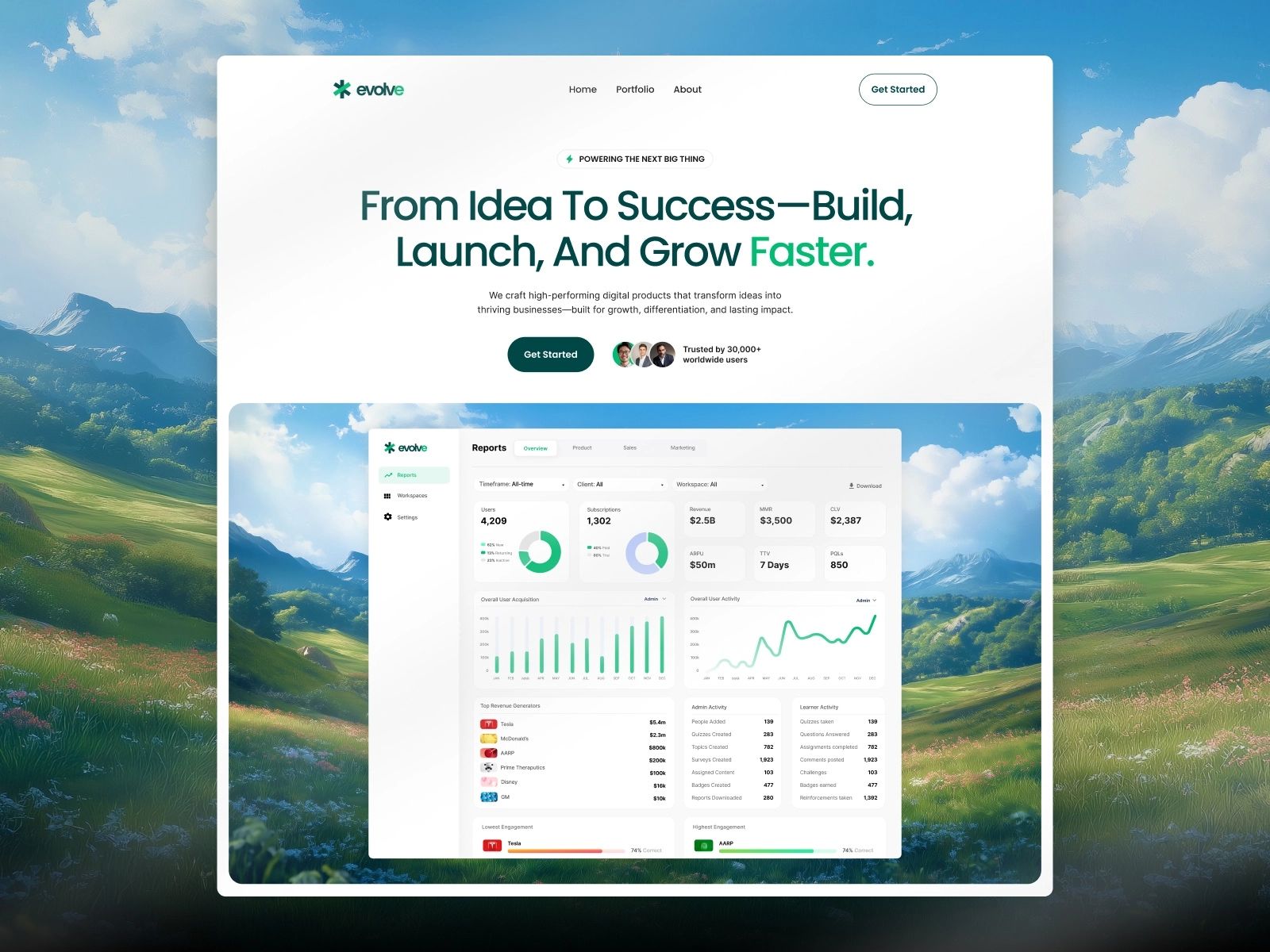
Blog, changelog, and a coming soon page, all at $79. That's the pitch for Evolve. It's not the flashiest template, but it's the most practical one at this price.
View Live Demo → | View on Framer Marketplace →
What stands out:
10 pages including blog, changelog, coming soon, and 404: a complete launch toolkit
Video tutorials included. The creator actually wants you to succeed.
AI-generated nature backgrounds give it a distinctive look without heavy customization
Pros:
Blog + changelog combo at $79 is genuinely rare
Coming soon page means you can tease the launch before the site is fully built
Tutorial support reduces customization friction for non-designers
Cons:
AI-generated backgrounds are polarizing. They work for some SaaS aesthetics, not all.
Fewer pages than CloudCraft or Superior at a similar but lower price point
Builder's Notes:
What to prepare: 3-5 initial blog posts and at least one changelog entry. The CMS pages look wrong without content.
Customization time: 5-7 days. Writing real content for the blog and changelog takes longer than the design work.
Biggest gotcha: The nature aesthetic doesn't work for every niche. Check the demo against your brand before buying.
Steal this if: You're building a content-first SaaS, want blog and changelog infrastructure, and don't want to spend $149.
5. Whisper ($79): Purpose-built for AI and voice SaaS
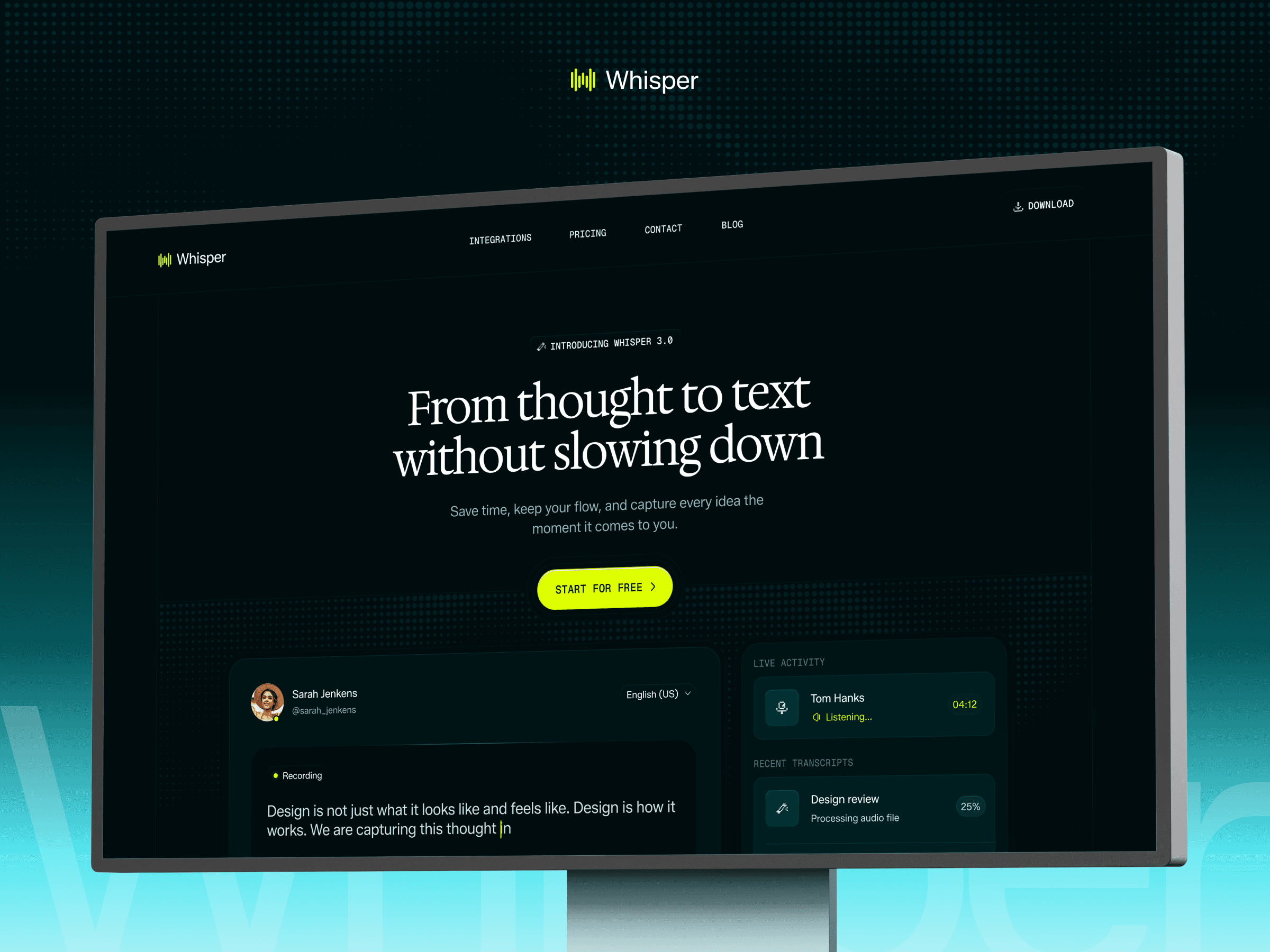
This one is ours, so take my bias into account. I built Whisper specifically for the voice AI and niche SaaS segment, the kind of product that needs an integrations page, not just a generic features list. Nine-plus pages, blog CMS, and a download page for when you have a desktop or mobile app alongside the SaaS.
View Live Demo → | View on Framer Marketplace →
What's included:
Home, Pricing, Integrations, Blog + Blog CMS, Download, Contact, Legal, 404
Light and dark theme toggle. Your visitors get to choose.
Custom cursors, sticky scrolling, variable fonts, and A11y optimized throughout
Pros:
Integrations page is a conversion asset for API-first or ecosystem products
Light/dark toggle works out of the box, no custom code needed
Blog CMS means you're set up for content marketing from day one
Cons:
183 marketplace views. Newer and less market-tested than Suprema or Evolve.
No changelog. If you ship fast and want to show product velocity, you'll need to build that page yourself.
Builder's Notes:
What to prepare: Your integration partners list and logos. The integrations page needs real logos to land.
Customization time: Average buyer takes around 7 days. Integration logos and brand assets are usually what slows people down, not the design.
Biggest gotcha: The custom cursor is distinctive but polarizing. Some visitors find it distracting; easy to disable but worth knowing upfront.
Choose this if: You're launching a voice AI product, developer tool with an ecosystem, or any niche SaaS where a dedicated integrations page is a conversion asset.
6. Strativ ($129): The premium AI SaaS pick
Strativ is for when you want to make a statement. Bold animations, dark aesthetic, the kind of design that signals "we're serious about this product." Hejna builds templates that look like funded startups, not side projects.

View Live Demo → | View on Framer Marketplace →
What stands out:
Premium animation work. The motion design is above average for Framer marketplace templates.
Blog CMS included in a $129 dark AI SaaS template
Layout built for AI-forward SaaS products that need to feel premium
Pros:
Stands out in a crowded market. Doesn't look like the template it is.
Strong first impression for high-ticket SaaS products
Blog infrastructure ready to go
Cons:
$129 for a dark AI SaaS template when Suprema achieves a similar aesthetic at $79
Animation intensity may hurt Lighthouse scores. Audit before launch.
Builder's Notes:
What to prepare: High-quality product screenshots or a Lottie animation. Strativ's design quality demands matching assets.
Customization time: 7-10 days. Sourcing or creating assets that match the premium design level takes time.
Biggest gotcha: The animations are beautiful but heavy. Performance tuning is non-negotiable for SEO.
Steal this if: You're launching a premium B2B AI product and need the website to look like it costs $500 to build.
7. Platform ($129): The modular builder's choice
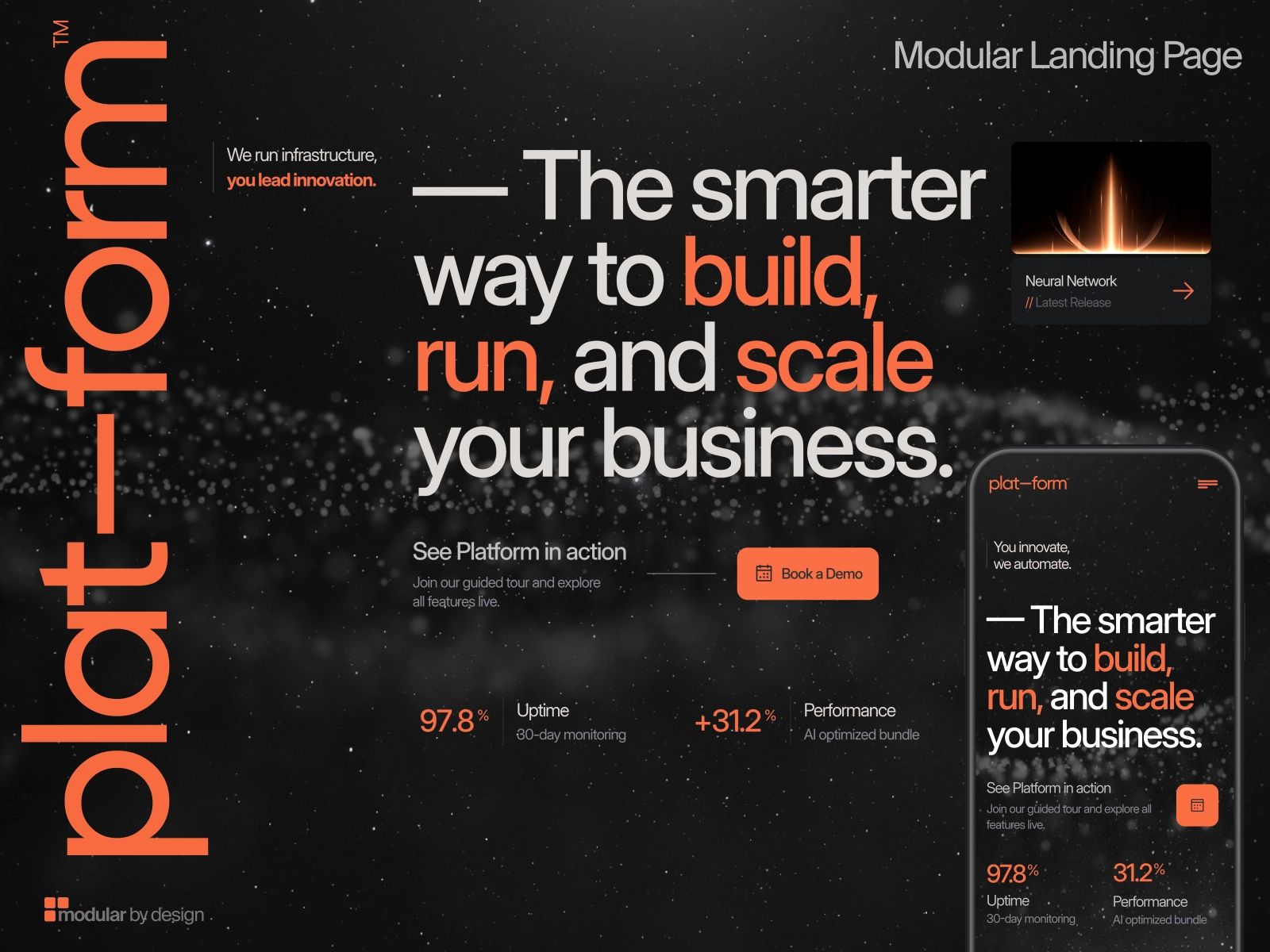
Platform is a template for people who hate templates. Section-based, mix-and-match layout, designed for SaaS and AI sites that don't fit a standard mold. If you need flexibility more than you need a predetermined page structure, Platform is it.
View Live Demo → | View on Framer Marketplace →
What stands out:
Modular section system: reorder, swap, and combine without breaking the layout
CMS included for content strategy
Works for both SaaS product sites and AI app marketing pages
Pros:
Most flexible architecture on this list. Builds like a design system, not a fixed template.
Scales well as your site grows and needs new section types
Premium finish at $129
Cons:
Flexibility is a double-edged sword. More decisions means longer customization time.
No changelog out of the box
Builder's Notes:
What to prepare: A rough sitemap and wireframe. The flexibility is wasted without a plan.
Customization time: Budget closer to 10 days. The modular system gives you more decisions to make than a fixed template, and that adds up.
Biggest gotcha: The modular system is powerful but has a learning curve. Budget extra time for your first build.
Steal this if: Your SaaS doesn't fit a standard marketing site mold and you need the freedom to build something custom.
8. Cassis ($79): Minimalism done right
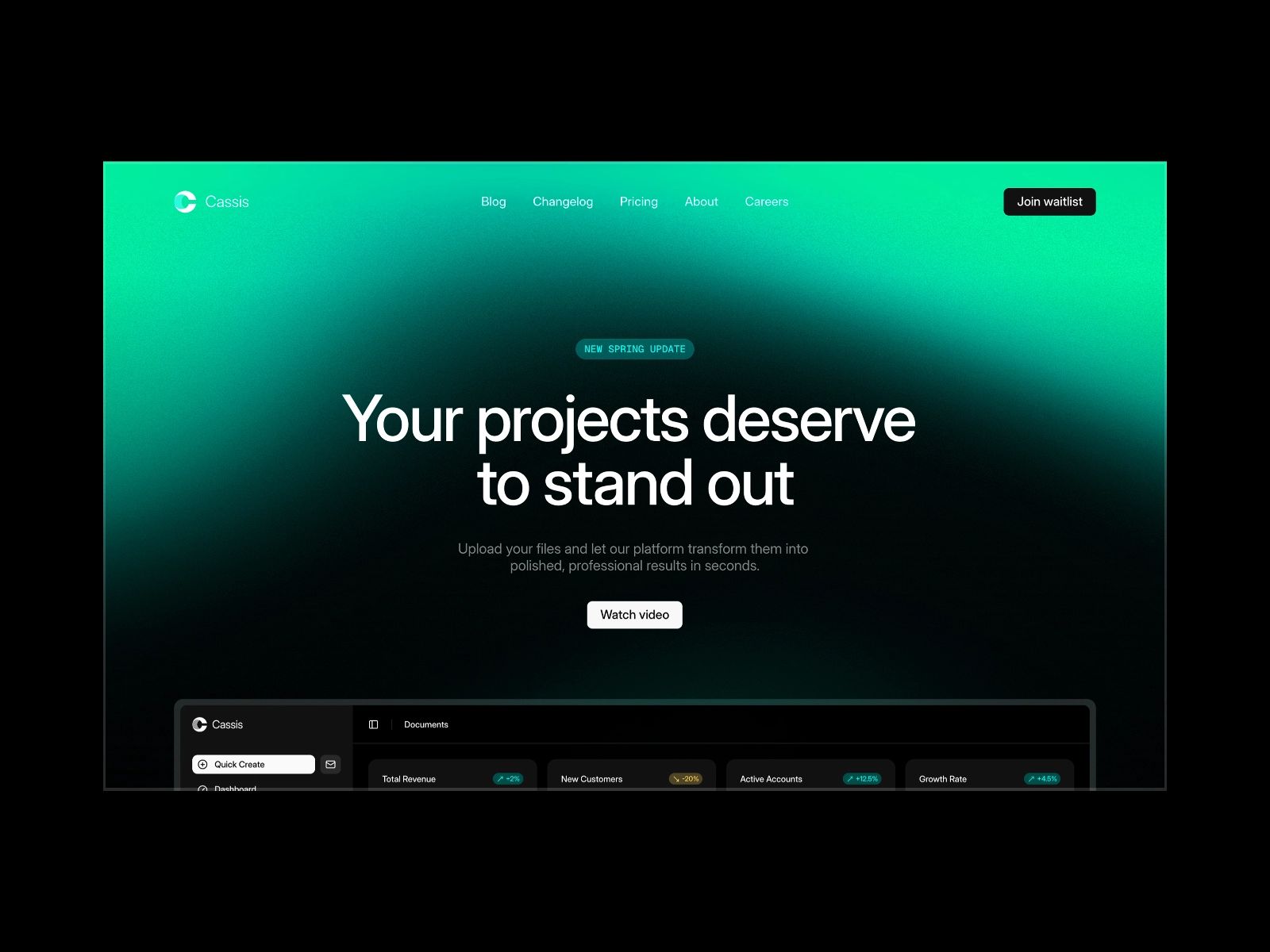
Cassis is for builders who are allergic to visual noise. Clean typography, flexible sections, and a design system that gets out of the way and lets your product speak. Oval Supply consistently ships some of the best minimal Framer templates on the marketplace.
View Live Demo → | View on Framer Marketplace →
What stands out:
Typography-first design. The content hierarchy is baked in, not fought against.
Blog CMS for content strategy
Flexible sections that can be rearranged without visual inconsistency
Pros:
Timeless aesthetic. Won't look dated in two years.
Fastest to onboard. Less design to fight means more time building.
Blog infrastructure ready
Cons:
Minimal design requires excellent copy. The template won't compensate for weak messaging.
No changelog
Builder's Notes:
What to prepare: Tight, polished copy. Cassis exposes weak messaging more than flashier templates do.
Customization time: Around 7 days. The design is fast, but writing copy strong enough for a minimal template takes longer than people expect.
Biggest gotcha: The restraint that makes Cassis beautiful requires similar restraint from you. Adding gradient accents or heavy illustrations breaks the system.
Steal this if: You're building a professional B2B SaaS where the product is the hero and you want nothing competing with it.
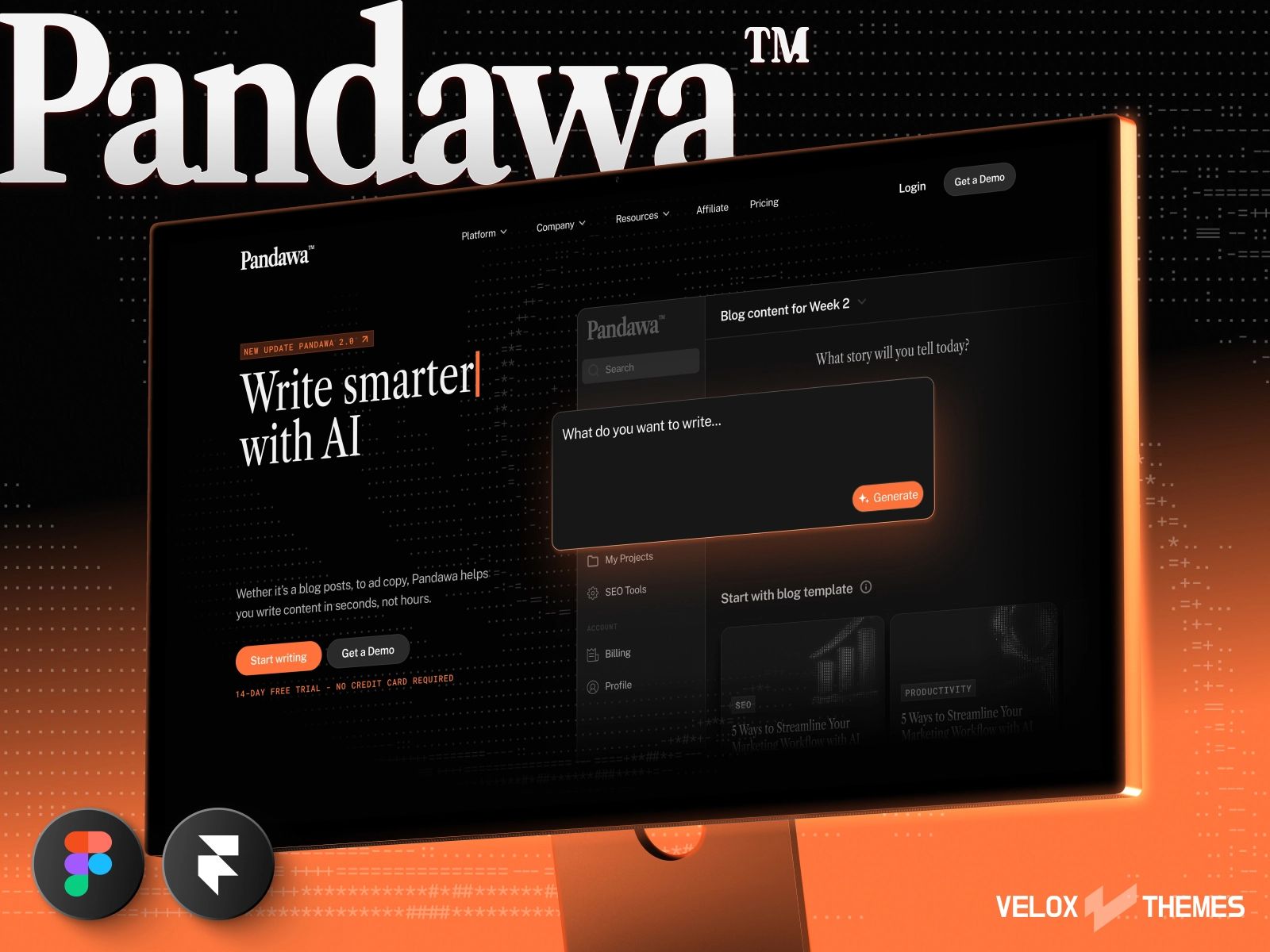
9. Pandawa ($129): The most distinctive template on this list
ASCII-inspired design, built-in dark mode, a unique aesthetic that doesn't look like anything else on the Framer marketplace. Pandawa is the right call if differentiation is your first priority and you're targeting the AI startup space.
View Live Demo → | View on Framer Marketplace →
What stands out:
ASCII-inspired grid system, genuinely unlike anything else in the Framer marketplace
Built-in dark mode that actually works, not just a dark background swap
Blog CMS for AI startup content strategy
Pros:
Memorable. Visitors won't mistake you for any other SaaS.
Dark mode is a first-class citizen, not an afterthought
Strong identity without custom design work
Cons:
$129 for a high-risk aesthetic. If the ASCII style doesn't align with your brand, it's a hard sell.
Less flexible than Platform. The aesthetic is opinionated in a way that limits deviation.
Builder's Notes:
What to prepare: Your brand personality and copy tone. Pandawa's personality needs to match your product's.
Customization time: 7-9 days. The opinionated design system takes time to either commit to fully or adapt properly.
Biggest gotcha: The design system is distinctive but deeply opinionated. Half-implementing it looks worse than not using it at all.
Steal this if: You're launching an AI research tool, developer-focused SaaS, or any product where technical credibility and differentiation are more important than broad appeal.
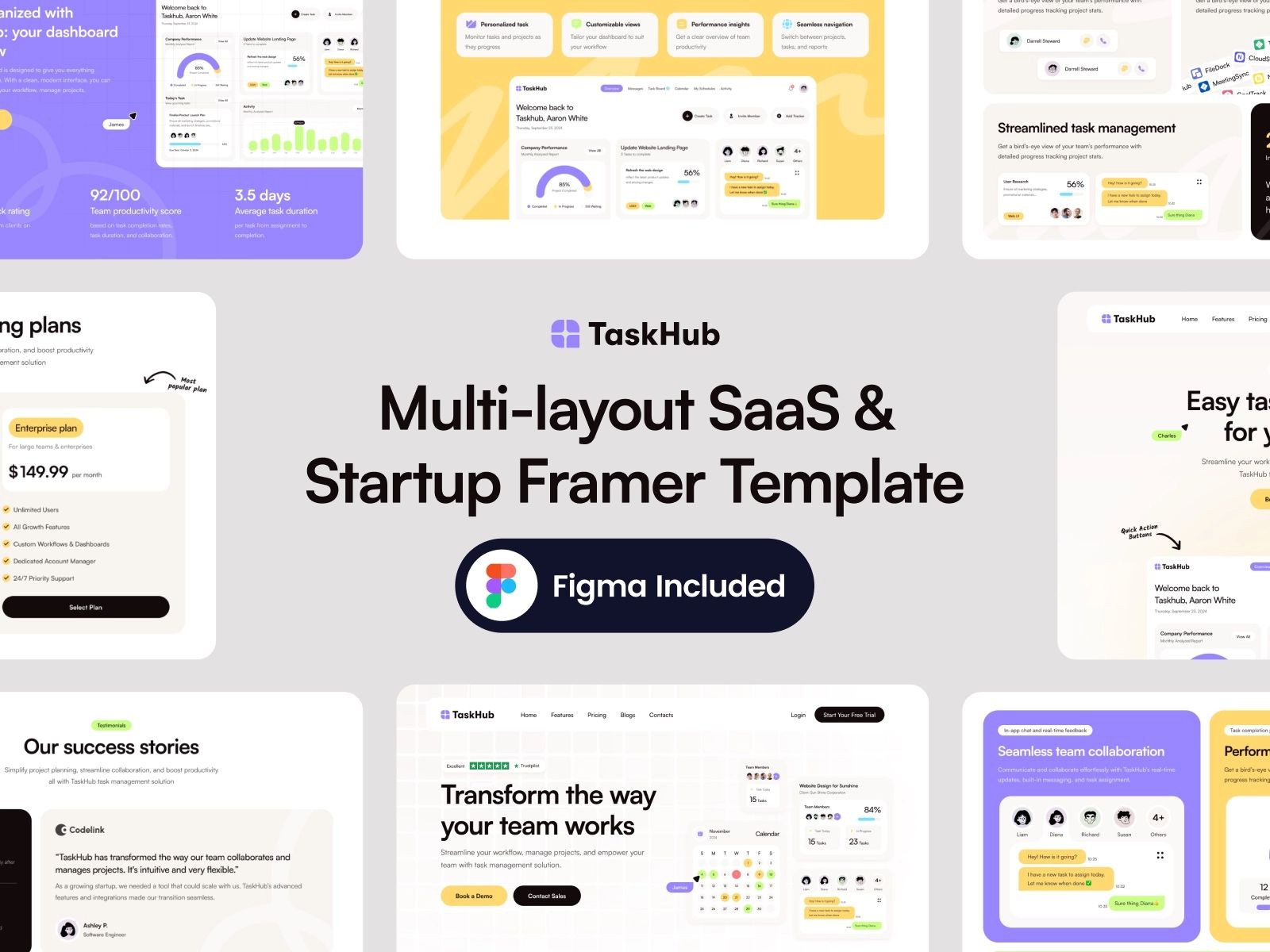
10. Taskhub ($79): Built for the task and project management niche
Taskhub ships with conversion sections designed specifically for productivity SaaS: feature comparisons, workflow diagrams, use-case blocks. If your SaaS is a project management tool, this template already understands your buyers.
View Live Demo → | View on Framer Marketplace →
What stands out:
Conversion layout tuned for project management and task SaaS
Blog CMS included
Startup-focused design system: clear, actionable, high-trust
Pros:
Niche-specific section types save days of custom design work
Strong conversion architecture for a product with multiple user types
Blog infrastructure for content strategy
Cons:
Less versatile than a generic SaaS template. Strong for its niche, weaker outside it.
No changelog
Builder's Notes:
What to prepare: User personas and the specific use cases your SaaS addresses
Customization time: Around 7 days. The niche-specific sections are faster to customize, but populating them with real use cases takes time.
Biggest gotcha: The niche specificity that makes Taskhub great for project management makes it awkward for other SaaS verticals. Be honest about fit before buying.
Steal this if: You're building a task management, project management, or team productivity SaaS.
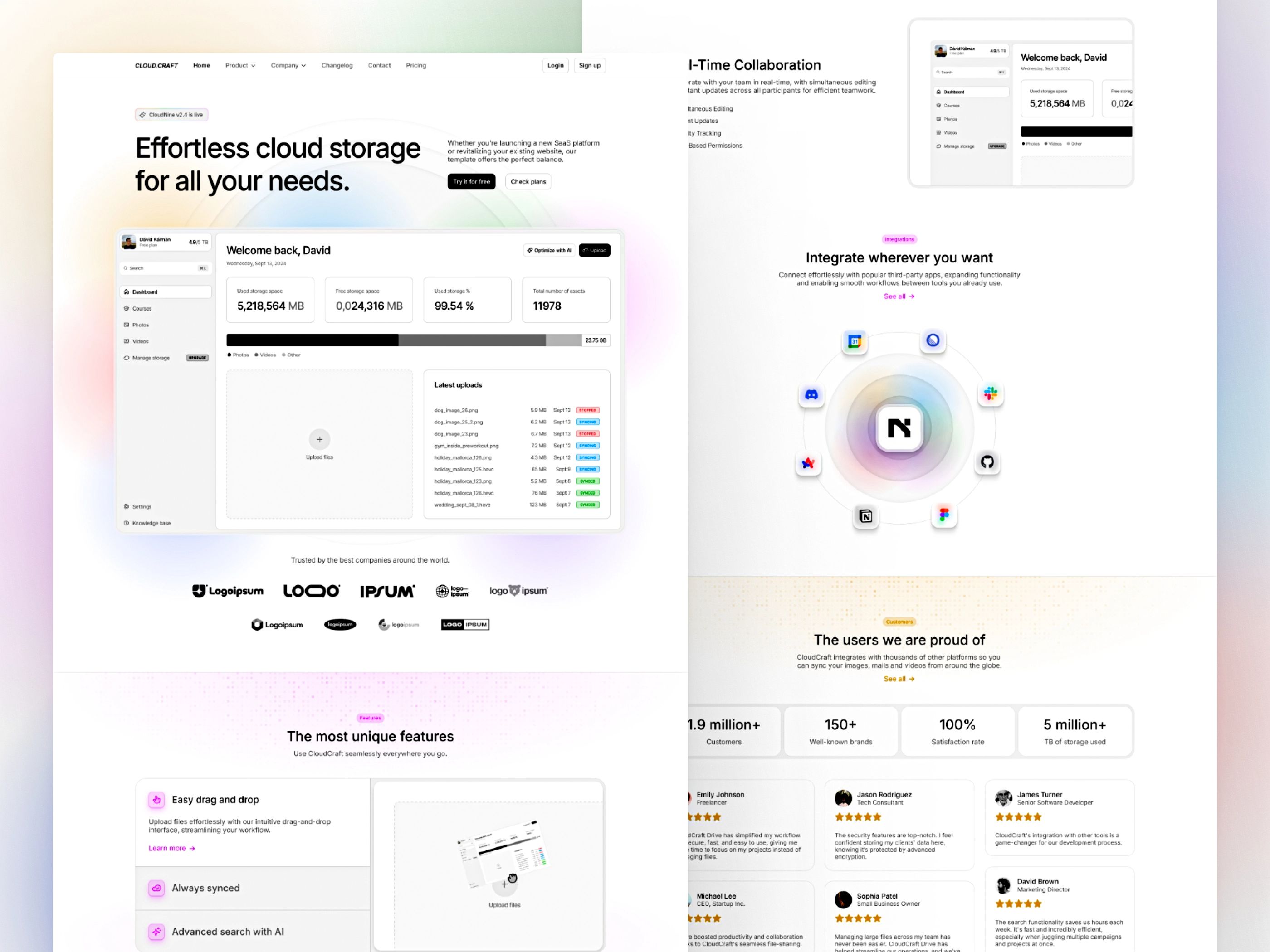
11. CloudCraft ($149): The content-heavy champion
If you're building a content-led SaaS, the kind that grows through SEO, a changelog people actually read, and a blog that attracts inbound, CloudCraft is the template to buy. 20+ pages, 3 CMS collections, and accessibility baked in from the start.
View Live Demo → | View on Framer Marketplace →
What stands out:
20+ pages covering every SaaS need: home, pricing, features, blog, changelog, docs, careers, contact, legal
3 CMS collections, one of the few templates on this list with that depth out of the box
SEO and accessibility focused at the architecture level, not bolted on after
Pros:
More page infrastructure than you'll need at launch, with room to grow into it
Multi-CMS setup means real blog + real changelog, not fake static pages
Strong foundation for content-led SEO strategy
Cons:
$149 is the highest price point on this list, justified but not for early validation
More template to customize means more time before you ship
Builder's Notes:
What to prepare: Your full site copy, brand colors, and logo before touching the template
Customization time: Most buyers take around 7 days from purchase to live site. CloudCraft's page depth means you'll use all of that.
Biggest gotcha: CMS collections require real content to look good. Don't launch with empty blog and changelog sections.
Steal this if: You're post-product, serious about content marketing, and want infrastructure that doesn't force a rebuild at 50 pages.
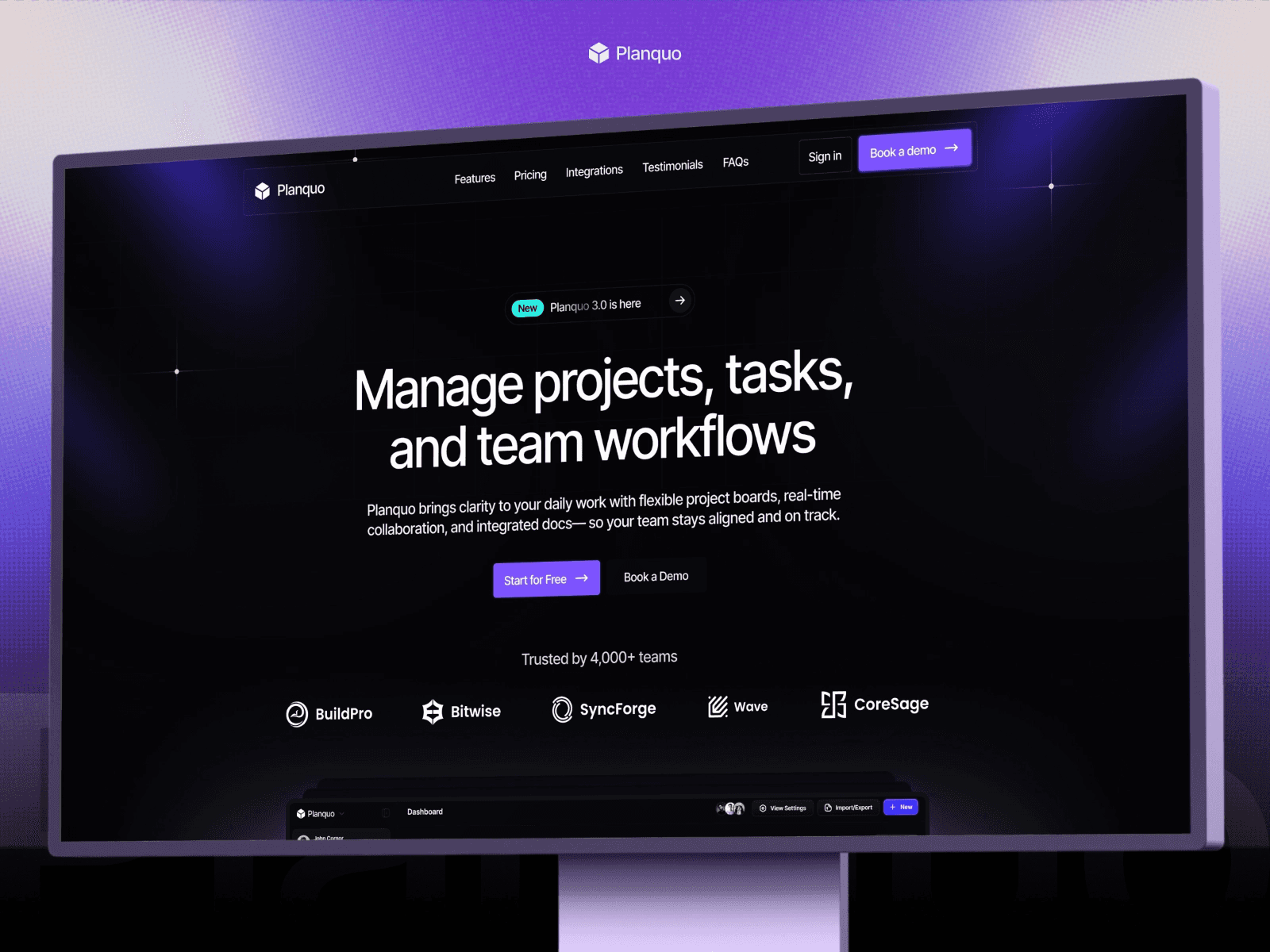
12. Planquo ($59): Dark SaaS landing page with a download page
Also ours, same caveat on bias. Planquo is a dark SaaS landing page with one thing most templates skip: a dedicated download page. If your SaaS has a desktop or mobile app alongside the web product, that matters.
View Live Demo → | View on Framer Marketplace →
What's included:
Home, Contact, Download, Privacy, Terms, 404
Dark gradient aesthetic: modular conversion sections, pricing breakdowns
Download page built for app distribution
Pros:
Download page is a genuine differentiator. Builds it for you.
Dark aesthetic with 3,700+ marketplace views. The market has validated this design.
$59 makes it the easiest budget decision on this list
Cons:
No CMS: no blog, no changelog
Five pages is light. Works for launch, not for scale.
If you don't have a downloadable product, the download page is useless
Builder's Notes:
What to prepare: App store or download links, platform badges (Mac/Windows/iOS/Android)
Customization time: 2-3 days. It's a tight template, but gathering app store assets and download links takes longer than the actual design work.
Biggest gotcha: Planquo was last updated 3 months ago. Check the marketplace listing for recent activity before buying.
Choose this if: You're launching a dark-aesthetic SaaS or desktop/mobile app and need a fast, polished landing page with app distribution built in.
13. Blocks (Free): Framer's official UI kit
Blocks isn't a template. It's a 100+ component library from Framer itself. No fixed pages, no predetermined structure. You assemble your site from scratch using professional-grade components.

What stands out:
100+ components across all SaaS page types
Framer-official quality and maintenance
Total assembly freedom
Pros:
Free, maintained, and always updated with new Framer capabilities
Builds like a design system, not a template
Nothing is predetermined. Complete control.
Cons:
Not for non-designers. You'll spend more time building than marketing.
No CMS out of the box
Slower to launch than any other option on this list
Builder's Notes:
What to prepare: A sitemap, a wireframe, and patience
Customization time: 1-2 weeks for a full SaaS site
Biggest gotcha: Freedom is time. If you don't have a designer and you're racing to launch, Blocks will cost you weeks.
Steal this if: You're a designer or developer who wants full control and has the time to build properly.
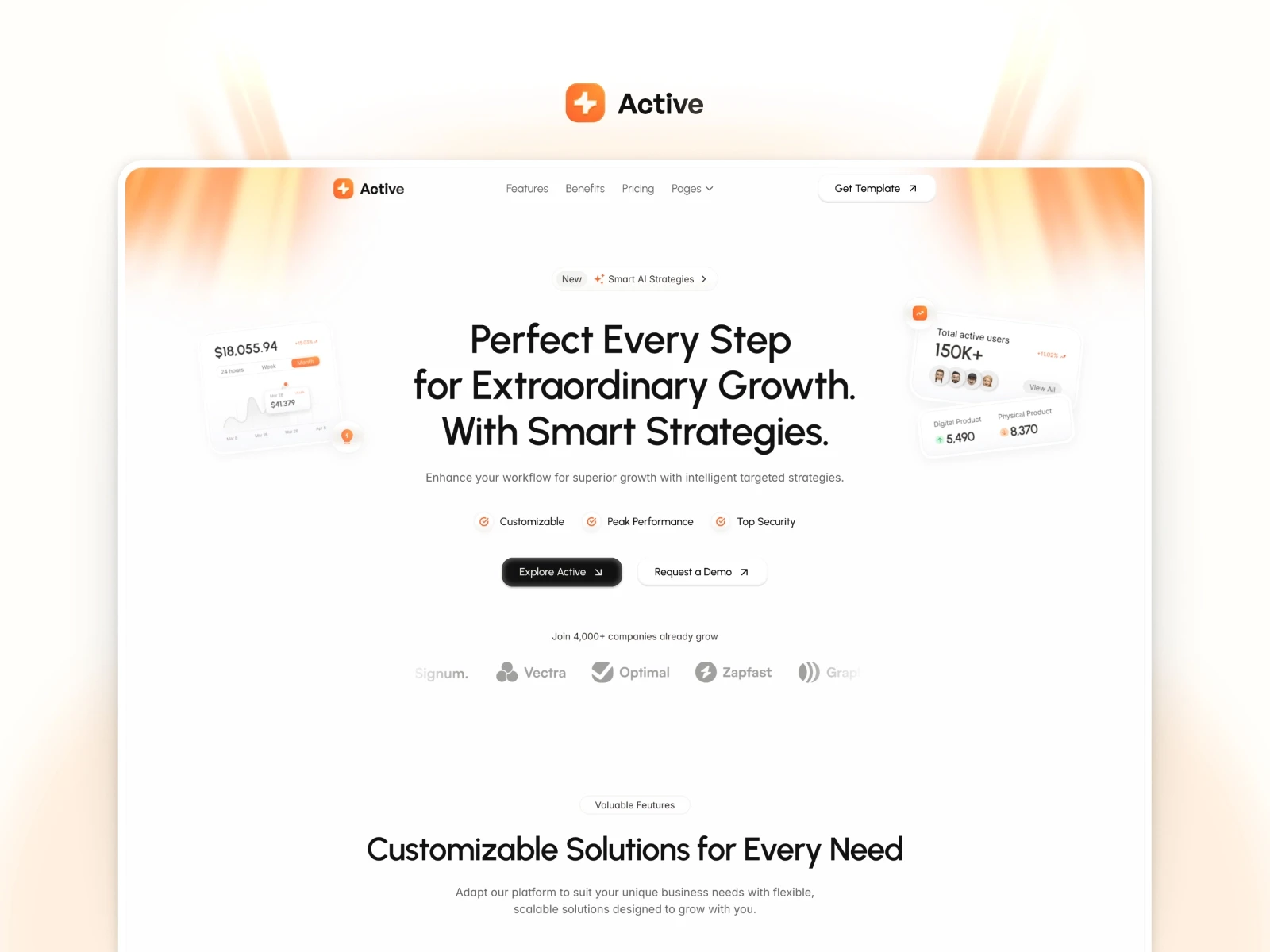
14. Active (Free): Fastest free SaaS landing page
Active doesn't look free. That's the reason it's #14 and not lower. Clean, modern, converts better than 90% of paid landing pages I've seen. For pure speed-to-launch on zero budget, nothing beats it.
What stands out:
Looks polished. The "this is free" tell isn't there.
Modern clean aesthetic that works across SaaS niches
Setup in under an hour
Pros:
Free, credible, fast
Works as a production landing page for validation
Low friction. Remixing takes minutes.
Cons:
~4 pages: no blog, no changelog, no CMS
Limited room to grow. You'll outgrow it at 6-12 months.
Builder's Notes:
What to prepare: Hero headline, 3-5 features, pricing tiers
Customization time: 1-3 hours
Biggest gotcha: Active's clean aesthetic is its strength and its ceiling. Don't fight it with heavy customization.
Steal this if: You need a production landing page today and have no budget.
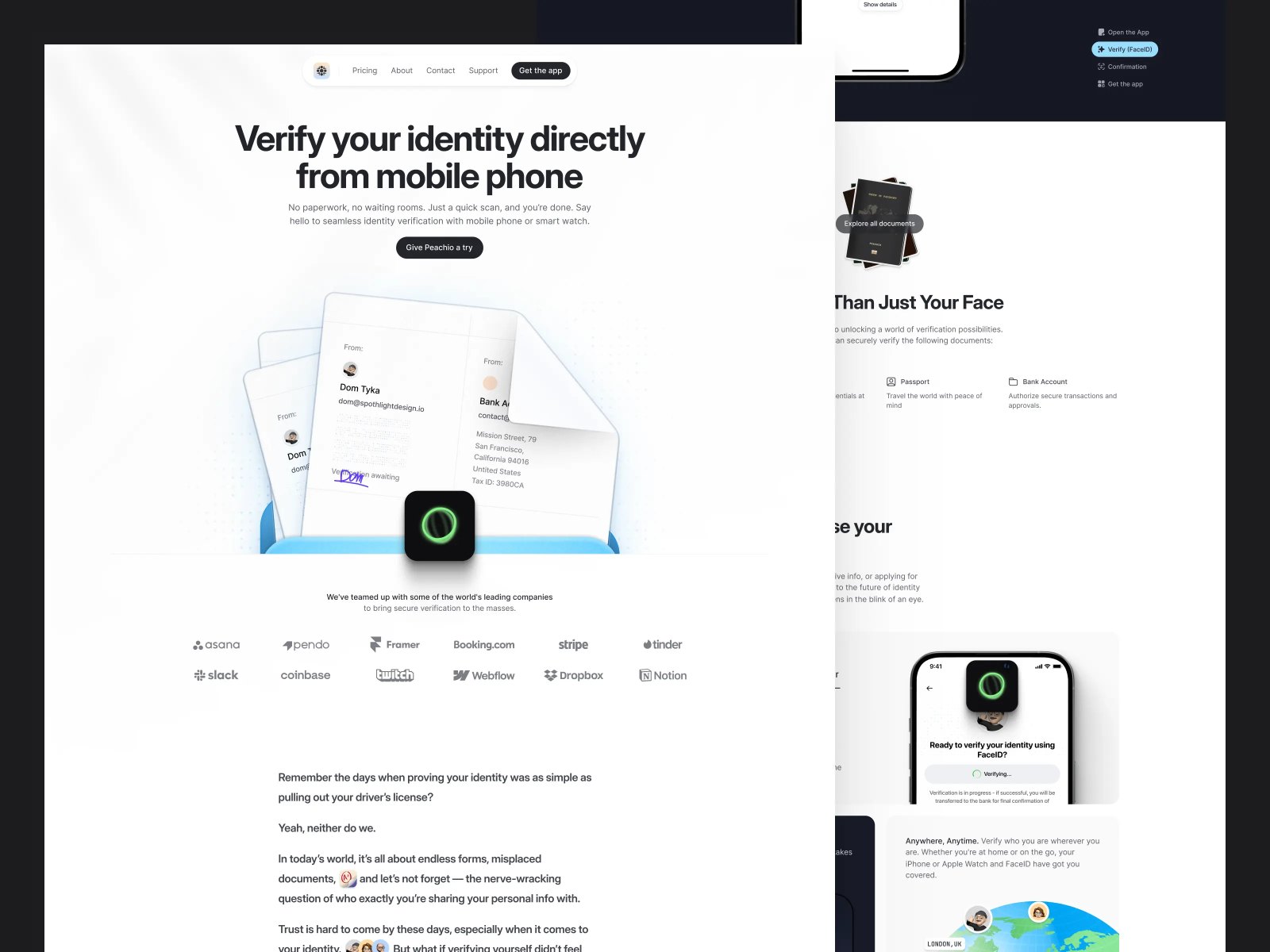
15. Peachio (Free): Clean free option for modern apps
Peachio is a mobile-app-focused free template that also works for SaaS. Slightly more distinctive than Active, slightly less proven. Good secondary option if Active's aesthetic doesn't fit your brand.
What stands out:
Minimal and product-focused. Works for SaaS and mobile apps equally.
Clean design that doesn't look like a default Framer template
Free with no catches
Pros:
Modern aesthetic for app and SaaS products
Works as a production validation page
Cons:
3-4 pages, same content ceiling as Active
Less Framer marketplace traction than Active
Builder's Notes:
What to prepare: Product screenshots or app mockups. Peachio's design centers the product visual.
Customization time: 1-3 hours
Biggest gotcha: The mobile-first framing can feel off if you're positioning a B2B SaaS. Check the demo against your product type.
Steal this if: Your SaaS has a mobile app component and Active's aesthetic doesn't fit.
Which Template Fits Your Stage?
Stop picking based on aesthetics. Pick based on where you are.
"I'm pre-product, just need a waitlist or coming-soon page"
→ Active (free), Peachio (free), Planquo ($59)
Don't overbuy. A 20-page template is overkill when you don't have a product yet. Spend the time validating, not customizing a changelog page you won't touch for six months.
"I'm launching an MVP, lean marketing site, fast"
→ Melon ($59), Cassis ($79), Blocks (free if you know Framer)
Priority: speed to launch, not feature depth. You can always add pages later. You can't get those weeks back if you over-built before anyone showed up.
"I'm content-heavy, need blog, docs, changelog from day one"
→ CloudCraft ($149), Evolve ($79), Superior ($149)
Watch for templates with a blog page but only 1 CMS collection. That's not enough for a real content strategy. Evolve is the play at $79. CloudCraft and Superior are the play if you need full infrastructure from launch.
"I need a full-scale marketing site"
→ Superior ($149), CloudCraft ($149), Strativ ($129), Whisper ($79)
Template architecture matters most here. Weak foundations break at 20+ pages. Don't pick a template with a fixed layout system and then expect it to handle 30 pages cleanly.
Which Templates Set You Up for Long-Term Growth?
The template you pick today affects your SEO ceiling, content strategy, and AEO readiness for years.
Best for SEO + Content Marketing
CloudCraft, Evolve, and Superior. Multi-collection CMS, proper blog infrastructure, heading hierarchy built for search engines. These are the templates that compound over time.
If you're serious about building search traffic, read the Framer SEO Checklist for 2026 before you launch. Template alone won't do the work.
Best for AEO / AI-Search Visibility
Templates with clean FAQ sections and structured benefit blocks: Suprema, Whisper, Superior. Answer engines (ChatGPT, Perplexity) extract structured content. If your CMS is flat and your sections are vague, you won't get cited. Structured benefit blocks and FAQ sections are the foundation.
Best for Scaling Past 50 Pages
CloudCraft, Superior, and Blocks. Built as systems, not one-off page collections. Everything else on this list is page-by-page, which breaks down at scale. If you're building toward that, read Can Framer Handle Enterprise Sites?. The CMS limitations that bite you at 50 pages are non-obvious.
One more thing: once you've picked a template and launched, loading experience kills conversions on all of them. Our preloader components drop into any Framer site in under a minute. Worth doing before you start driving real traffic.
Verdict
Don't overthink this. Here's the short version:
Best overall: CloudCraft. 20 pages, 3 CMS collections, content infrastructure from day one. The most complete SaaS template on Framer.
Best for shipping fast: Active (free) or Melon ($59).
Best free template: Blocks if you know Framer. Active if you don't.
Best for content-led growth: Evolve at $79. Blog, changelog, and coming soon for the price of a nice dinner.
Building the product is easy now. The website shouldn't be what slows you down. Pick a template. Ship the site. Start selling.
FAQ
Are free Framer SaaS templates good enough for a production site?
For validation, yes. Active and Peachio both produce credible launch pages that don't embarrass you. For content marketing or scale, no. You'll hit a ceiling fast without blog CMS, and rebuilding later costs more time than the $59-79 saved.
How long does it take to customize a Framer SaaS template?
Basic content swap: 2-4 hours. Full brand customization with your colors, fonts, and copy across all pages: 1-2 days. Adding new pages or custom sections beyond what the template includes: 3-5 days. Builder's notes in each entry above give you more specific estimates per template.
Can I add a blog to any Framer template?
Technically yes, but templates with existing CMS collections save a full day of setup, sometimes more. You'll need to build the collection schema, connect CMS to pages, and create article templates from scratch. Check the comparison table above and favor templates that already have CMS infrastructure if content is a growth channel.
Do Framer templates affect site speed and SEO?
Yes, meaningfully. Heavy animations hurt Lighthouse scores. Poor heading hierarchy confuses search engines. All 15 templates in this guide have acceptable foundations, but you'll still need to add meta descriptions, structured data, and OG images. Performance tuning after launch is non-negotiable for SEO, regardless of which template you pick.
Which Framer SaaS template is best for a solo founder shipping fast?
Active (free) for today. Melon ($59) if you need a features page and tiered pricing section. Cassis ($79) if you want a minimal, expandable design system you won't outgrow in the first year.
What should I look for if I plan to scale past 20 pages?
Three things: CMS collection count, component reusability, and navigation flexibility. Fixed page templates break at scale. Design systems don't. CloudCraft and Superior are the two templates on this list built with 50+ pages in mind. Everything else hits a ceiling somewhere between 10-25 pages.