Framer’s opening argument at its June 16, 2026 keynote was blunt: engineers’ way of working changed more in the past year than in the previous decade combined, driven by AI agents. And Framer’s bet is that design goes through the same shift now.
Everything below shipped live the same day. No waitlist, no phased rollout. Agents, Branching, External Agent connections, a rebuilt Community, and a new pricing model all landed at once. Presented by Andy, with live demos from Joseph and Justin, this was the biggest single-day release Framer has shipped.
I’ve been watching Framer’s AI feature set evolve since Workshop launched. This one is different in scope. Here is the full breakdown.
Key Takeaways
Framer Agents are now built into the canvas. A new Agent tab in the right panel lets you co-edit your site with an AI model in real time, including conversational image iteration, responsive styling, CMS wiring, and code component direction.
Branching gives every project an isolated copy system. You spin up a branch, make changes (or let an agent make them), and merge back to main when ready. Every agent message has its own rollback.
External Agents connect outside tools (Claude Code is the primary example) to Framer via the Framer CLI, without consuming your Framer AI Credits.
The Framer Community is rebuilt under one roof: Marketplace, Gallery, Feed, Members, Awards, and Contests in a single tab. The pre-publish Marketplace review process is gone.
AI Credits replace the previous AI pricing model. Free plan includes 500 credits per day. Pro includes 3,000 per month. Editor seat price dropped from $40 to $20. The Scale plan is retired, leaving Basic and Pro.
The Four Pillars at a Glance
Framer 3.0 is built on four structural changes, each shipping simultaneously with a UI redesign and new pricing.
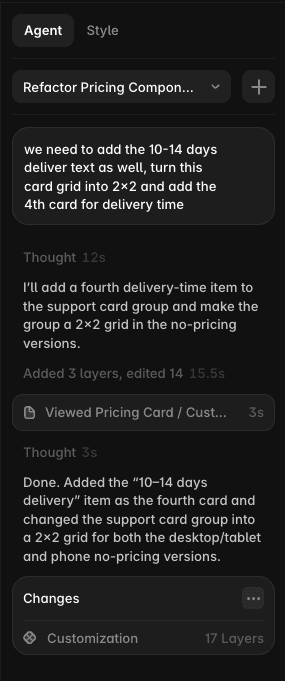
Framer Agents. A redesigned right panel splits into a Style tab and a new Agent tab where all AI conversation happens. The agent co-edits your site in real time, with visual feedback on which layers it touches, and full undo/redo including a Revert option that rolls back an entire prompt.
Branching. Every project now has a main label at the top of the canvas. From there you can spin up named, isolated branches for experiments. Merging back to main is a one-click operation.
External Agents. Third-party AI tools like Claude Code can connect to Framer via the Framer CLI. They operate on branches automatically and run on the user’s own LLM tokens, not Framer’s credit system.
The new Framer Community. Marketplace, Gallery, Feed, Members, Awards, and Contests are now under one tab. Marketplace moderation replaces the old review-before-publish gating.
Alongside these pillars: a redesigned UI, a $40 to $20 editor seat price cut, the retirement of the Scale plan, and a $100,000 24-hour hackathon that started immediately after the keynote.
Framer Agents
This is the deepest change in 3.0 and the one that took up most of the keynote.
The Agent tab lives in the right panel alongside the existing Style tab. When you open it, you see a chat interface with a model dropdown. The presenter favored Opus 4.8 for complex tasks. There is a context tool that lets you click any layer or frame on the canvas and pull it into the chat as context. You can add multiple elements at once. You can also @-mention pages or headings directly.
Co-editing in practice
Joseph’s demo showed what Framer calls the co-editing loop. He asked the agent to generate a services section while he manually rearranged and deleted other elements at the same time. His phrase: “agents and myself co-editing together.” The agent doesn’t pause while you work. You don’t pause while it works. It’s parallel.
Real-time visual feedback shows exactly which layers the agent is touching as it works. If the agent is building something on another page, a Follow button jumps your viewport to where the work is happening.
Practical details from the demo that matter:
The agent pulls icons from a curated vector set, choosing contextually appropriate ones rather than generic placeholders. Full undo/redo works on agent-generated content. Revert undoes an entire prompt in one action, not step by step.
In one demo sequence, Joseph asked for a full contact page with three office locations. The agent built it. He then ran conversational image iteration: “more iconic image of SF, more foggy.” The image updated. He dropped a screenshot of a broken contact form into the chat and asked the agent to rebuild it. It did.
Animation control was specific. Staggered appear/scroll animations across headings, with Joseph specifying 1 second duration, 0.1 second stagger, and whether the stagger applied by character or by word. The agent also caught a clipping issue when asked to fix it.
Styling and cleanup
One demo sequence illustrated what distinguishes this from pattern-matching AI. The agent found all text layers across the project that were not bound to a text style (excluding intentionally fit-sized ones) and matched them to the correct existing style. Framer’s framing: a “dumb” plugin would codify the mistakes. The agent found the intent and matched it to the design system.
From there: a type scale refined on major-third intervals, and a light/dark theme where the agent reused values for dark mode, generated the light mode, and left static colors alone.
The agent also works on non-website design pages. Joseph showed it generating a style guide and six hero layout explorations with animated liquid-gradient shaders in seconds.
Production work: Justin’s half
The second half of the agent demo shifted to production tasks with Justin.
Batch asset replacement: drop approved image files into the chat, the agent replaces placeholders across the site. Copy audit: Justin asked what adjective appears most across the site. The answer was “bold,” used too frequently. The agent proposed tone-matching synonyms rather than blind find-and-replace.
SEO pass: the agent rewrote passive voice to active, generated SEO titles, meta descriptions, semantic HTML tags, and alt text across the site. Justin noted it can also discuss post-launch analytics.
Structure: the agent identified repeated list items that should become a component with variables and instances, built it, then audited the rest of the site for other componentizable elements. It also built interactive mobile navigation open/close states.
Code components: Justin dropped a static analog clock component into the chat. The agent read the visual direction from the canvas and converted it into a functioning clock with a time-zone property.
CMS demos: the agent created a services CMS collection from 13 existing items and wired the homepage to show six dynamically. It added multi-reference fields between Team and Work collections, batch-renamed blog post titles, and simplified slugs with redirects in place.
For context on what this builds on, Workshop was the prior generation for component creation. The Agent tab handles Workshop’s use cases and extends well beyond them into page-level and site-level work.
Branching
Framer’s framing: branching is the answer to the “trust problem” with AI agents.
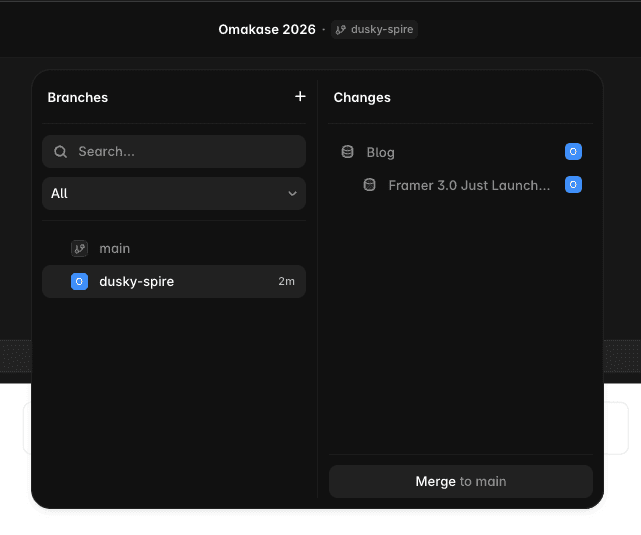
The mechanic is straightforward. A “main” label appears at the top of the canvas. Clicking it opens a branches popover. The plus icon spins up a new branch that is immediately isolated from main. Branches are renamable. The popover shows who created each branch.
Joseph showed a practical example: making the site responsive on a branch, generating tablet and phone footer variants, then clicking “Apply to main” to merge. Instant. No conflict resolution, no manual merge step.
The key architectural fact: you and your agents are always working on a copy of the live site. Every agent message creates its own rollback point. Creating and switching between copies is cheap and instant.
The implication for anyone who has been nervous about AI making unsanctioned changes to a live site: every change is reversible at the message level, not just the session level.
This also directly addresses the collaboration and governance gaps that have made Framer difficult to use for teams that need review workflows before publishing. Branching gives teams a structural place to review agent output before it reaches main.
External Agents
The most technically significant feature in 3.0, and the most demoed.
External Agents let tools outside Framer connect to your project via the Framer CLI. Joseph’s demo used Claude Code in the terminal. The connection flow: type /framer in the terminal, paste the project link, approve an OAuth-style handshake. Connected.
From an empty CMS and a messy local folder containing CSVs, markdown files, and image folders, Joseph ran a single large prompt. Claude built five relational collections (clients, team, work, services, articles), mapped and imported all images, wired reference fields, and populated detail pages from pre-designed layout templates. All of that work appeared on an auto-created branch named “warm fjorded” for review before merging.
Other flows demonstrated:
Performance, SEO, and accessibility audits running in parallel via sub-agents, each outputting markdown files. The output was pushed to Notion via an MCP connection. A separate demo pulled tweets via an X MCP into a CMS-powered animated ticker, where the agent independently decided to make the ticker CMS-driven rather than hardcoded.
Additional documented flows: design.md-driven design workflows, merging two separate Framer projects, and importing designs from Figma and FigJam via the Figma MCP.
Framer’s stated pitch: External Agents let you use new model capabilities the moment they ship, without waiting for Framer to integrate them. They also run on tokens from your own LLM subscription. This is the detail that matters for cost planning: External Agent work does not draw from your Framer AI Credits.
If you already run a BYOL (bring your own LLM) workflow with Claude Code or a similar tool, the Framer CLI is the bridge. The connection is lightweight. The capability surface is the full Framer canvas and CMS.

The New Framer Community
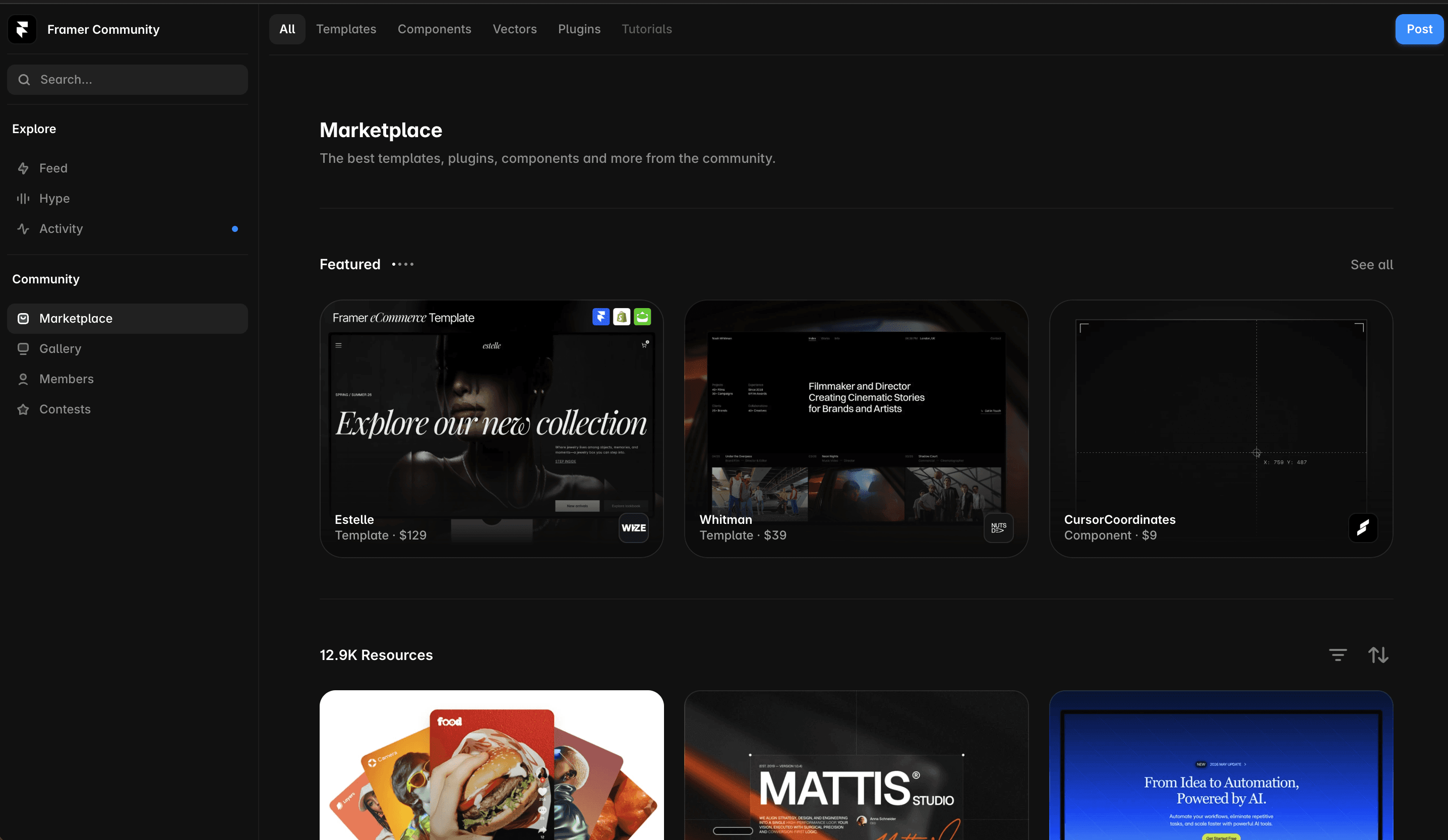
Framer’s community infrastructure got rebuilt under one roof: Marketplace, Gallery, Feed, Members, Awards, and Contests are now accessible from a single Community tab.
Marketplace items now support comments, likes, and richer feedback. The Feed lets creators post their latest work. Members is a talent discovery surface. Awards and Contests are integrated directly rather than living in separate links.
The most consequential change, per a dedicated post from Jorn: the pre-publish review process is gone. Creators publish when they are ready. Moderation replaces reviewing. Framer’s team curates what gets featured and improves ranking signals, but there is no gate between finishing your template or component and it being live on the Marketplace.
Framer’s framing on ranking: it is a discovery system, not a permanent scoreboard. Creators are explicitly told to focus on product quality and distribution rather than gaming the feed. Existing Marketplace categories and SEO pages are preserved.
Framer’s platform numbers from the written announcement: 188,000 companies using Framer, 364 million monthly visitors across sites built on the platform, more than 4 million sites, and 7,000-plus creators. In 2025, Framer paid out $6.5 million to creators at 200% year-over-year growth, with no revenue share taken. Named customers using Framer include Perplexity, Miro, Cal.com, Bilt, Superhuman, Dribbble, and Zapier.
Pricing and AI Credits
This section covers the written announcement, not the keynote stage. The numbers below come from Framer’s published post.
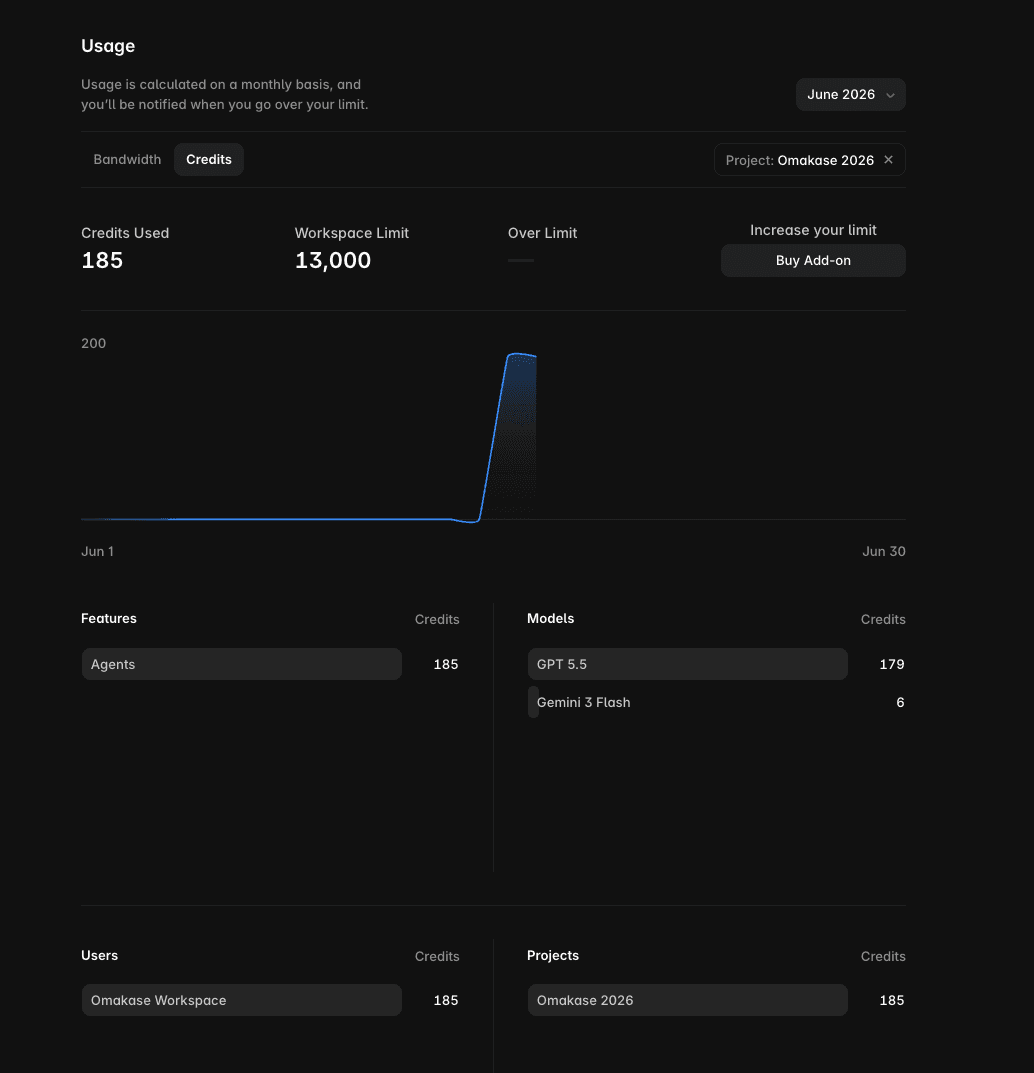
The credit unit. AI Credits are the new usage unit for all Framer AI features. One credit equals one operation at the base model cost.
Plan allocations:
Plan | AI Credits | Approximate output |
|---|---|---|
Free | 500 per day | ~2 landing pages. Resets daily. No rollover. |
Basic | 1,000 per month | ~5 landing pages |
Pro | 3,000 per month | ~10 landing pages |
Add-ons | From 1,000 credits | Available at any tier |
Operation costs at base model (GPT-5.5, 1x):
Operation | Credits |
|---|---|
Full landing page | ~300 |
Responsive layout | ~150 |
Large edit | ~100 |
Small edit | ~50 |
Model multipliers:
Model | Multiplier |
|---|---|
GPT-5.5 | 1x (base) |
Sonnet 4.6 | 0.9x |
Opus 4.8 | 1.8x |
Choosing Sonnet 4.6 saves credits versus the base model. Opus 4.8 costs 80% more per operation. The agent model dropdown in the Agent tab is where you make this choice per session.
Other plan changes:
Editor seat price dropped from $40 to $20 per month. Content Editor seats are $10. The Basic plan was upgraded to include 2 CMS collections and 50 GB bandwidth. The Scale plan is retired. You now choose between Basic and Pro.
Bad results can be refunded: Framer includes a “Mark as Bad” option that returns credits when a generation misses.
To run your actual monthly number across plans and seat counts, the Framer website cost calculator at oma-kase.com handles the math.
The $100K Hackathon
Framer opened a 24-hour hackathon immediately after the keynote. Total prize pool: $100,000. The brief: build anything with agents, whether a page, a full site, a component, or a design system. Details and submission live in the new Community tab.
No further constraints were announced publicly. The timing is deliberate: the hackathon runs while the features are still fresh and everyone is watching.
Under the Hood: Engineering Candor
Framer published a separate technical post alongside the keynote. A few items from that post that change how you think about the system:
Custom patch language. Framer built a token-efficient patch format for AI operations, shortening property names (for example, backgroundColor becomes bg) and dropping default values. This reduces token consumption per operation.
90-plus percent token caching per session. Within a session, most tokens are cached, which is why iterative edits cost less than new generations.
A design linter. Framer built layout, typography, contrast, and accessibility checks into the AI pipeline. The agent runs against these before returning output.
Pixel-level rendering. On request, Framer uses a server-side browser to render the canvas at pixel level for precision tasks.
Nightly self-improving evals. The AI system runs against a test suite nightly and improves based on results.
Honest cost figures. Framer published their internal cost estimates: approximately $3 to generate a page with GPT-5.5, approximately $0.50 for a medium edit. One early tester spent approximately $300 to build a full site, saving what they estimated as two to three weeks of manual work.
Training policy. Framer does not train on your designs unless you opt in.
The long-term prediction. Framer’s team stated they expect design-grade AI tokens to become cheap or free “sooner than most people expect.” The credit pricing today is calibrated to current model costs, not a permanent margin structure.
FAQ
What is Framer 3.0?
Framer 3.0 is a major platform update that launched on June 16, 2026. It introduces Framer Agents (AI co-editing directly inside the canvas), Branching (isolated copies of your live site for safe experimentation), External Agents (connections to tools like Claude Code via the Framer CLI), a rebuilt Framer Community hub, and a new AI Credits pricing system.
When did Framer 3.0 launch?
Framer 3.0 launched on June 16, 2026. All features went live the same day as the keynote. There was no phased rollout or waitlist.
What are AI Credits and how much do they cost?
AI Credits are the usage unit for Framer’s AI features. Free plan users get 500 credits per day (roughly 2 landing pages, resets daily, no rollover). Basic includes 1,000 per month, Pro includes 3,000. Add-on packs start at 1,000 credits. Operation costs vary: a full landing page costs approximately 300 credits, a responsive layout 150, a large edit 100, a small edit 50. Model multipliers apply: Sonnet 4.6 runs at 0.9x the base cost, Opus 4.8 at 1.8x.
What are External Agents and do they use Framer credits?
External Agents let outside tools connect to Framer via the Framer CLI. Claude Code is the primary example. You connect by running /framer in the terminal, pasting the project link, and approving an OAuth-style handshake. External Agents do not consume Framer AI Credits. They run on tokens from your own LLM subscription.
Is the Framer Marketplace review process gone?
Yes. As of Framer 3.0, the pre-publish review process has been removed. Creators publish when they are ready. Framer now uses moderation, curating what gets featured and tuning ranking signals, rather than gating publication. Existing category pages and SEO pages are preserved.
Does Framer train on my designs?
No. Framer’s technical post states they do not train on your designs unless you explicitly opt in.
Framer’s framing is that this is a platform bet, not a feature drop: that the agent-in-the-canvas model is the next version of the design surface, the way the visual canvas replaced code-first tools a decade ago. Whether that bet lands will be clear over the next few months of real usage.
If you are building with Framer right now and want a production-ready starting point that is already structured for the kind of CMS-driven, component-rich work that Agents are best at augmenting, take a look at our Framer template collection at oma-kase.com.