The most common message in our support inbox isn't a bug report. It's some version of "I bought the template months ago and I still haven't launched." The template is fine. Life got busy, one section didn't fit, the mobile layout broke, and the project quietly stalled.
As a Project Manager at Omakase, I've seen almost every way a template site can get stuck. Most of them show up as one of these 7 signs. You can check each one yourself in about two minutes.
Key Takeaways
The biggest sign is the simplest: a template you paid for that still isn't live.
Leftover demo content, a broken mobile layout and missing page titles are the most common problems on sites that are live.
If you're scared to edit your own site, the problem is usually how it was set up, not you.
Pages an AI agent adds can look 90% right and still feel off. That last 10% is what visitors notice.
Most of these signs take two minutes to check and less than an hour to fix yourself.
The 7 signs at a glance
# | Sign | 2-minute check | Fix it yourself? |
|---|---|---|---|
1 | Your template still isn't live | Type your domain into a browser | Sometimes |
2 | Demo content is still on your site | Look at the browser tab, footer and 404 page | Yes |
3 | It breaks on mobile | Open your site on your phone | Usually |
4 | You're scared to edit it | Change one heading style and watch what moves | Sometimes |
5 | Pages your AI agent adds look 90% right | Put a new page next to your homepage | Sometimes |
6 | Google can't find it | Search site:yourdomain.com | Yes |
7 | It looks like everyone else's | Compare your site with the template's demo | Sometimes |
1. Your template still isn't live
You bought it, you opened it, maybe you changed the logo. Then it sat there. Weeks turned into months, and your old site, or no site, is still what people find.
The 2-minute check: type your own domain into a browser. If you see your old site, a placeholder, or nothing, or if your Framer site only lives on a framer.website address, it isn't really live.
Fix it yourself: publish the site, then connect your domain under Site Settings, then Domains. A custom domain needs a paid Framer site plan, so check that first. Don't wait for every page to be perfect. A finished homepage and a contact page are enough to launch.
When to get help: if it has stalled for more than a month, the problem usually isn't time. It's the one section that doesn't fit your business, or the copy you can't bring yourself to write. That's exactly what Template Rescue is for.
2. Demo content is still on your site
This is the most common sign on sites that are live. The homepage looks right, but the template's leftovers are hiding in places owners never check.
The 2-minute check: look at the browser tab. Does it show your business name and your own icon, or the template's? Then scroll to the footer, open your 404 page and your legal pages, and open one blog or CMS item. Look for placeholder names, "Lorem ipsum", stock photos and the template's name.
Fix it yourself: set your favicon and social sharing image in Site Settings. Rewrite the footer, 404 and legal pages. Delete the demo CMS items, or replace them with real ones. It's tedious, but it's an hour, not a week.
When to get help: if you keep finding more, it's worth having someone go through every page in one pass.
3. It breaks on mobile
Framer designs desktop, tablet and phone layouts separately. That's powerful, but it means a change you make on a desktop doesn't always look right on a phone. Most owners only check the desktop.
The 2-minute check: open your site on your phone and scroll every page. Look for text running off the screen, images overlapping, buttons you can't tap and a menu that won't open.
Fix it yourself: in Framer, switch to the Phone breakpoint and fix each section there. Check text sizes, stack side-by-side columns, and make sure buttons are big enough to tap.
When to get help: if fixing one breakpoint keeps breaking another, the layout itself needs restructuring, not more patching.
4. You're scared to edit it
If you avoid touching your own site because the last change broke something, that's a sign. It's usually not your fault. It's how the site was set up.
The 2-minute check: change the style of one heading and watch what else moves. If only that heading changes, every page needs fixing by hand. If the page layout shifts or breaks, sections are built with fixed sizes.
Fix it yourself: open the Assets panel and check whether the site uses text styles and colour styles. If it does, change things there, not on individual elements, and the whole site updates together.
When to get help: if there are no styles at all, or dozens of one-off colours and font sizes, the site needs a cleanup before it will ever feel safe to edit.
5. Pages your AI agent adds look 90% right
This one is new. You ask Framer's agent, or a tool like Claude Code, to add a page. It looks close. But the spacing is slightly off, there's a font you never chose, and the buttons don't quite match. Visitors can't name what's wrong, but they feel it.
The 2-minute check: open a page the agent made next to your homepage. Compare the fonts, colours, spacing between sections and the buttons. If any of them differ, the agent was guessing.
Fix it yourself: give the agent your design rules before it builds. In Framer, you can save them as a Framer Skill. Outside Framer, a DESIGN.md file does the same job.
When to get help: if the pages Claude Code or Codex adds keep coming out slightly wrong, your site probably has no clear design rules for the agent to follow. Our redesign fixes that, we redesign and rebuild your site so every new page fits. Redesign is coming soon. Email tech@oma-kase.com to be first in line.
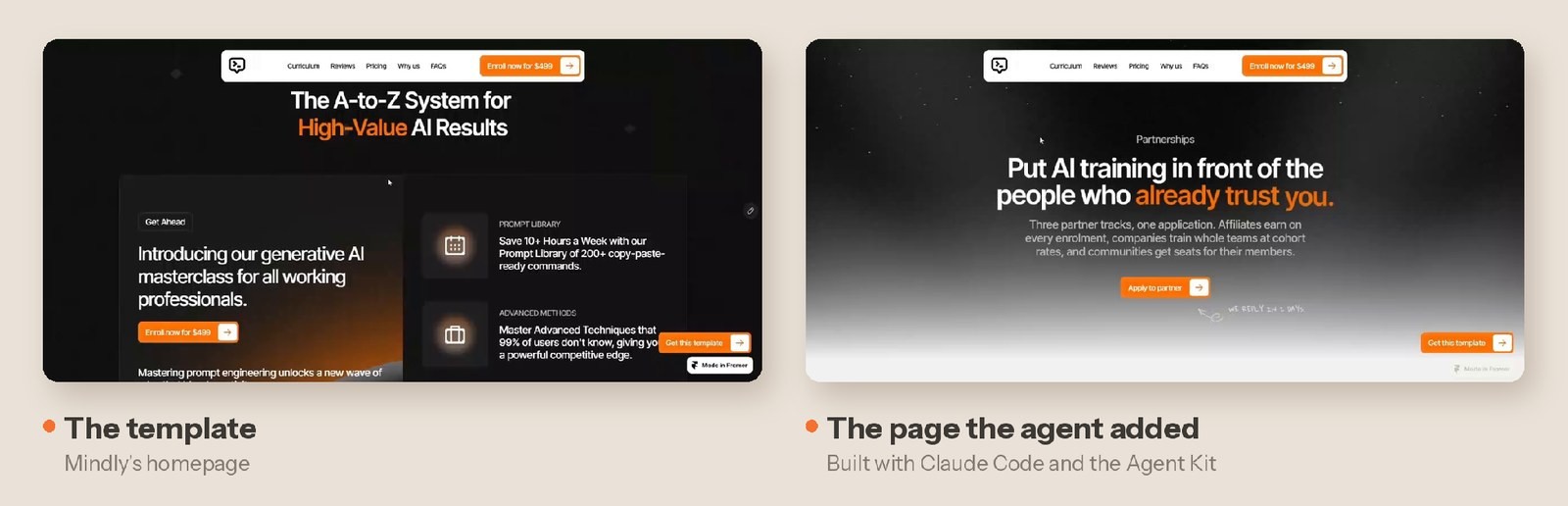
What a matching page looks like: same navigation, same orange highlights, same buttons.
6. Google can't find it
A live site that nobody can find isn't doing much. Framer handles a lot of SEO for you, but only if you fill in the basics.
The 2-minute check: search Google for site:yourdomain.com. If nothing shows up, or the results show the template's page titles, Google isn't seeing your site properly.
Fix it yourself: give every page its own title and description in its page settings. Then add your site to Google Search Console and submit your sitemap, which Framer creates for you.
When to get help: if your pages are indexed but still don't show up for what you sell, that's a bigger content and structure question.
7. It looks like everyone else's
Popular templates are popular for a reason, but if your site still looks like the demo, anyone who has seen that template elsewhere will notice.
The 2-minute check: open the template's demo next to your site. If the hero, images, layout and colours are mostly the same, you've filled in the template rather than made it yours.
Fix it yourself: start with three things: your own photos, your own brand colour, and a headline only your business could write. Those change how a site feels more than anything else.
When to get help: if you want it to look custom but don't know where to start, a written review of your site gives you a clear list of what to change.
Rescue or audit: which one do you need?
If you recognise two or more of these signs and don't have the time to fix them, there are two ways we can help.
Template Rescue is for signs 1 to 4. Your site isn't live, or it's live but half-finished, broken on mobile or impossible to edit. We take the template you already bought, finish it with your content, and launch it for you. Learn about Template Rescue
The Site Audit (coming soon) is for signs 5 to 7. Your site is live, but something isn't working: it doesn't look right, Google can't find it, or it doesn't feel like yours. We review your site and give you a written report of exactly what to fix and why. You or your AI agent can work through it yourselves, or hand it back to us. With over 7 years of experience, we'll use it to redesign your site into something even better. Want to be first in line? Email us at tech@oma-kase.com.
FAQ
Why does my Framer site look different on my phone?
Framer designs desktop, tablet and phone layouts separately. A change made on the desktop doesn't always carry over well, so each breakpoint needs checking on its own.
How do I remove the template's name from the browser tab?
Change the favicon in Site Settings, then update the title in each page's settings. The browser tab shows both.
Can I use a Framer template without a custom domain?
Yes. Your site can go live on a free framer.website address, but a custom domain needs a paid Framer site plan.
Why doesn't my Framer site show up on Google?
Usually because pages are missing their own titles and descriptions, or Google hasn't found the site yet. Fill in each page's settings, then submit your sitemap in Google Search Console.
Why do pages made by Framer's agent look slightly off?
The agent guesses your design rules unless you give them to it. Saving your fonts, colours and spacing as a Framer Skill, or in a DESIGN.md file, helps new pages match.